

New Participant
January 6, 2022
Answered

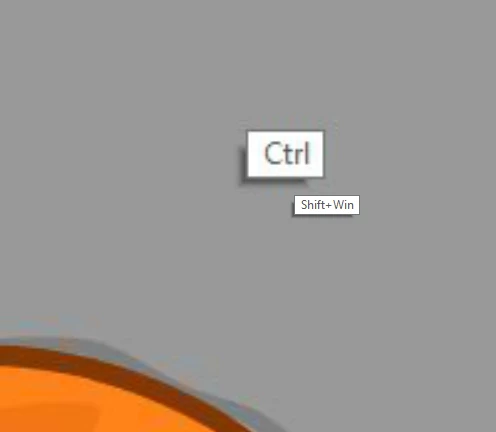
how do I disable the help labels when i'm holding ctrl/shift keys?
  • January 6, 2022
  • 1 reply
  • 372 views

    This topic has been closed for replies.
    Correct answer Avishai225127889mjz

    Thank you for the reply. somehow it's gone. but since you mentioned Wintab...I work with Wacom Intuos, and since I switched to animate 21, if I want sensitivity and pressure I need to turn on WinInk, but everything else except the pressure advantage is lagging and doesn't function as it should. only when I turn off WinInk again, it goes back to normal. I've searched the web for all the solutions available and nothing seems to fix it. there is a solution when working with Photoshop (making a text file that overrides the WinInk) but there isn't any for Animate...
    working with WinTabe in the Animate settings is all messed up.
    I'm currently working with two monitors and I have no way of controlling the mapping and the general settings of WinTab.
    Do you know any solution around it?

    tnx

    1 reply

    kglad
    Adobe Expert
    January 6, 2022

    i've never seen that.  it looks like something specific to your computer.

    n. tilcheff
    Brainiac
    January 6, 2022

    It's specific to Windows Ink, the use of a drawing tablet and possibly some Windows settings.

    I've seen it, but I don't use WinInk, so I don't know how one can get rid of it.

    Switching to WinTab removes the labels.


    Nick - Character Designer and Animator, Flash user since 1998 | Member of the Flanimate Power Tools team - extensions for character animation
    Avishai225127889mjzAuthorCorrect answer
    New Participant
    January 16, 2022

    Thank you for the reply. somehow it's gone. but since you mentioned Wintab...I work with Wacom Intuos, and since I switched to animate 21, if I want sensitivity and pressure I need to turn on WinInk, but everything else except the pressure advantage is lagging and doesn't function as it should. only when I turn off WinInk again, it goes back to normal. I've searched the web for all the solutions available and nothing seems to fix it. there is a solution when working with Photoshop (making a text file that overrides the WinInk) but there isn't any for Animate...
    working with WinTabe in the Animate settings is all messed up.
    I'm currently working with two monitors and I have no way of controlling the mapping and the general settings of WinTab.
    Do you know any solution around it?

    tnx
