


Participating Frequently
September 10, 2010
Question

How Do I Fix This Runtime Library Error?

  • September 10, 2010
  • 4 replies
  • 1599 views

Hello,

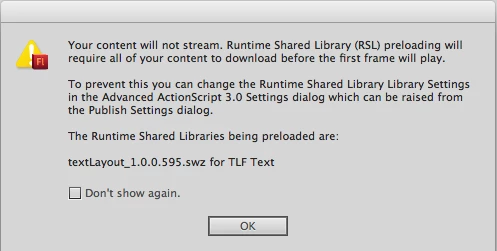
I just finished up my site, and this is the only thing holding me back from publishing it. Whenever I "Test" my site, I get this error: " Your content will not stream. Runtime Shared Library (RSL) preloading will require all of your content to download before the first frame will play.

To prevent this you can change the Runtime Shared Library Library Settings, in the Advanced ActionScript 3.0 Settings dialog which can be raised from the Publish Settings dialog.

The Runtime Shared Libraries being preloaded are:

textlayout_1.0.0.595.swz for TLF Text"

****

Does anyone know how to correct this error? If you do, could you please walk me through it step-by-step. I am still very new to "Flash Professional (CS5)" & "ActionScript (3.0)"

***
***

Above is the exact error message I receive.

This topic has been closed for replies.

4 replies

Participating Frequently
September 10, 2010

I followed your steps, and now my Flash Website does not function. Whats wrong?

kglad
Community Expert
Community Expert
September 10, 2010

given the information provided in this forum, do you really think someone could answer that question?

Participating Frequently
September 10, 2010

I'll try it out right now.

Participating Frequently
September 10, 2010

What do I link it to?

kglad
Community Expert
Community Expert
September 10, 2010

follow the steps above and you only have one choice (merge into code) other than RSL.

kglad
Community Expert
Community Expert
September 10, 2010

click file/publish settings/flash/settings/library path and change your default linkage.