

New Participant
February 28, 2021
Answered

how do i merge layers in animate

  • February 28, 2021
  • 4 replies
  • 15485 views

i have a bunch of layers for a character so i want to merge them together to clean it up, but i cant figure out how. ive been trying for hours please help

    This topic has been closed for replies.
    Correct answer n. tilcheff

    in other words, how can I nest my content inside a symbol? 🙂 Thanks


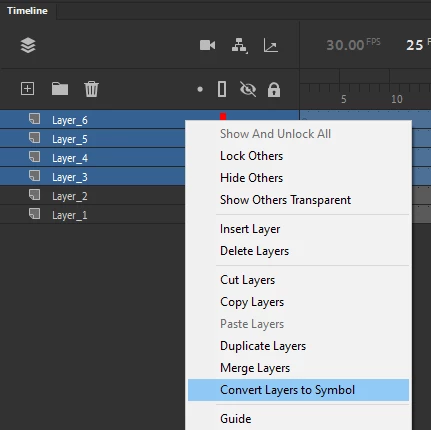
    You can wrap the layers inside a container by selecting the desired range of layers (click the first, hold down Shift, click the last), then right-clicking to trigger the context menu and from there choosing "Convert Layers to Symbol"
     

    4 replies

    _keyframer
    Community Expert
    December 15, 2021

    Make sure you SELECT all the layers you want to merge in the timeline panel - then right-click over the highlighted area (near layer names) and select Merge Layers.

    Animator and content creator for Animate CC
    Inspiring
    March 6, 2023

    is it possible to separate back the merged layers?

    Inspiring
    March 7, 2023

    You can wrap the layers inside a container by selecting the desired range of layers (click the first, hold down Shift, click the last), then right-clicking to trigger the context menu and from there choosing "Convert Layers to Symbol"


    Thank you very much for your reply.

    Sorry, I wasn't very clear.

    As you can see in the ss that I would like to put all the selected items in the timeline and put them all in one folder or one layer. 

    Many thanks


    Community Expert
    December 12, 2021

    Unlock all the layers. Select all the layers. Then paste them back onto one layer.

    Community Expert
    February 28, 2021

    Are the various layers different graphics like PNGs or are they vector graphics? You tidy/merge layers as kglad has said. If there is something else you'd like to do with reducing the amount of assets, let us know the format and otehr options can be given

    kglad
    Community Expert
    February 28, 2021

    if you're just trying to tidy things up, you can create a folder and put those layers in that folder.


    if you really want all the assets in the same layer select the layers you want to merge (using shift click and/or ctrl click)>right click>click merge layers

    New Participant
    December 12, 2021

    whenever i hit shift it doesnt work


    kglad
    Community Expert
    December 12, 2021

    you should:  create a folder and put those layers in that folder.


    if there's some reason that doesn't work for you, what problem is there?