


Known Participant
December 30, 2013
Question

How to do random shuffling of Movie Clips by maintaining Row-Column symmetry ?

  • December 30, 2013
  • 1 reply
  • 3608 views

Hi all !

This is for an alphabet learning app developed by procedural coding (not OOP). In level two the player (kids) have to click on alphabet movieclips in an orderly fashion (A, B, C, D....etc.,) eventhough they are placed in a disorderly manner (eg., C, D, Z, A etc.,)  before a count down timer hits zero. As the kid clicks on each alphabet block "in an orderly manner" the alpha changes, and the sound of the alphabet is played.

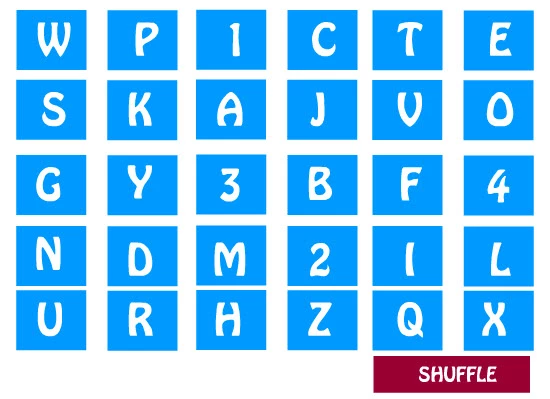
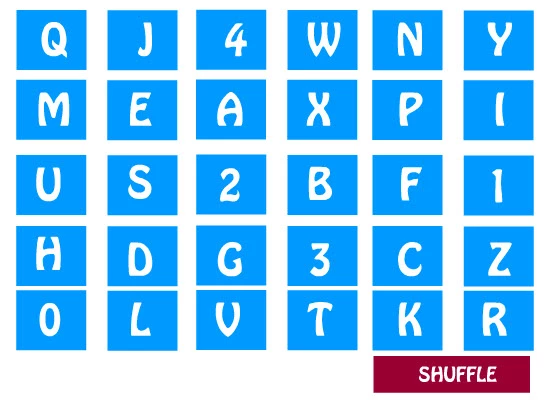
The challenging task that i cannot achieve is to randomly shuffle the MovieClip blocks in such a manner that the positions should change but the symmetry should be maintained (in contrast to shuffling in such a way that the movieclips position get haphazardly displaced). Even after shuffling the chess-board like symmetry of rows and columns should be maintained. Only the blocks should get repositioned.

Pls see the Before and After Shuffling Images Below:

Before Shuffling:
After Shuffling:
Pls kindly help

Thanks in advance

This topic has been closed for replies.

1 reply

Ned Murphy
Legend
December 30, 2013

Your use of the word symmetry is likely confusing the explanation of what you are after.  If your goal is to maintain the grid formation while the letter positions change within that formation then you can do that using an array (containing the instance names) that you shuffle into a random order and some looping thru it for the placement.

Here are the two portions of coding that you will need to work into whatever you currently have...

Below is a function for shuffling an array using AS3.

function shuffle(a:Array) {
    var p:int;
    var t:*;
    var ivar:int;
    for (ivar = a.length-1; ivar>=0; ivar--) {
        p=Math.floor((ivar+1)*Math.random());
        t = a[ivar];
        a[ivar] = a

;
        a

= t;
    }
}

// Usage:
shuffle(letterArray);

For the placement you can do it using one or two loops.  Here is a two-loop approach....

var count:int = 0;

var rowY:Number = 0; // replace with starting y value

for(var i:int=0; i<5; i++){   // for each row


      var colX:Number = 0; // replace with starting x value

      for(var j:int=0; j<6; j++){  // for each column in the current row

             letterArray[count].x = colX;

             letterArray[count].y = rowY;

             colX += distanceBetweenXs;

             count += 1;  // increment for the next letter in the array

       }

      rowY += distanceBetweenYs;

}

Known Participant
December 30, 2013

Hi !

I need some help with my adobe community forum login issues. For some

reason that i have no idea about, my IP address has been banned. The only

reason that i can think of is, i have included a youtube upload link in one

of my posts. But then, the very same link was directly related to a

question that i had posted in the forum, and nothing more. I do not know if

the forum moderators took it for a spam message and banned my IP address

altogether. Kindly inform me how to resolve this issue.

Thanks

regards Arshad

Ned Murphy
Legend
December 30, 2013

Since you were able to reply with the message I do not understand what your problem is with continuing the discussion you started.

If you need help with a matter involving using the forums you need to post in the forum dedicated to that purpose... http://forums.adobe.com/community/general/forum_comments