


Answered
How to hide or show a layer in JS (HTML5 Canvas)
Hi.
I can't figure out how to hide or show a layer in the timeline using JS.
Help please.

Hi.
I can't figure out how to hide or show a layer in the timeline using JS.
Help please.
EDIT: 01/21/2022
It's still possible to target layers but only if:
- The advanced layers mode is on (Cmd/Ctrl + J > Use Advanced Layers);
- The virtual camera is on the stage;
- The layer is on the main timeline;
- The layer we want to target is not empty.
EDIT: 11/12/2020
It's still possible to target layers but only if:
- The advanced layers mode is on (Cmd/Ctrl + J > Use Advanced Layers);
- The virtual camera is on the stage;
- The layer is on the main timeline;
- The layer we want to target is not empty.
If all these three conditions are true, then all we have to do is to target a layer by their name like this:
this.Layer_1.visible = false;
I hope it helps.
Regards,
JC
-----------------------------------------------------------------------
Hi.
You first have to make sure that the advanced layers mode is on by going to the Document Settings (Ctrl/Cmd + J) and checking Use Advanced Layers.
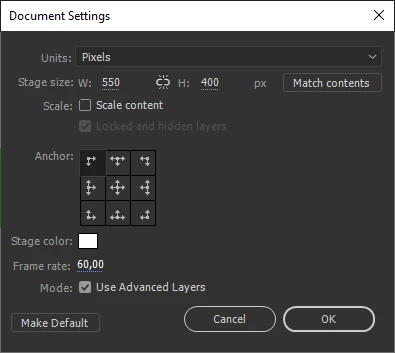
Then you can access the layer you want by its name.
For example, if your layer is called Layer_1, then you can make it invisible like this:
this.Layer_1.visible = false;
I hope this helps.
Regards,
JC
Already have an account? Login
Enter your E-mail address. We'll send you an e-mail with instructions to reset your password.
 AdChoices