


New Participant
September 5, 2018
Question

How to stop audio layer playing in a separate scene?

  • September 5, 2018
  • 1 reply
  • 267 views

Right- I have a music file dropped into a layer in my first scene. 2 scenes later, I want the music to stop. It would start playing in scene 1 and stop playing in scene 3. Currently the music has these settings:
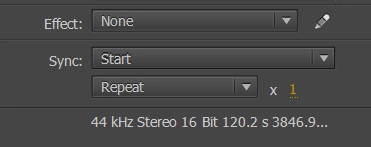
When I press ctrl+enter, the music continues to play after the animation loops around again, and also starts playing again. So there's like two layers of music.

How do I make the music stop in a separate scene?

This topic has been closed for replies.

1 reply

Robert Mc Dowell
Brainiac
September 5, 2018

how do you make this music play? NetStream? Sound?

FlatJimAuthor
New Participant
September 5, 2018

Well, I'm actually completely new to animate, but I basically imported the

mp3 track to my library, made a new layer in my scene and dragged the music

from my library onto the stage. Hope you can still help

On Wed, 5 Sep 2018, 7:19 PM Robert Mc Dowell <forums_noreply@adobe.com>

Robert Mc Dowell
Brainiac
September 5, 2018

ok so the mp3 must be considered as a Sound object.

Sound - Adobe ActionScript® 3 (AS3 ) API Reference

myMp3Sound.close() should be the right thing for you