



avtutorials
Known Participant
April 12, 2020
Question

HTML5 Canvas, SVG Outline Or Glow

  • April 12, 2020
  • 1 reply
  • 1738 views

Hello,

I am rewriting my AS3 application with HTML5 Canvas. I am importing SVG graphics, and I need to make an outline around those graphics that varies in width depending on user input.

In AS3, I used the glow filter, but it is no longer available (please see the attached photo, showing how I made an outline around imported graphics using the glow filter.).  And, it seems that CreateJS does not have a glow filter.  

Can anyone point me in the right direction of how to 1) use a third-party JS library to obtain a glow filter, 2) draw an outline around these SVGs, or 3) any other ideas?  Thank you for any help!
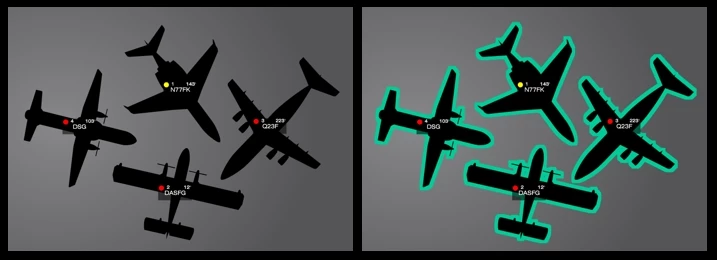
 

    This topic has been closed for replies.

    1 reply

    JoãoCésar17023019
    Community Expert
    April 13, 2020

    Hi.


    You can use the Shadow class to simulate an outline/glow.


    Please let us know if you have any further questions.


    Regards,

    JC

    avtutorials
    Known Participant
    April 13, 2020

    Thanks, JC.

    I tried the Shadow class, but I cannot achieve a hard edge to simulate an outline (see image).  I also looked at BlurFilter, but that, too, doesn't have the ability to make a hard edge.  I've also scoured the web for hours looking for any technique for adding a stroke outline via Javascript, similar to how this is done through HTML.  I am stumped.  If you have thoughts, I'd appreciate it!  Thank you.

    - Steve


    const loader = new createjs.LoadQueue(false, null, true);
    loader.on("complete", e =>
    {
        const bitmap = new createjs.Bitmap(e.currentTarget.getResult("test"));
        this.addChild(bitmap);
    	
    	// Scale image
    	bitmap.scaleX = bitmap.scaleY = 1;
    	
    	// Get width and height
    	console.log( "Width = " + bitmap.getBounds().width );
    	console.log( "Height = " + bitmap.getBounds().height );
    	
    	bitmap.shadow = new createjs.Shadow("#00FF00", 0, 0, 10);
    	
    });
    loader.loadManifest([{id:"test", src:"images/global_6000.svg", type:"image"}]);


    avtutorials
    Known Participant
    September 17, 2021

    Hi JC,

    Great!  Thank you for the suggestion -- let me kick that around a little and see if I can make that work.

    - Steve


    JC, I'm still trying to figure out how to apply an outline or a glow to a SVG that is loaded as a Bitmap.  


    When you say SVG DOM Element, I'm not sure how to apply that in Adobe Animate/HTML5 Canvas.  Given my code above, could you be more specific?  Thanks for any help.