


Participating Frequently
December 4, 2017
Answered

HTML5 Opens to a blank page, Error 800A138F

  • December 4, 2017
  • 2 replies
  • 3000 views

Hello there,

I'm trying to complete a small banner animation for my school assessment but keeping hitting a wall when publishing. My animation is made up of 4 images that are on screen for 4 frames while an mp3 audio file plays in the background. I can publish the HTML fine on my end, when i open it in browser it works. When I try to send it to my assessors or anyone else it opens to a blank screen.

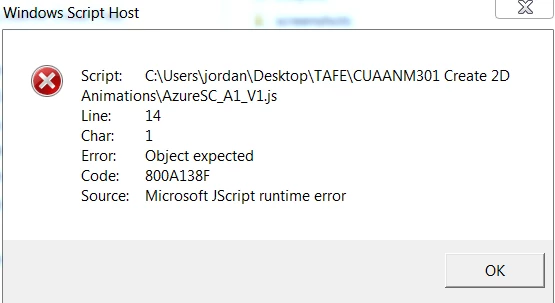
When I opened the JS file I get the following error. If anyone could please help me it would be greatly appreciated. Thank you.
This topic has been closed for replies.
Correct answer Colin Holgate

Going back to your original problem, I noticed something that could lead to problems. You are using the online version of CreateJS, the link points to code.createjs.com. If your assessors try to look at your files while they're not online, the window will be blank.

In Publish Settings Advanced tab is a Hosted Libraries option. Try unchecking that, and when you send the files make sure it includes the main JS file, the folder of sounds, folder of images, and the 'libs' folder. You could also send that zip file to a friend, to make sure they can run it locally while offline.

2 replies

Colin Holgate
Colin HolgateCorrect answer
Inspiring
December 5, 2017

Going back to your original problem, I noticed something that could lead to problems. You are using the online version of CreateJS, the link points to code.createjs.com. If your assessors try to look at your files while they're not online, the window will be blank.

In Publish Settings Advanced tab is a Hosted Libraries option. Try unchecking that, and when you send the files make sure it includes the main JS file, the folder of sounds, folder of images, and the 'libs' folder. You could also send that zip file to a friend, to make sure they can run it locally while offline.

Participating Frequently
December 6, 2017

Hi Colin,

I unchecked that box and it seems to have made some progress. The way I've been testing to see if they work is by uploading the files to my schools submission webpage and then downloading those files on to my computer. Previously they would open to a blank page so I assumed what I would see downloading these files is what my assessors would see.

Since unchecking the hosted libraries option, after uploading and downloading the files they work correctly. When I email the files to myself they work correctly too (where before it was a blank page)

However when I emailed them to my girlfriend they open to a blank page again. Im wondering if its just her computer or internet explorer she uses.

Colin Holgate
Inspiring
December 6, 2017

It could be the browser she is using. But, as things have improved for you I would hope it would be improved for your assessors too.

kglad
Brainiac
December 4, 2017

what are the first 20 or so lines of your js file?

Participating Frequently
December 4, 2017

Thanks for replying! I'm not sure where to find that information. I went into the developer tools within the web browser while the animation was running and found these lines of script in the source tab.

Participating Frequently
December 5, 2017

try it.

but if it fails, attach a screenshot showing your library bitmaps.


Apologies for being daft but I don't know how to do that. Do I find my libraries bitmaps in animate or where I was taking screen shots before?