



pablo_el_tipo
Participating Frequently
November 8, 2019
Answered

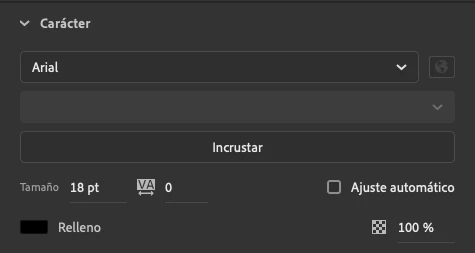
Impossible to change font weight

  • November 8, 2019
  • 16 replies
  • 8412 views

Hello everyone!

I'm having an annoing issue. I can't change the font weigth. It appears blocked. I made a lot of things: reinstall Animate, come back to default settings... etc and I still can't.

I'm working actively in Animate and I am having to create texts in Illustrator and copy-paste them in Animate, but I have to do it everytime I have to make a minimum change.

Please help!!!
 

Correct answer Mohanaraj

Hi All 

Just wanted to let you know that this issue has been addressed in the latest update (20.0.2.22168) that we have pushed today. Please update your copy of Animate to the latest to avail the fix.


Thanks!

Mohan

16 replies

pawli1315
New Participant
September 5, 2025

For anyone out there years later searching, and finding none of the "solutions" everyone offers works...

Check to see if this might be a variable weight font. Uninstall it, and install the STATIC versions of the font. I had two google fonts with this problem and noticed they both had variable and static options for download. On two different Macs with two different operating systems, they both started working when I reinstalled the *static* versions.

New Participant
October 3, 2023

Hi There, appreciate this is a VERY old thread, but I had this issue running Animate 2019 on Catalina yesterday. It had been working fine, then for no apparant reason the 'style' field was greyed out and I couldn't pick sub-styles of fonts. Solved it (hoping it sticks) by quiting aniamate,  deactivating all fonts in my font manager (in this case Typeface) then reopening animate. Style field was re-enabled.

kglad
Community Expert
October 3, 2023

@defaultwnn0m3ebnmq8 


thanks for that solution.

Mohanaraj
Adobe Employee
MohanarajCorrect answer
Adobe Employee
February 11, 2020

Hi All 

Just wanted to let you know that this issue has been addressed in the latest update (20.0.2.22168) that we have pushed today. Please update your copy of Animate to the latest to avail the fix.


Thanks!

Mohan

JoãoCésar17023019
Community Expert
February 11, 2020

Hey, Mohan!


This is excellent! Thanks for the hard work!

JoãoCésar17023019
Community Expert
January 29, 2020

Hi again!


I'm really glad to kwow that this script is being helpful! I still have the intention to turn it into a panel so it won't be necessary to manually call the script everytime a font change is needed.


Anyway, really good to know that the team figured it out the root of the issue, Mohan!


Regards,

JC

pablo_el_tipo
Participating Frequently
January 29, 2020

Wow! I didn't realized it was so nice! You just have to download the jsfl file, double click it and it works! I saw it but I thought it was quite more difficult than it really is.

Even if it is awesome (I think it really is, thank you João) I think it can't be the definitive solution for this issue. Changing font style is a basic and we cannot stay runing a script every time we want to do so.

Thank you for remembering us the João solution. 

pablo_el_tipo
Participating Frequently
January 29, 2020

Hi Mohanaraj!
Sorry, but I'm not going to make a fresh new installation of my OS just because I can't change my font-style in Animate. It sounds ridiculous.
I think you shouldn't have marked your answer as the right one even because you are not offering a solution because you are not sure if making the new installation would work.

Thanks anyway for your taking your time! 😉

Inspiring
January 29, 2020
Inspiring
January 29, 2020

JoãoCésar


You are my hero too! 


With all due respect I don´t understand how Mohanaraj answer is the "right answer" if it has not been solved by Adobe.

JoãoCésar17023019
Community Expert
January 13, 2020

Excellent!


I'm going to work on this script again and see what can be improved.


Probably it's going to be a good idea to turn this into a panel so there won't be the need to keep calling it everytime a font face/weight change is needed.


Regards,

JC

JoãoCésar17023019
Community Expert
January 10, 2020

Hi.


While the team doesn't come up with a solution, I wrote this script that may or may not be able to change the font style/face.


Code:

https://github.com/joao-cesar/adobe/tree/master/animate%20cc/jsfl/change_font_face


Download:

Go to the link below and click de Clone or download button to download the whole repository.

https://github.com/joao-cesar/adobe


Usage:

1 - Select one or more text field instances;
2 - Run the "Change Font Face.jsfl" file in one of the following ways:
- Double-clicking it;
- Drag and dropping it over the Animate IDE;
- Going to Commands > Run Command....
3 - Select the font face in the dropdown menu;
4 - Click "OK";


Images:


Please notice that this is experimental. As I cannot reproduce this issue, I'm not sure if this is gonna work.


Issues:

- It's going to load all installed fonts in your system. I'll try to figure out later a way to filter out faces not related to the current text field font family.

- I'm not sure if this will load webfonts. I'll check this later.


Please feel free to modify this script in any way needed.


Regards,

JC

Erick Jones
Participating Frequently
January 11, 2020

WoW! They should hire you in Adobe!
Thank you.

New Participant
January 10, 2020

@Mohanaraj your solution suggestion did not work for me.