



pablo_el_tipo
Participating Frequently
November 8, 2019
Answered

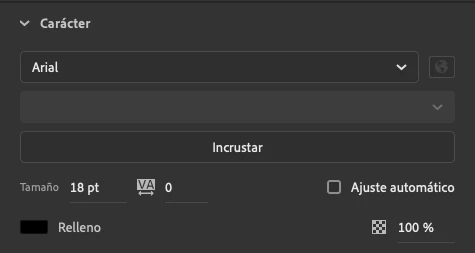
Impossible to change font weight

  • November 8, 2019
  • 16 replies
  • 8413 views

Hello everyone!

I'm having an annoing issue. I can't change the font weigth. It appears blocked. I made a lot of things: reinstall Animate, come back to default settings... etc and I still can't.

I'm working actively in Animate and I am having to create texts in Illustrator and copy-paste them in Animate, but I have to do it everytime I have to make a minimum change.

Please help!!!
 

Correct answer Mohanaraj

Hi All 

Just wanted to let you know that this issue has been addressed in the latest update (20.0.2.22168) that we have pushed today. Please update your copy of Animate to the latest to avail the fix.


Thanks!

Mohan

16 replies

Mohanaraj
Adobe Employee
Adobe Employee
January 8, 2020

Hi,

We have heard this issue from couple of users who have updated to Catalina from previous Mac OS versions. We have no luck yet reproducing this in-house as this doesn’t seems to happen with OS update every time. We are still actively investigating the cause of this issue.

In the meantime couple of users have confirmed that updating Catalina to the latest or Installing Catalina a fresh(not an update on top of the older Mac OS version) help resolve this issue. Could you please try this and see if that helps?


Thanks!

Mohan

Erick Jones
Participating Frequently
January 8, 2020

I am having the same issue. Updated now and it didn't help. Still the same thing, I cannot choose the font's weight.

pablo_el_tipo
Participating Frequently
December 30, 2019

Pleeease Adobe! You've got so much time to fix this. Offer us a solution soon, please. It's very hard and time consuming to work this way.

New Participant
January 1, 2020

Pablo. Parece que las fuentes intaladas en el mac dan algún tipo de probelma. Quizás hay alguna fuente estropeada, quizás animate no sopoeta tantas fuentes instaldas. Prueba desactivar todas las fuentes y ver si aparece el font weight, y, si aparece, luego activa las fuentes una por una hasta encontrar el problema. Yo también estaba desesperado... Suerte.

pablo_el_tipo
Participating Frequently
January 2, 2020

Pero esa no puede ser la solución... Trabajo con fuentes de clientes que no puedo desactivar porque realmente no sé ni donde están los archivos originales y no voy a arriesgarme a perderlas y tener que volver a pedirlas. Además, si no da ningún problema en el resto de apps (Illustrator, Photoshop... etc) no creo que sea un problema de mis fuentes, si no de Animate. 

En cuanto a la cantidad, no va a ser eso porque tengo bastantes pocas. No soy un coleccionista obsesivo de fuentes.


pablo_el_tipo
Participating Frequently
November 11, 2019

I've talked with technical support and they told me it is a known issue happening with Catalina SO so I have to wait until they solve it.

Hope can help to anyone having the same issue.

New Participant
November 14, 2019

i also have the same problem since upgrading to Catalina.

this is a major headache

Brainiac
November 8, 2019

Are you saying you can't select bold in ANY font? Does the problem exist in both AS3 and Canvas documents? Does the keyboard shortcut for bold also not work?

pablo_el_tipo
Participating Frequently
November 8, 2019

Yes sure. No font at all. Not bold, nor italic, black, narrow... etc

Preran
Community Manager
Community Manager
November 8, 2019

Because none of the solutions here have helped, and no one was able to reproduce your issue, I suggest getting in touch with our tech support team https://adobe.ly/2WYE62m for further investigation.


Thanks,

Preran

JoãoCésar17023019
Community Expert
November 8, 2019

Hi.


It's working for me in both 2019 and 2020 versions.


So it might be a bug related to your installation and/or OS and/or device.


Please submit this issue here:

https://www.adobe.com/products/wishform.html


Regards,

JC

pablo_el_tipo
Participating Frequently
November 8, 2019

Thank you very much JoãoCésar. I have already done. 

I think it's possible not to be a bug, but an option to block the select box and I pressed a keyboard shortcut to it without knowing or something similar, because it started before any software update. It was spontaneous.

Inspiring
November 8, 2019

Is this related to Animate 2020, did it work in Animate 2019?

pablo_el_tipo
Participating Frequently
November 8, 2019

No, it didn't work in Animate 2019. In fact I updated the version this morning and I was hopping it would be solved, but it didn't.