


Inspiring
February 28, 2014
Answered

Increase the size of an AutoComplete feature

  • February 28, 2014
  • 1 reply
  • 1132 views

I've found this tutorial (really well done) in the internet : http://www.xtydigitaldesign.ca/autoComplete.php

I've started to use it and change it a little. But I can't find a way to increase the size font of the text of the list. (when you type "P" you get a list with four fruits that start with the letter P.) I've found how to increase the font size of everything, EXCEPT the font siez of the list..

Do you know how can I increase the font size of this list ?

Thank you very much !

I think it is in this part of the code, but I'm not sure :

    acList = new List();

    acList.x = 0;

    acList.y = acTxt.y + acTxt.height;

    acList.setSize(_txtWidth, listHeight);

    acList.visible = false;

    acList.addEventListener(Event.CHANGE, listHandler);

    addChild(acList);
This topic has been closed for replies.
Correct answer moccamaximum

Great ! Thank you.

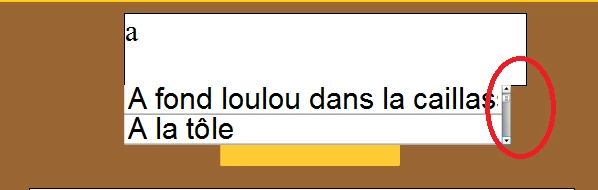
Last thing (sorry, for that), it seems that the size of the scroll bar can't be increase directly in its Movieclip.. Do you know a way to increase it ? Thank you again !


http://gskinner.com/blog/archives/2007/05/variable_scroll.html

1 reply

Inspiring
February 28, 2014

In the class of the tutorial you linked change these Lines

titleFormat.size = 12;

titleFormat.font = "verdana";

to whatever you prefer

Inspiring
February 28, 2014

I've tried. It's changing the font of the description, not the list...

moccamaximumCorrect answer
Inspiring
March 3, 2014

Great ! Thank you.

Last thing (sorry, for that), it seems that the size of the scroll bar can't be increase directly in its Movieclip.. Do you know a way to increase it ? Thank you again !


http://gskinner.com/blog/archives/2007/05/variable_scroll.html