


Participant
February 2, 2020
Answered

Is it possible to change the FPS in Adobe Animate 2020?

  • February 2, 2020
  • 1 reply
  • 72073 views

So far everything looks very easy to control in this program-- but the FPS is stuck on 30. and I don't see any way to change it. I'd like to have the option of animating in 2's (12 fps) or using standard film frame-rate (24 fps)-- this must be an option right?
Correct answer n. tilcheff

Hi mate,


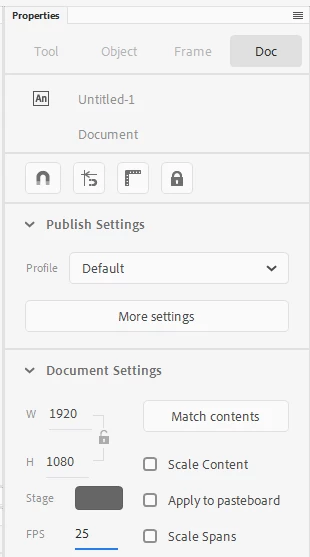
There are at least two easy places, maybe more.


Properties Inspector - FPS at the bottom of this image:


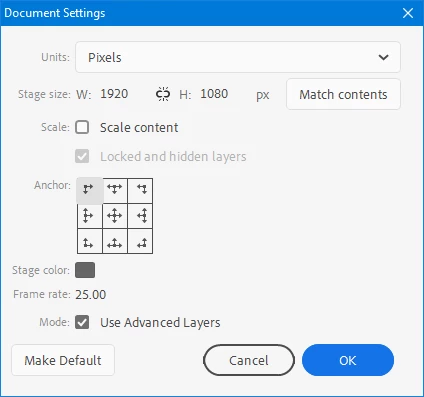
And Modify menu > Documents Settings...


Hope this helps!


1 reply

Participant
February 2, 2020

I just noticed the frame-rate changes with different presets-- but I'd still like to choose the frame rate. Specifically, I'd like to work in full HD at 12 fps. 

n. tilcheff
n. tilcheffCorrect answer
Legend
February 2, 2020

Hi mate,


There are at least two easy places, maybe more.


Properties Inspector - FPS at the bottom of this image:


And Modify menu > Documents Settings...


Hope this helps!


Nick - Character Designer and Animator, Flash user since 1998 | Member of the Flanimate Power Tools team - extensions for character animation
Participant
February 2, 2020

Beautiful-- thanks!