Inspiring
March 9, 2018
Answered

Is there a way to make Animate automatically do that ? (like a macro)

  • March 9, 2018
  • 2 replies
  • 2211 views

I'm making animations with Adobe Animate and importing layers from Photoshop.

Sometimes I've got like 34 or 40 layers and I have to manually do that :

Capturer 04 - Streamable

Is there a way to make Animate automatically do that ? (putting each layer after the previous one ?)

Thank you for your help

    This topic has been closed for replies.
    Correct answer JoãoCésar17023019

    Hi.


    Here is a script that does what you need.


    Probably k will give you a most efficient way of doing this, but, for now, I think it can help you.


    Feel free to improve it in any way desired.


    UPDATE (03/23/2023):

    I didn't review the code. Just grabbed it from another folder I have in Google Drive.

    var defaultValue = "3";
    var space = prompt("Type the pyramid edge width.", defaultValue);
    var doc = fl.getDocumentDOM();
    var timeline = fl.getDocumentDOM().getTimeline();
    var selectedLayers = timeline.getSelectedLayers();
    var count;
    var increment;
    
    function start()
    {
    	if (!doc || !selectedLayers || selectedLayers.length == 1 || space == null)
    		return;
    	else
    	{
    		space = space.replace(/\s/g,'');
    		
    		if (isNaN(parseFloat(space)) || space <= 0)
    			return;
    		else
    			count = Number(space);
    		
    		increment = count;
    	}
    	
    	for (var i = selectedLayers.length - 1; i >= 0; i--)
    	{	
    		timeline.setSelectedLayers(selectedLayers[i], true);		
    		timeline.insertFrames(count, false, 0);		
    		timeline.insertKeyframe(count - (increment - 1));
    		count += increment;
    	}
    }
    
    start();

    -----------------------------------------------------------------------------------------------------------------------


    JSFL download: layers_pyramid.jsfl - Google Drive


    Usage:

    Select the layers you want, type in the value of the pyramid's edges or leave the default and press 'OK'.


    Code (for reference):

    var defaultValue = "3";

    var space = prompt("Type the pyramid edge width.", defaultValue);

    var doc = fl.getDocumentDOM();

    var timeline = fl.getDocumentDOM().getTimeline();

    var selectedLayers = timeline.getSelectedLayers();

    var count;

    var increment;


    function start()

    {

        if (!doc || !selectedLayers || selectedLayers.length == 1 || space == null)

            return;

        else

        {

            space = space.replace(/\s/g,'');


            if (isNaN(parseFloat(space)) || space <= 0)

                return;

            else

                count = Number(space);


            increment = count;

        }


        for (var i = selectedLayers.length - 1; i >= 0; i--)

        {   

            timeline.setSelectedLayers(selectedLayers, true);       

            timeline.insertFrames(count, false, 0);       

            timeline.insertKeyframe(count - (increment - 1));

            count += increment;

        }   

    }


    start();


    Demonstration:
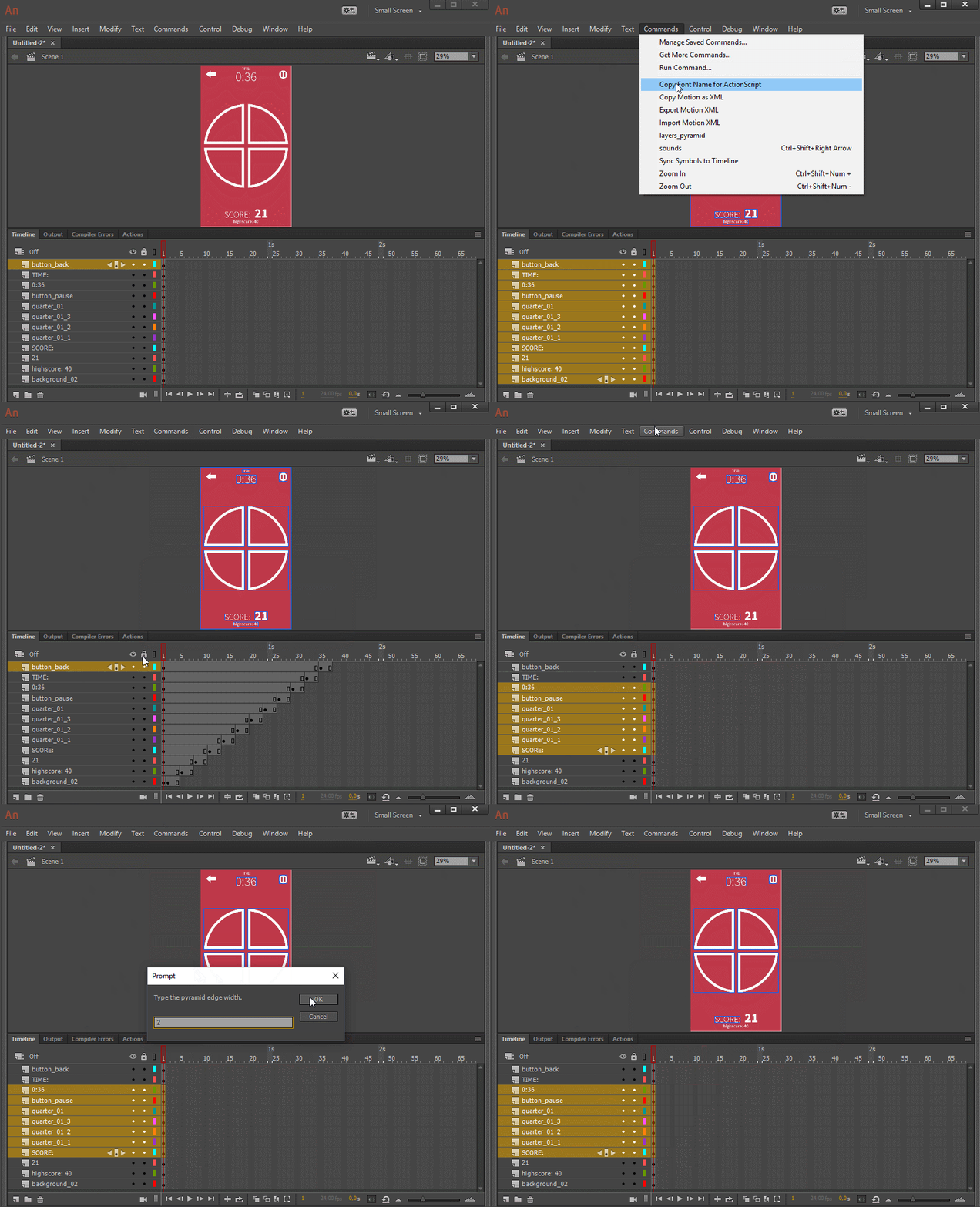
     

    I hope it helps.


    Regards,

    JC

    2 replies

    JoãoCésar17023019
    Community Expert
    JoãoCésar17023019Community ExpertCorrect answer
    Community Expert
    March 10, 2018

    Hi.


    Here is a script that does what you need.


    Probably k will give you a most efficient way of doing this, but, for now, I think it can help you.


    Feel free to improve it in any way desired.


    UPDATE (03/23/2023):

    I didn't review the code. Just grabbed it from another folder I have in Google Drive.

    var defaultValue = "3";
    var space = prompt("Type the pyramid edge width.", defaultValue);
    var doc = fl.getDocumentDOM();
    var timeline = fl.getDocumentDOM().getTimeline();
    var selectedLayers = timeline.getSelectedLayers();
    var count;
    var increment;
    
    function start()
    {
    	if (!doc || !selectedLayers || selectedLayers.length == 1 || space == null)
    		return;
    	else
    	{
    		space = space.replace(/\s/g,'');
    		
    		if (isNaN(parseFloat(space)) || space <= 0)
    			return;
    		else
    			count = Number(space);
    		
    		increment = count;
    	}
    	
    	for (var i = selectedLayers.length - 1; i >= 0; i--)
    	{	
    		timeline.setSelectedLayers(selectedLayers[i], true);		
    		timeline.insertFrames(count, false, 0);		
    		timeline.insertKeyframe(count - (increment - 1));
    		count += increment;
    	}
    }
    
    start();

    -----------------------------------------------------------------------------------------------------------------------


    JSFL download: layers_pyramid.jsfl - Google Drive


    Usage:

    Select the layers you want, type in the value of the pyramid's edges or leave the default and press 'OK'.


    Code (for reference):

    var defaultValue = "3";

    var space = prompt("Type the pyramid edge width.", defaultValue);

    var doc = fl.getDocumentDOM();

    var timeline = fl.getDocumentDOM().getTimeline();

    var selectedLayers = timeline.getSelectedLayers();

    var count;

    var increment;


    function start()

    {

        if (!doc || !selectedLayers || selectedLayers.length == 1 || space == null)

            return;

        else

        {

            space = space.replace(/\s/g,'');


            if (isNaN(parseFloat(space)) || space <= 0)

                return;

            else

                count = Number(space);


            increment = count;

        }


        for (var i = selectedLayers.length - 1; i >= 0; i--)

        {   

            timeline.setSelectedLayers(selectedLayers, true);       

            timeline.insertFrames(count, false, 0);       

            timeline.insertKeyframe(count - (increment - 1));

            count += increment;

        }   

    }


    start();


    Demonstration:


    I hope it helps.


    Regards,

    JC

    Inspiring
    March 10, 2018

    Super thanks for this answer and the code! Unfortunately, I've just tested it but it doesn't seems to work (nothing is happening) :

    Capturer 01 - Streamable

    JoãoCésar17023019
    Community Expert
    Community Expert
    March 10, 2018

    Great!

    You have to select the layers first.

    Sorry, because I edited my comment and you probably didn't see the update.

    kglad
    Community Expert
    Community Expert
    March 9, 2018

    yes.  you can use jsfl to automate that task.

    Inspiring
    March 9, 2018

    Ok.. Do you have any tutorial how to do that ?

    kglad
    Community Expert
    Community Expert
    March 9, 2018

    i haven't made a tutorial but you could search for one using google:  jsfl tutorial