



scot cameron
Participating Frequently
September 4, 2020
Answered

issue with "edit sound envelope"

  • September 4, 2020
  • 1 reply
  • 1405 views

I have a 2:00 minute Animate project and the MP3 music track is 2:30 or so 

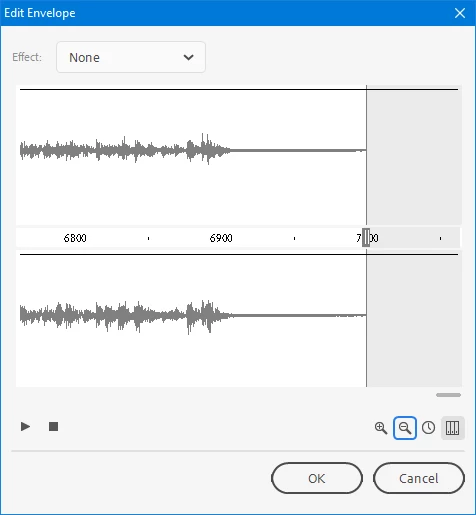
I wanted to use edit sound envelope on the audio track so that I can apply a fade out. For some reason the frames showing in the edit envelope STOP at 3090 - but i need to get to frame 3200 where the music should end. Why is it blocking access to frame past 3090 is this a limitation of Animate?
    This topic has been closed for replies.
    Correct answer n. tilcheff

    Hi again mate!


    I just did a quick test with a longer audio.


    When you open the 'envelope' dialog, just click on the zoom out button a couple of times and all should be fine 🙂


    1 reply

    n. tilcheff
    Legend
    September 5, 2020

    Hi mate,


    Definitely not the frame count limitation. It is around 16 000 frames.


    I have not experienced the issue, but (only based on intuition) it may be related to frequency incompatibility and wrong frame mapping.

    To be sure that your audio file is properly imported and interpreted by Animate, convert it to a PCM WAV (i.e. decompress it) and make sure that is at 44 100 Hz and 16-bit. Re-sample if you need to.


    Import again, set to stream and see if the envelope shows the end.


    Hope this helps!


    Nick - Character Designer and Animator, Flash user since 1998 | Member of the Flanimate Power Tools team - extensions for character animation
    scot cameron
    Participating Frequently
    September 5, 2020

    Thanks for the suggestion Nick. I imported a PCM WAV 44K 16b version, resaved and tried again but still stops at that same frame 3090 in the edit envelope. I tried copying all the timeline frames into a NEW project file and still same limitation. I opened up the last 10 projects I worked on and noticed that all of them have the same limitation - stopping at 3090 in that edit window, despite the length of the timeline content. I am stumped and adobe has no idea

    n. tilcheff
    n. tilcheffCorrect answer
    Legend
    September 5, 2020

    Hi again mate!


    I just did a quick test with a longer audio.


    When you open the 'envelope' dialog, just click on the zoom out button a couple of times and all should be fine 🙂


    Nick - Character Designer and Animator, Flash user since 1998 | Member of the Flanimate Power Tools team - extensions for character animation