


Dima-O
New Participant
March 2, 2018
Answered

Layers in Animate will Not accept Motion Tween

  • March 2, 2018
  • 3 replies
  • 4785 views

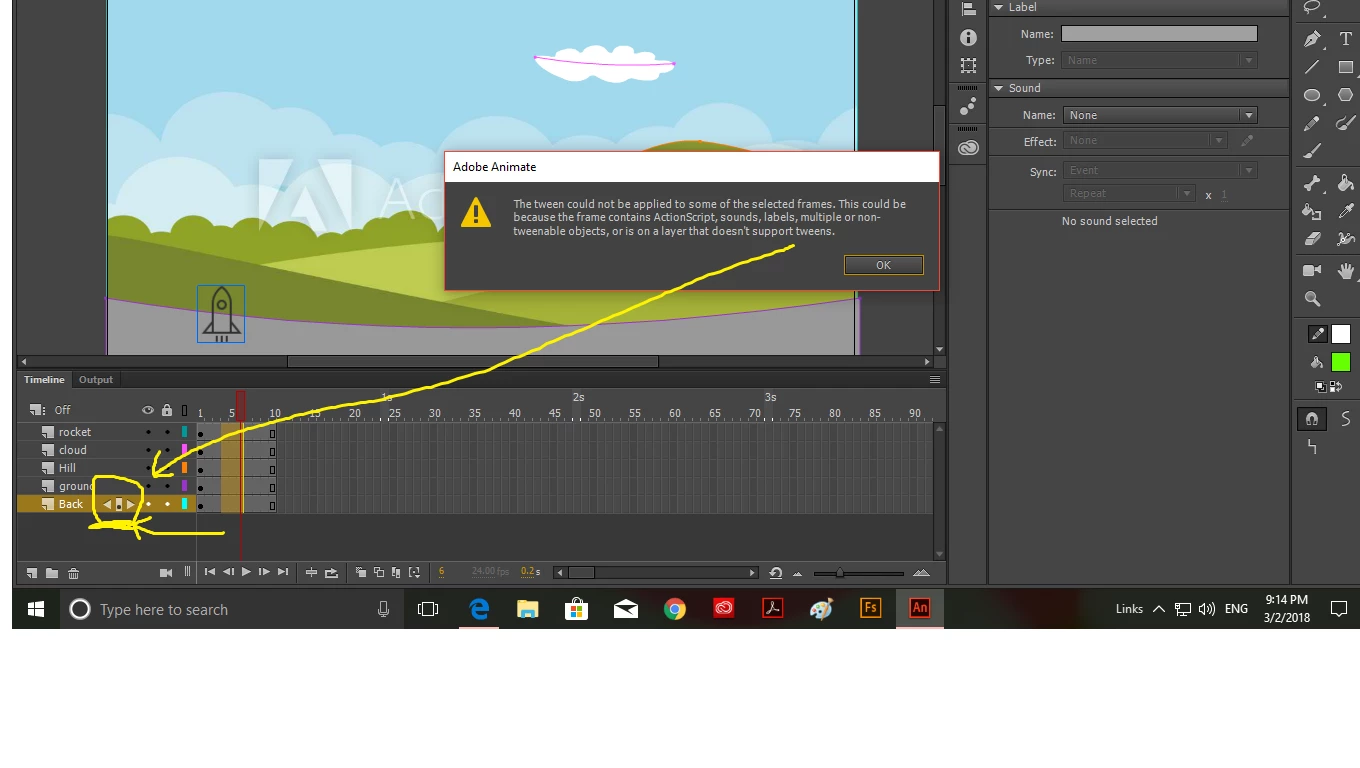
I am a beginner at this... and I have followed the tutorial to animate... step by step...(I think)... and when we got to the part that you choose 4 or 5 layers to create a motion tween... it refused, and said that one of the layers must have a feature like audio that prevents it.  I did that even with NEW layers that contain nothing.

I noticed that even when I create a New layer there is NO symbol of a pen to indicate that this layer is editable.. but instead it has the symbol of (back-play-forward)... but I didn't do that myself, so I'm not sure why its happening.  see image below  and please let me know if you know what it means  ... thanks 
This topic has been closed for replies.
Correct answer JoãoCésar17023019

It seems to me that you are trying to apply motion tweens to drawing objects. To use motions tweens, you must first convert your objects to symbols.

3 replies

UDESCO
Adobe Employee
Adobe Employee
March 5, 2018

Yes, as Joao mentioned, the problem is because you are trying to apply Motion tween on Shapes/Drawing objects.

You need to click on first frame of each layer one by one and convert it to a Symbol (press F8) first.

After that you can select all the layers and apply Motion tween together.

JoãoCésar17023019
JoãoCésar17023019Correct answer
Inspiring
March 2, 2018

It seems to me that you are trying to apply motion tweens to drawing objects. To use motions tweens, you must first convert your objects to symbols.

Dima-O
Dima-OAuthor
New Participant
March 4, 2018

Thanks Joao...

I will try that and let you know if it works 

Brainiac
March 2, 2018

Sooo.... attempt to apply the tween to one frame at a time until you've isolated which one is causing the problem?

Dima-O
Dima-OAuthor
New Participant
March 2, 2018

Hi Clay...

Tried that already... it wont let me because all the layers seem to have that same problem, and have the same symbol...

I just don't know how or why they got it... 

Brainiac
March 2, 2018

Well I'm out of ideas. Another reason to be glad I never use Motion Tweens.