


Inspiring
March 21, 2011
Question

Major font rendering issue (latest OSX build / Quadcore MacBook Pro)

  • March 21, 2011
  • 26 replies
  • 28701 views

I have this weird issue on my new MacBook Pro (i7 quadcore - 2ghz), the font rendering sometimes goes bezerk (see screenshots).
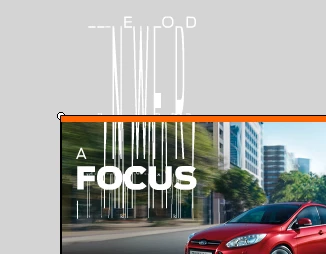

Possibly the latest OSX build and hardware combination has compromised something…

It's a freshly installed setup, running Mac OS X 10.6.6 (10J3210) & Kernel version: Darwin 10.7.1. Flash 11.0.2.489.

The Font is OK, it works with all my other apps and it has never given problems before.

The issue isn't exclusively related to the font used in this example, it affects other fonts too.

Sometimes, on a freshly booted system and first run of Flash, it is OK in Flash.

But the error can return rapidly.

Especially, after restarting Flash a couple of times (no choice, due to the copy/paste layer bug).

Tried turning off the 'Automatic graphics switching', with no result.

Tried uninstalling my fonts, rebuilding the font library as minimalistic as it gets, with no result.

Switching preview-modes within Flash, didn't work.

Interestingly, switching anti-alias mode on a textfield to 'Bitmap text', resolves the problem… turning the Anti-alias back on, brings the problem back.

In this example, I use 3 copies of a textfield containing the text "Ford Antenna".

From left to right, anti-alias: readability - anti-alias: animation - anti-alias: bitmap text

It goes without saying that this is affecting my workflow tremendously, everything I produce with Flash gets corrupted. I understand that when Apple secretly releases new OSX builds, things can go wrong. That said, apart from running Flash 5 beta in the good old day's, I've never experienced this much problems with Flash before… so I cannot stress enough, that I'm expecting the upcoming CS5.5 update too be free.

    This topic has been closed for replies.

    26 replies

    New Participant
    May 10, 2011

    This isn't just a 10.6.7 issue. I'm running 10.6.6 at work and have this same font problem. So that Apple update for 10.6.7 isn't going to be much use to me!

    Participating Frequently
    April 9, 2011

    There is a discussion on the Apple forums about this major problem:


    http://discussions.apple.com/thread.jspa?threadID=2792142&start=45&tstart=90

    It seems that clearing your font cache's works.  It worked for me so far.

    You can clear the cache with Onxy

    http://www.macupdate.com/app/mac/11582/onyx

    It was quite a week working with and around this problem.

    Cheers,

    Luke

    Participating Frequently
    April 26, 2011

    Apple has provided a fix today! Works great. Download here: http://support.apple.com/kb/DL1377

    Thanks Adobe for doing your part!

    New Participant
    April 27, 2011

    Yep, just installed the software update from apple and the bug seems to be gone. Thanks to everyone for contributing with your solutions, you were very helpful, saved me hours of work.

    Regards,

    Paco

    New Participant
    April 7, 2011

    Hi,

    I was having the same issue, here's what solved it for me:

    Go into user > library > application support > adobe > Flash CS5 > en_US > Configuration > fontinfo.txt and move this file to another folder, don't delete it in case something goes wrong, I had no problems but just to be safe.

    Restart Flash.

    It worked for me, I hope it helps.

    Regards,

    Paco L.

    dustin5
    New Participant
    April 8, 2011

    This seems to be on the right track. However, once flash regenerated a fontinfo.txt file after quitting, my fonts broke again.

    I took a look inside the file in question and noticed that fonts I was having trouble with (HelveticaNeueLTStd 23, 33, 43, 53) all had odd entries for "widths" and "heights":

    <HelveticaNeueLTStd-ThEx widths="37,0,0,0,0" heights="11,0,0,0,0">

    <HelveticaNeueLTStd-UltLtEx widths="35,0,0,0,0" heights="11,0,0,0,0">

    <HelveticaNeueLTStd-LtEx widths="38,0,0,0,0" heights="11,0,0,0,0">

    <HelveticaNeueLTStd-Ex widths="39,0,0,0,0" heights="11,0,0,0,0">

    While some had entries like this:

    <ClarendonLTStd-Light sample="" widths="0,0,0,0,0" heights="0,0,0,0,0">

    So I quit Flash again and edited the newly-created fontinfo.txt file to make all my problem fonts' widths and heights = "0,0,0,0,0".

    Restarted Flash and everything seems fine for now, of course YMMV.

    I don't know what that did exactly, maybe someone can shed some light on that.

    All I know is that I can again consistently use the fonts I couldn't use after the 10.6.7 update.

    Regards,

    Dusty

    Known Participant
    April 8, 2011

    Changing all the values to zeroes in the fontinfo.txt file solved most of the issues but some are still left. However, I found that changing all my text fields to "Use Device Fonts" solves the problem, at least for now. I don't know what the differences are between the various options there (Anti-Alias for Readability, Use Device Fonts, etc...), but it sure did help.

    Known Participant
    April 1, 2011

    Same problem here on a Late 2008 MacBook Pro running OS X 10.6.7... The issue started a few days ago, maybe right when I upgraded to 10.6.7...

    How can I downgrade back to 10.6.6 without losing any of my data? I could restore from Time Machine but then it would not restore all the files that have been created since the update... And I can't restore them manually as I don't remember which files have been changed since then.

    New Participant
    April 1, 2011

    Re-install from the Snow Leopard install disk (it won't remove any of your files or programs). I found that after doing this my Mac Mail had a problem with my SMTP server (i.e. it wouldn't send mail). Installing the 10.6.6 combo pack fixed that issue.

    Known Participant
    April 1, 2011

    Thanks, I guess I'll have to do that then... Strange that there is no easier way to downgrade, I think in Windows you could just uninstall an update, I thought there would be something similar for OS X...

    New Participant
    April 1, 2011

    The issue appears to be with OS 10.6.7. Reinstalling Snow Leopard and upgrading to the OX 10.6.6 combo fixed it for me.

    It's a shame that Apple releases these upgrades without testing them. When I originally spoke with Apple Care they made it sound like there's a possible lack of communication between Adobe and themselves - possibly due to Apple's resistance to putting Flash on the iPad/iPhone.

    What really is a shame is how far Apple has fallen. Now all they seem to be concerned with is how many facial piercings their Apple Store employees have.

    New Participant
    March 30, 2011

    Thanks for the link. It worked a treat for my immediate needs, getting Helvetica Neue Lt Std working. But as far as I could tell, you have to convert them one font at a time, and HNLS has 51 .OTF files. That took a few minutes to get converted, but I'm not about to do that for all the open type fonts on my system.

    But again, many thanks!

    New Participant
    March 30, 2011

    Hi all,

    We've posted a tech note on this issue: http://kb2.adobe.com/cps/896/cpsid_89637.html

    Much thanks to all of you for calling it to our attention.

    Marisa

    Adobe Flash Authoring, QA

    New Participant
    March 31, 2011

    While not super relative to this specific forum, this rendering issue also affects some of Apple's Pro Applications, as I find the same issue with Myriad Pro inside of Final Cut Pro (but not Motion or After Effects).

    Alex Lucas

    Participating Frequently
    March 30, 2011

    I experience the same issue with several fonts, among which Frutiger LT Std.

    System is Mac Pro 3.1 18Gb RAM, ATI Radeon HD 5870 videocard, using Flash CS5

    My workaround is

    -     in Flash, set Publish settings to Flash Player 10 and AS 3

    -     select an effected Textbox, set properties of text from Classic Text to TLF text

    -     deactivate all the fonts used in the Flash file with either your font managing software or through Font Manager.

    -     quit your Font Managing software, leave the Flash file open

    -     reopen your Font Managing software and reactivate the fonts used by the Flash file

    -     if necessary, revert your Flash file to the last saved version

    -     fonts appear as normal

    Hope that works for you lot too.

    Joe

    New Participant
    March 30, 2011

    Since the problem seems to be with .otf fonts only, I converted mine to .ttf from here:

    http://www.freefontconverter.com/

    Fast, free, does not affect the original and works like a charm.

    Participating Frequently
    March 29, 2011

    Same issue here. I have about 20 versions of flash banners that all need edited and now all have messed up fonts.

    Font is Myriad Pro OTF family.

    Running Flash CS5 on a MBP 2.4 dual core i5

    Mac OS system 10.6.7

    Video NVIDIA GeForce GT 330M

    Have tried clearing caches with FontExplorerX and Font Nuke. Reinstalled font from original Adobe Type Library disk. Activated font with Font Book instead, and left it running in the background. Choose "Bitmap Text" in Flash. Nothing has worked.

    New Participant
    March 29, 2011

    On Flash CS5 you could try to convert text from CALSSIC TEXT to TLF TEXT and you should probably have no problem.

    Instead you could convert your font to ttf, if you want send me your font to me and i will convert them.

    Participating Frequently
    March 29, 2011

    That does work!

    Seems to be a good solution if you are ok with (a) converting to or using AS3 and (b) going through your flash file and selecting all text objects and changing them to TLF.

    Exported .swf seems to be the same file size as the classic version. At least on my basic display-only web banners.

    Inspiring
    March 29, 2011

    Most people are rolling back to 10.6.6, it will resolve the problem, at least if you didn't had it before.

    Not everyone has that option, as you can see from my first post, I was running 10.6.6.

    The newest MacBooks are delivered with a newer build & kernel, so I cannot roll back, can't use my new MacBook Pro right now.

    New Participant
    March 29, 2011

    Hello. I had the exact same problem today (running CS4) with the opentype font GoodPro Wide Light on an existing file. I'm on Mac 10.6.7 with a 2GHz imac Intel Core Duo. It seems to work after deactivating/activating the font. Haven't used Flash in a while so I'm not sure if this is due to specific OS X updates as other people have reported.