


New Participant
February 13, 2013
Answered

match, drag and drop game

  • February 13, 2013
  • 2 replies
  • 5102 views

Hello,

My name is Nikola and I'm newbie with AS.

Here’s the thing:

With the help of some tutorial I’ve created a 'game', where user selects objects, drags it, and drops it on correct shape/color/object. Tutorial is “1 to 1” based, so you can match one object and one target only.

Now, I would like to have multi objects, and one target on which I can drop them.

Example:

TARGET: blue square

OBJECTS: blue star, blue circle, etc.

I got stucked with Instance and Movie clip names since they have to be unique, and the code itself works on the principle of names paring - object: name, target: "target"+object name.
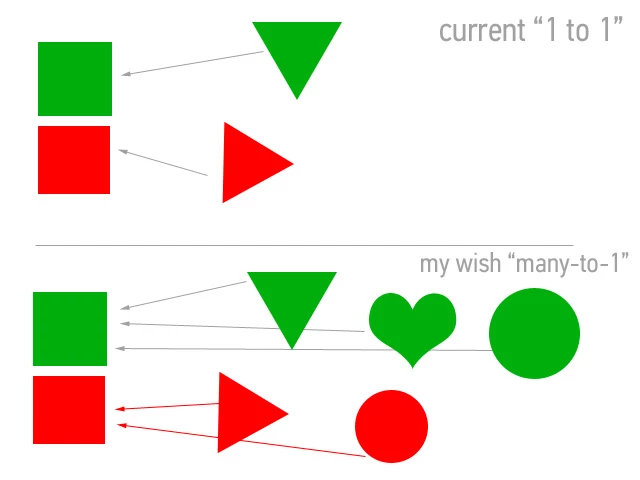
Here’s a code for “1 to 1” option:

var objectoriginalX:Number;

var objectoriginalY:Number;

shape_mc.buttonMode = true;

shape_mc.addEventListener(MouseEvent.MOUSE_DOWN, pickupObject);

shape_mc.addEventListener(MouseEvent.MOUSE_UP, dropObject);

shape2_mc.buttonMode = true;

shape2_mc.addEventListener(MouseEvent.MOUSE_DOWN, pickupObject);

shape2_mc.addEventListener(MouseEvent.MOUSE_UP, dropObject);

function pickupObject(event:MouseEvent):void {

event.target.startDrag(true);

event.target.parent.addChild(event.target);

objectoriginalX = event.target.x;

objectoriginalY = event.target.y;

}

function dropObject(event:MouseEvent):void {

event.target.stopDrag();

var matchingTargetName:String = "target" + event.target.name;

var matchingTarget:DisplayObject = getChildByName(matchingTargetName);

if (event.target.dropTarget != null && event.target.dropTarget.parent == matchingTarget){

event.target.removeEventListener(MouseEvent.MOUSE_DOWN, pickupObject);

event.target.removeEventListener(MouseEvent.MOUSE_UP, dropObject);

event.target.buttonMode = false;

event.target.x = matchingTarget.x;

event.target.y = matchingTarget.y;

} else {

event.target.x = objectoriginalX;

event.target.y = objectoriginalY;

}

}

I hope that I was clear,

thanks,

Nikola

This topic has been closed for replies.
Correct answer moccamaximum

for your special example give all matching instances an identical leading Letter:

like: bStar,bSquare,bHeart for all blue Shapes and gStar,gHeart etc. for all green ones...you get the idea

then change your function

function dropObject(event:MouseEvent):void

{


    event.target.stopDrag();


   //check if the leading Letter for both Sprites is the same


    if (testIfMatch(event.target.name, event.target.dropTarget.parent.name))

    {


        event.target.removeEventListener(MouseEvent.MOUSE_DOWN, pickupObject);


        event.target.removeEventListener(MouseEvent.MOUSE_UP, dropObject);


        event.target.buttonMode = false;


    }


    else

    {


        event.target.x = objectoriginalX;


        event.target.y = objectoriginalY;


    }

}

function testIfMatch(_drop:String, _target:String):Boolean

{


    if (_drop.substr(0, 1) == _target.substr(0, 1))

    {


        return true;


    }


    else

    {


        return false


    }

}

2 replies

moccamaximumCorrect answer
Inspiring
February 13, 2013

for your special example give all matching instances an identical leading Letter:

like: bStar,bSquare,bHeart for all blue Shapes and gStar,gHeart etc. for all green ones...you get the idea

then change your function

function dropObject(event:MouseEvent):void

{


    event.target.stopDrag();


   //check if the leading Letter for both Sprites is the same


    if (testIfMatch(event.target.name, event.target.dropTarget.parent.name))

    {


        event.target.removeEventListener(MouseEvent.MOUSE_DOWN, pickupObject);


        event.target.removeEventListener(MouseEvent.MOUSE_UP, dropObject);


        event.target.buttonMode = false;


    }


    else

    {


        event.target.x = objectoriginalX;


        event.target.y = objectoriginalY;


    }

}

function testIfMatch(_drop:String, _target:String):Boolean

{


    if (_drop.substr(0, 1) == _target.substr(0, 1))

    {


        return true;


    }


    else

    {


        return false


    }

}

cvaakiAuthor
New Participant
February 15, 2013

Dear moccamaximum and Ned,

Sorry for the late replay and thank you for your suggestions.

I've just tested moccamaximum's solution and it works flawlessly.

Many thanks!

There's another thing that just popped out:

I would like to have Congratulations screen which appears after the all objects are paired.

Any suggestions how to perform this?

Nikola

Inspiring
February 15, 2013

make a variable that acts as a counter and one that holds the total number of your to-be-matched shapes. Say you have 10 shapes that need to be matched.

var counter:int = 0;

var totalShapes:int = 10;

then in this section you add another if-clause that checks if all shapes are matched:

if (testIfMatch(event.target.name, event.target.dropTarget.parent.name))

    {

     counter++;

        event.target.removeEventListener(MouseEvent.MOUSE_DOWN, pickupObject);

        event.target.removeEventListener(MouseEvent.MOUSE_UP, dropObject);

        event.target.buttonMode = false;


       if(counter == totalShapes){

               congrats();

      }

    }


//and the congrats function would show a messageBox you hid at the start of your game via  messageBox.visible = false;

function congrats():void{

   messageBox.visible = true;

}

Ned Murphy
Brainiac
February 13, 2013

If you want to be able to match different items to the same target then you probably want to use something other than the name of the object.  Try assigning a property to each object, and if necessary make it an array.  Have that property identify the target(s) that it is allowed to be dropped on.  When checking a drop, use that property instead of the object's name.

Participating Frequently
April 16, 2015

Hi, Ned. It's two years since you've written this, but I'm a graduate student in Instructional Design and I'm confronted with the SAME issue as the original poster. I want to attempt your idea of using an array, but not sure how to do it. I have roughly 13 items to be sorted into three different bins; so basically those items are one of three "types": compost, recycling, or landfill. I want to be able to check if the item was dropped on the correct target and if so play a sound; if not snap back to original location. In my first code attempt I specified the starting x, y for all of the items, but want to also know if there is a way for me to just have the code get it for each and then send it back.

Thanks for any assistance!