


Participating Frequently
December 9, 2016
Question

Missing Blend Mode Control?

  • December 9, 2016
  • 1 reply
  • 4031 views

I'm making a simple logo animation and cannot find an option for changing blend modes anywhere.

I created an animation previously in which I was able to set blend modes for several different shapes on different layers, but I guess an update happened since then and the interface was changed. I figured I forgot what to do, so I went to Using and applying blend modes to look it up. According to the help page, blend mode controls should be in the "Color pop-up menu in the Properties panel". As you can see below, this apparently no longer exists.
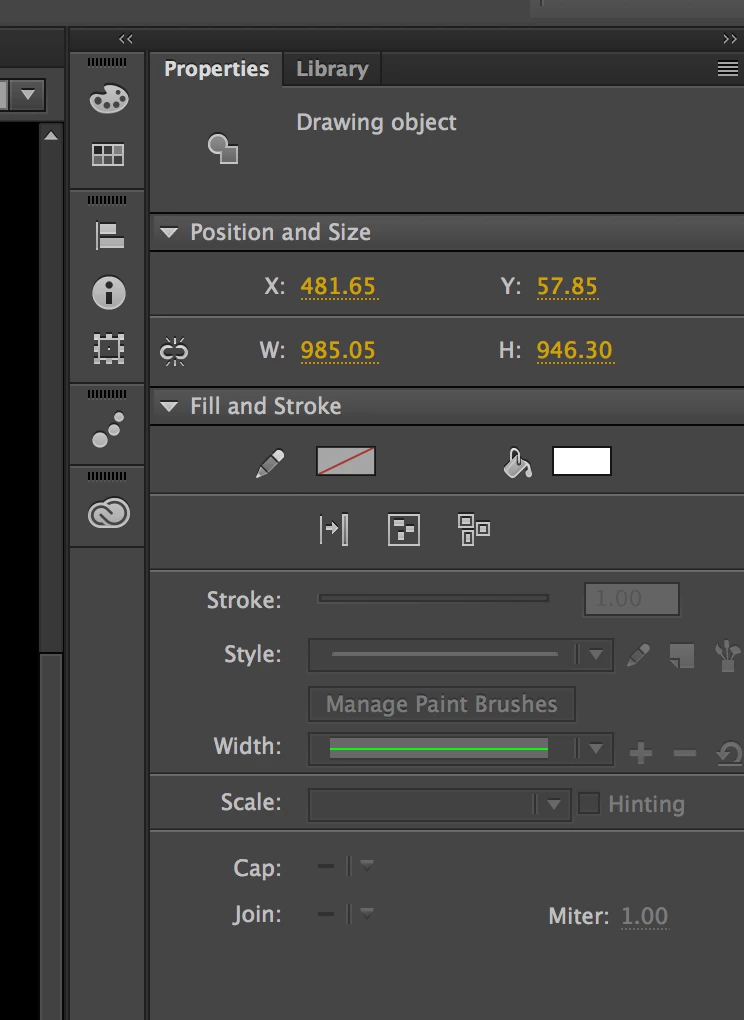
I've searched the interface and internet for hours and found no explanation. Has support for this function been removed?

    1 reply

    Colin Holgate
    Inspiring
    December 9, 2016

    You get display blending on movieclips. Select what you want to blend and convert it to a movieclip symbol.

    There's only two blend modes in HTML5 Canvas, so make sure you're animating in an ActionScript 3.0 FLA, if you want all of the blend modes.

    MPoppeAuthor
    Participating Frequently
    December 12, 2016

    It is in ActionScript 3.0 already.


    I've converted the object into a symbol, and was able to change the blend mode, but all this does is make the symbol invisible under all circumstances. Blend modes have no effect beyond preventing the symbol from rendering at all.

    Note: This object undergoes two shape deformations over the course of the animation.

    MPoppeAuthor
    Participating Frequently
    December 13, 2016

    Does anyone know how to solve this problem? I've been looking for a solution for days now.

    I've done all you suggested and the blend modes still do not work. Changing the blend mode to anything other than normal just makes the symbol invisible.

    If there's nothing to be done, can someone recommend another program as an alternative to Animate CC that's basically functional? It's clear that Adobe is not earnestly supporting this product anymore; the support site is very out of date and refers to nothing that actually appears in the program's interface.

    Help, anyone?