


Participant
December 15, 2022
Question

motion graph editor problem

  • December 15, 2022
  • 2 replies
  • 488 views

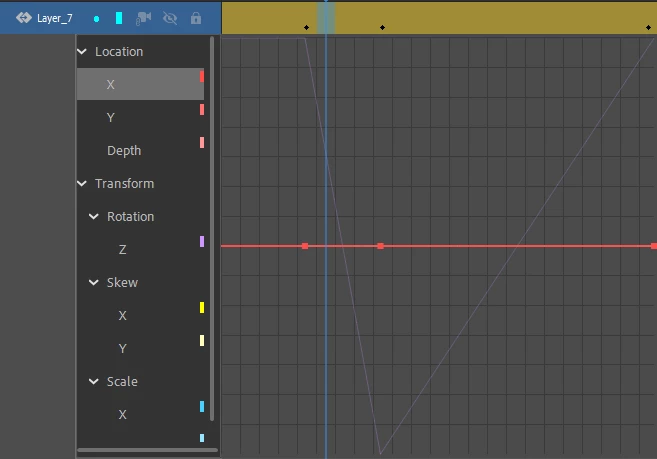
I'm incapable of clicking on any units in the motion graph besides the one already selected. In this image the only keyframe types I can edit, and click on, is for X, and it does not let me edit and click on rotation even though there is clearly keyframes for it. How do I fix this issue? Sometimes I don't have this issue, and sometimes I do.
 

    This topic has been closed for replies.

    2 replies

    Mario_CR
    Community Expert
    Community Expert
    December 16, 2022

    I can't see the problem on my end. To edit a property, first click on one on the left. For example to edit rotation, click on the Z property under rotation. You can add anchor points using the 'Add Anchor Point' button at the bottom left corner of the graph.

    kglad
    Community Expert
    Community Expert
    December 15, 2022

    on the left click the z (to select it), then click the add anchor points icon.


    if you are unable to select z, close and restart animate.


    if that fails, reset your preferences:


    remove


    Win:

    C:\Users\<username>\AppData\Local\Adobe\Animate CC <version>\ and

    C\Users\<username>\AppData\Roaming\Adobe\Animate\<version>\


    Mac:

    /Users/<username>/Library/Application Support/Adobe/<Animate CC version>/ and /Users/<username>/Library/Preferences/Adobe/Animate/<version>/

    Participant
    December 16, 2022

    Unfortunately, that doesn't seem to work. I wanna be clear that I cannot click on anything to the left, nothing works. I have the most recent version of animate as well.

    kglad
    Community Expert
    Community Expert
    December 16, 2022

    did you follow my suggestions?