


Participating Frequently
August 13, 2023
Answered

Nested animation is not synced with main timeline

  • August 13, 2023
  • 2 replies
  • 931 views

Hi

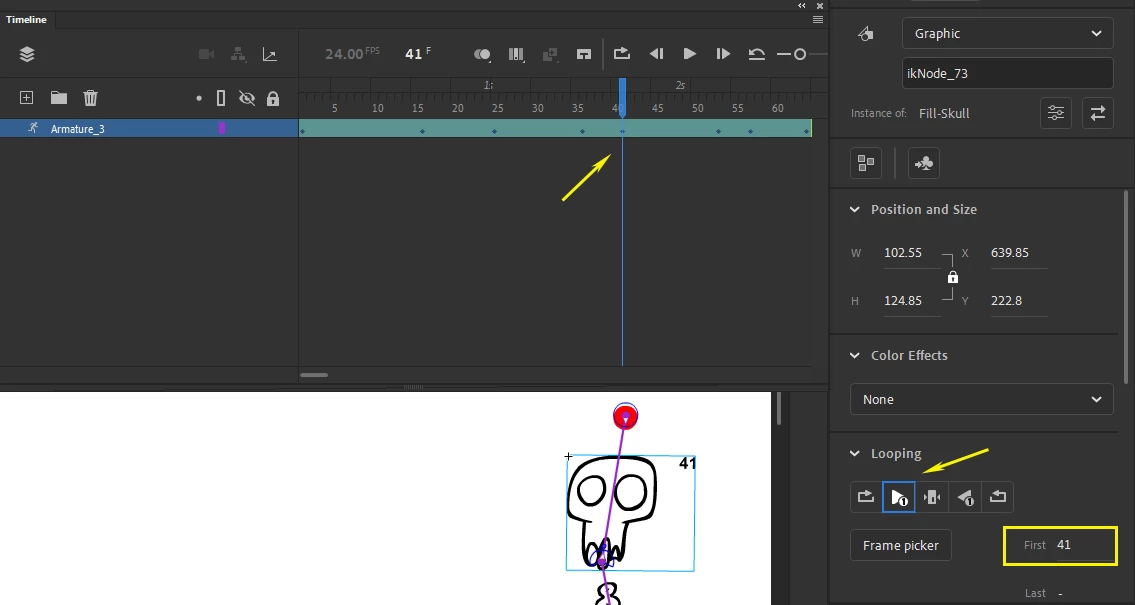
I have a bone armature that has lipsync animation nested into its head. When I play the animation on the main timeline, the nested lipsync animation is not synced with the main timeline.

How can I make the nested lipsync animation be synced with the main timeline in a bone armature?


(I'm aware that the bone tool is limiting so I'm currently learning to use the EDAP toolset as an alternative)
 

    Correct answer n. tilcheff

    Go to each of your keyframes, with the Selection tool click on the head and make sure it is set to Play Once, then manually type the frame number of the current timeline as First Frame to match.


    2 replies

    n. tilcheff
    n. tilcheffCorrect answer
    Legend
    August 13, 2023

    Go to each of your keyframes, with the Selection tool click on the head and make sure it is set to Play Once, then manually type the frame number of the current timeline as First Frame to match.


    Nick - Character Designer and Animator, Flash user since 1998 | Member of the Flanimate Power Tools team - extensions for character animation
    skug98Author
    Participating Frequently
    August 14, 2023

    Thank you!

    Manually changing the frame number on each keyframe of the head worked. 


    Unfortuanetly it's extremely incovenient to manually change each keyframe.

    Do you know a way to prevent the head from desyncing when animating using an armature?

    Futhermore, will Flanimate also have this issue? 


    Thanks again for your help.

    n. tilcheff
    Legend
    August 14, 2023

    First question: I don't think so, but I can't be 100% sure, since I never use armature as it is conceptually and functionally unusable.


    Second question: No. When elements are each on its own layer and you use Classic Tweens, even if you go out of sync, you can re-sync the whole layer with the press of a key with Sync Symbols To Timeline.


    Nick - Character Designer and Animator, Flash user since 1998 | Member of the Flanimate Power Tools team - extensions for character animation
    kglad
    Community Expert
    Community Expert
    August 13, 2023

    use graphic symbols, not movieclips.

    skug98Author
    Participating Frequently
    August 14, 2023

    Thanks for the reply!

    I am already using all graphic symbols