


Inspiring
December 30, 2020
Question

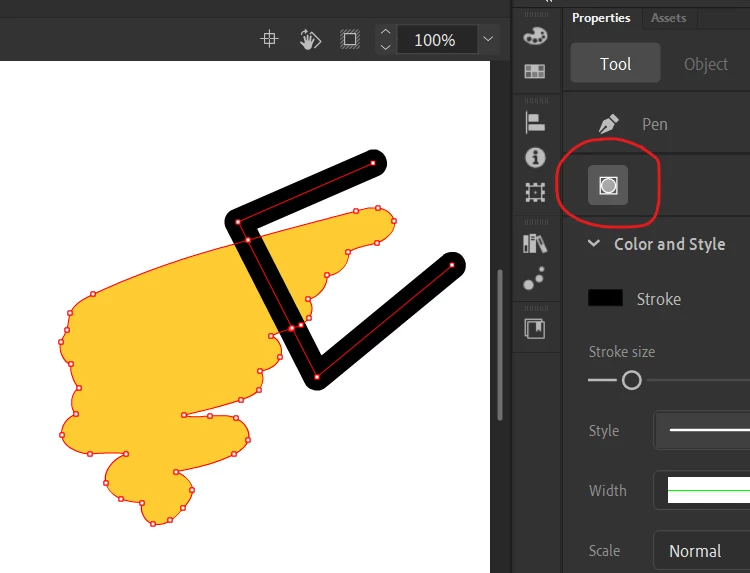
Object Drawing mode doesn't work with the Pen tool - version 21.0.1

  • December 30, 2020
  • 4 replies
  • 2548 views

Hi,

If I activate Object Drawing while using the Brush, Line, Oval, or Rectangle tool, it creates a separate object as expected (I verify it by switching to the Selection Tool, clicking on the new object, and seeing its bounding box appear). However, when I do the same with the Pen tool, it doesn't create a separate object. The path just merges with the overlapping paths, as if I never would have selected Object Drawing. Am I missing something or is it a bug for this version?
This topic has been closed for replies.

4 replies

Participating Frequently
March 22, 2024

This seemed to work for me:
In the Preferences dialog box, click Reset to Defaults or press and hold Control+Alt+Shift (Windows) or Command+Option+Shift (Mac OS) as you start Animate.

New Participant
March 22, 2024

But there is no option of reset to defaultdefault in prefrences dialog box. Does you have any other solution?

Participating Frequently
March 22, 2024

It worked when I relaunched Animate and held down the appropriate keys to reset. hold Control+Alt+Shift (Windows) or Command+Option+Shift (Mac OS) as you start Animate.

New Participant
March 21, 2024

Hi kglad I am facing same problem and your trick doesnot work. Can you suggest any other solution?

kglad
Community Expert
March 21, 2024

i also see a pen tool object drawing problem with the current and previous animate versions.   try cc 2018

New Participant
March 22, 2024

Thankyou for your reply kglad but I also try the 2021 version but the same problem occurred in that too

Community Expert
September 28, 2022

I just did a test with the pencil tool works, it is working foe me with Object drawing mode. 

kglad
Community Expert
December 30, 2020

i don't see that when i use the pen tool in object mode


can you duplicate the issue?  if yes, explain the exact steps to reproduce the problem.

RLoraAuthor
Inspiring
December 30, 2020

Hi.

Thank you for answering. Yes, I can duplicate the issue. YOu can see a video of the issue in the following link:

https://drive.google.com/file/d/1sT_RGgkigRsIEBu_OTIoD1_qrJj3kid2/view?usp=sharing


In the video, you can see the following actions:

1. Select the Pen tool

2. Activate Object Drawing

3. Draw a line

4. Switch to the Selection tool

5. Select the path but no bounding box appear despite the Object Drawing option being active)

6. Move the path to show that it is not an object

7. Draw a circle with the Object Drawing option active

8. Switch to the Selection tool

9. Click on the circle and the bounding box appear (as expected since the Object Drawing option is active)

10. Select the Pen tool

11. Keep Object Drawing active and draw another path overlapping the previous path

12. The new path merges with the path beneath indicating that none of the paths are treated as isolated objects, even though Object Drawing was selected


kglad
Community Expert
December 30, 2020

that's not what i see at step 5.  i see the bounding box.


reset your preferences, https://helpx.adobe.com/animate/using/set-preferences.html