


joshuap6375948
New Participant
March 30, 2017
Answered

Serious Brush bug with Latest AnimateCC Update

  • March 30, 2017
  • 18 replies
  • 19429 views

Newest update for AnimateCC has pretty much broken it for me.

Whenever using the brush tool at any size and any smoothing, after about 2-3 minutes a new window pops up saying 'Animate is processing strokes, Please wait'. System hangs after that and I need to restart the program.

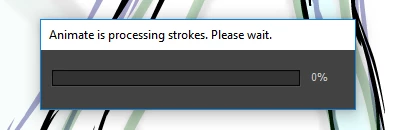
Is there any way to roll back? This is a massive problem and I have deadlines this friday and I can't get any work done.

    This topic has been closed for replies.
    Correct answer Mohanaraj

    Hi All,

    The fix for this issue has been rolled out in the update that we have released today. Please update your copy of Animate CC to the latest (16.5.0.100) using the Creative Cloud desktop application. If you don't see an update yet then you can click on the gear icon in Creative Cloud desktop application and choose 'Check for App Updates' option.

    This update also features Custom Easing, Ease Presets support for Shape and Classic Tween, Texture Atlas Export and much more. You can learn more about this update at https://www.adobe.com/products/animate/features.html

    Thanks!

    Mohan

    18 replies

    AncestorX
    New Participant
    April 23, 2017

    Same issue here, after drawing for a while I hit Ctrl+Z to redo a brush stroke and get the popup. No option to get a crash report as the program just hangs and I have to close it with task manager.

    Really frustraiting when your into the swing of things and haven't saved for over a minuite. Re-doing something you've just done is not nice at all when your on a roll.

    Windows 7, i5 CPU and 8GB RAM

    _keyframer
    Braniac
    April 23, 2017

    I've experienced same issue on my Win 10 machine. I waited about 30 minutes and the dialogue never went away. Had to force quit. Thankfully Animate's auto-save prevented a complete loss of work. This issue has been reported to the team internally.

    Animator and content creator for Animate CC
    jasonr2k
    New Participant
    April 24, 2017

    Apologize for the late response. This is the response I received from the team

    Like Colin observed, the progress-bar is supposed to go away as soon as the processing is complete in the background, which should be very quick in most cases. If it doesn’t go even after leaving it idle for a while then there’s a problem that we need to investigate and fix.

    I suggest reaching out to customer care using this link Contact Customer Care and ask them to investigate your issue. They should be able to log a bug on your behalf as well.

    Thanks,

    Preran


    Thank you Preran,

    Unfortunately for most of us the issue seems to be that the progress bar does not go away, not quickly and not at all. I’m literally running on a brand-new, high-speed dedicated workstation and when it happens to me, the progress bar stays on 0% until I end the task with task manager. The first couple times it did it, I let it sit , and after an hour it never resolved itself.

    I will reach out to customer care. Thank you for your response.

    Jason Raines

    Aleksey Minchenok
    New Participant
    April 21, 2017

    3db74b9449.jpg

    the second day in a row! It is impossible to work !!!!

    jasonr2k
    New Participant
    April 20, 2017

    It's starting to get real annoying. I'm on a TV production right now and I keep having these crashes come up. It seems to happen when I hit undo ... it's happened twice today and if I wasn't a save-all-the-time freak, I'd be losing a lot of work.

    Retablez
    Participating Frequently
    April 17, 2017

    Same here. I was drawing in my normal pace (slightly fierce) and the dialog box poped up, with a no-progress bar that didn't allow me further interaction with the app. No draw, no save... Happily the RECUP document had all the information before the crash, but I'm afraid this doble-thread stroke vectorizer is even worse than prior system.
    By the way, the high amount of nodes per line issue is not solved.

    Preran
    Community Manager
    Community Manager
    April 18, 2017

    From what I understand, most brush issues have been fixed on devices running on Mac OS (Sierra).

    I checked with the product team, and they told me that they have a few bugs related to Surface pro that they are working on.

    Can you provide me with details about the OS on your device, and also if you have updated all drivers?

    Thanks,

    Preran

    jasonr2k
    New Participant
    April 18, 2017

    I'm running Windows 10 on a Wacom mobilestudio pro 16 ... i7 processor, 16GB RAM.

    jasonr2k
    New Participant
    April 17, 2017

    I'm having the same issue. Not sure what's triggering it. I just picked up a wacom mobile studio and I've been having that message come up .... but when it does, the progress bar never moves and the program just sticks. I end up having to end the task.

    New Participant
    April 14, 2017

    I just had this problem and managed to save my file. Writing it here for future reference: I tried to shut down the computer (or switch accounts) so it forces Flash to close. Cancel the shut down so you get back into windows and Flash asks you if you want to save your file. Click yes and it gets saved, though it stays blocked and you need to force its restart from task manager anyways

    TheBigBrownBlue
    New Participant
    October 25, 2017

    Thank you!

    March 30, 2017

    I been having problems with the brush tool as well. Its not as severe as pop up loading box but for me even the smallest sized strokes have a delay in where Animate takes about .5 seconds to process the smoothness and I'm not running Animate on no toaster either. I just wished the brush tool was as effective like it was on Adobe Flash. All these problems seem to derive from the smoothness percentage. (For me anyways.)

    Colin Holgate
    Inspiring
    March 30, 2017

    You are able to continue drawing during that half second, aren't you?

    March 30, 2017

    Yes, is just extremely annoying

    Colin Holgate
    Inspiring
    March 30, 2017

    That dialog will come up even after a few seconds if you have managed to draw quite a lot of curves, stop drawing, and then tried to modify what you have drawn. The main addition that has helped with brush strokes is that the smoothing is handled by another thread. This means you could rapidly draw a lot of different curves, and the previous curves are smoothing while you're drawing the new ones. Previously if you drew quickly you would have to wait after every brush stroke.

    So, the dialog is intentional but will hopefully only come up under specific cases. It shouldn't cause a crash though. The progress should fill in and you're all set, ready to modify what you just drew.

    I'm not able to draw fast enough to invoke the dialog on my computer, so I'm having to remember how the dialog behaved the one time I saw it a few weeks ago.

    If the app does hang, are you able to find any crash reports?