



joshuap6375948
New Participant
March 30, 2017
Answered

Serious Brush bug with Latest AnimateCC Update

  • March 30, 2017
  • 18 replies
  • 19429 views

Newest update for AnimateCC has pretty much broken it for me.

Whenever using the brush tool at any size and any smoothing, after about 2-3 minutes a new window pops up saying 'Animate is processing strokes, Please wait'. System hangs after that and I need to restart the program.

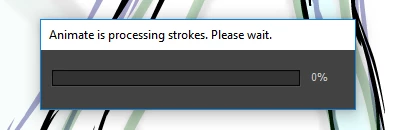
Is there any way to roll back? This is a massive problem and I have deadlines this friday and I can't get any work done.

    This topic has been closed for replies.
    Correct answer Mohanaraj

    Hi All,

    The fix for this issue has been rolled out in the update that we have released today. Please update your copy of Animate CC to the latest (16.5.0.100) using the Creative Cloud desktop application. If you don't see an update yet then you can click on the gear icon in Creative Cloud desktop application and choose 'Check for App Updates' option.

    This update also features Custom Easing, Ease Presets support for Shape and Classic Tween, Texture Atlas Export and much more. You can learn more about this update at https://www.adobe.com/products/animate/features.html

    Thanks!

    Mohan

    18 replies

    New Participant
    October 17, 2017

    Hello I'm having pretty much the same issue of some of the other users reported here.
    I'm using Sierra (iMac 2012 + Wacom intous )

    Adobe Animate CC ( 16.5.1.104 )

    it's impossible to draw fast...at the moment I have to draw a line, wait almost one second and draw another line...

    Is there a fix for it available now?


    Regards

    Alvise

    Mohanaraj
    Adobe Employee
    Adobe Employee
    October 17, 2017

    Hi,

    Have you updated your Wacom driver software to the latest? There was an issue with the Wacom driver software which caused the delay and has been fixed in the recent update.

    Thanks!

    Mohan

    KStaggs
    New Participant
    June 25, 2017

    I just checked for updates using the gear icon and it says all up to date. There is still a good 1 second lag in between drawing strokes that it takes to smooth out the line and the pop up appears. It makes drawing in flash much more of a hassle, and this is my main vector art program.

    Im using a Mobile Studio Pro 16in i7.

    KStaggs
    New Participant
    June 26, 2017

    In case anyone else still runs into this problem with the mobilestudio pro, it's fixed when your battery settings are set to high performance! Yay

    New Participant
    June 11, 2017

    still happening to me D:

    Mohanaraj
    Adobe Employee
    MohanarajCorrect answer
    Adobe Employee
    June 13, 2017

    Hi All,

    The fix for this issue has been rolled out in the update that we have released today. Please update your copy of Animate CC to the latest (16.5.0.100) using the Creative Cloud desktop application. If you don't see an update yet then you can click on the gear icon in Creative Cloud desktop application and choose 'Check for App Updates' option.

    This update also features Custom Easing, Ease Presets support for Shape and Classic Tween, Texture Atlas Export and much more. You can learn more about this update at https://www.adobe.com/products/animate/features.html

    Thanks!

    Mohan

    New Participant
    July 5, 2017

    Hi Mohan.

    The latest update didn't resolve the issue for me. Im still getting the pop-up and its still very distracting.

    This is running Win 10 64-bit on a fairly new rig with good power.

    I was using an older build of animate on a much older mac the other day and did not have any issues im experiencing on my PC.

    Again, the problem for me is not that it takes a second to smooth out the line, but that the pop up appears every time, messing up the workflow and being incredibly annoying. Is it not possible to disable just the pop up, and have the smoothing process happen quietly?

    New Participant
    June 7, 2017

    Noticed this problem happening to me on OS Sierra.  Switched off the NVIDIA web driver to the OS X Default Graphics driver and haven't been able to recreate the problem so far.  There is still a lag between quick strokes, which is annoying for sketching purposes.

    Colin Holgate
    Inspiring
    June 7, 2017

    One of the things that would provoke the problem was if you had H.264 video in the timeline. I image that it would be affected by which video driver you are using.

    New Participant
    June 7, 2017

    Wasn't any video in my timeline.  Was just going through a blank canvas sketching really fast, creating blank keys and the problem kept popping up.  Did the same method with the Default Driver, and wasn't able to recreate it.  I've been having issues with the NVIDIA drivers and adobe for awhile now.  Past updates would just freeze my computer when running Animate.  The latest one seems to just cause this "processing stroke" bug.  Working on an iMac late 2012.

    edwardb30301390
    New Participant
    June 5, 2017

    I am having this same problem as well on Mac and  I am going insane. I just updated to CC from CS3. I was holding out for so long because CS3 is amazing, literally never crashes. Now I am getting this terrible bug...please help!

    Sufferincats
    Known Participant
    June 5, 2017

    The moderator has a beta file which is very good. I would just like to say that the older versions of Flash/Animate had a way of sometimes corrupting your .fla irrecoverably if they crashed. I started out with Flash 6 and have used every version. This one is the best. When you install the beta version you have to import your prefs like keyboard shortcuts yourself, unlike the retail CC releases. This beta will fix your problem.

    edwardb30301390
    New Participant
    June 5, 2017

    ok great! i will install the beta once i hear from the moderator. can't wait to get this fixed. thank you!

    Known Participant
    June 5, 2017

    Can I have a fix too please! I use Animate all day and it's driving me crazy!

    Mohanaraj
    Adobe Employee
    Adobe Employee
    June 6, 2017

    Hi - Just sent you a PM with the required details, please check. Thanks!

    New Participant
    May 3, 2017

    I'm having the same issue. You guys need to fix this bug ASAP.

    Mohanaraj
    Adobe Employee
    Adobe Employee
    May 13, 2017

    Hi All,

    We have fixed this issue internally and the same is available in our beta channel. Please PM me if you are interested in validating the same.

    Thanks!

    Mohan

    New Participant
    June 5, 2017

    Hi - Just sent you a PM with the required details. Please check. Thanks!


    Hi Mohana,

    I've just had the same issue, could I access the beta bug fix too please? It's severely hindering my work

    Wacom Intuous Pro

    Macbook Pro Late 2015 (Sierra)

    Animate CC

    Latest drivers and OS and all.

    Regards,

    Charles.

    New Participant
    April 30, 2017

    Any news from the devs about htis problem? I'm having the same issue, did anyone of you got any replies from customer support?

    New Participant
    May 1, 2017

    I am also having this issue. I never goes away. See.

    New Participant
    April 29, 2017

    Having same problem on Windows 10 and my (gaming) computer is only a few months old. Rarely gets past 0% for me.

    New Participant
    April 29, 2017

    Same thing for me.

    windows 7, and MacOS sierra.

    The "Animate is processing strokes" dialog shows up and the progress bar either stays at 0%, or goes to 11% and then stops.

    iMac 5K with wacom bamboo.

    Please, please fix.