


Inspiring
March 12, 2021
Answered

Simple Analog clock

  • March 12, 2021
  • 3 replies
  • 3779 views

Hi - I wonder if someone can help me. I am trying to create a simple analog clock (with real time) for a static scene that I am creating. I am totally new to Adobe Animate (Canvas) so I have no clue how to write code for a real analog clocks that appears in a scene. I have searched the Internet for many weeks now to no avail. Please help Many thanks.
    This topic has been closed for replies.
    Correct answer kpabble

    Hi!


    You're welcome!


    The first message is telling you that my FLA has been created in a newer version of Animate. You can just click OK.


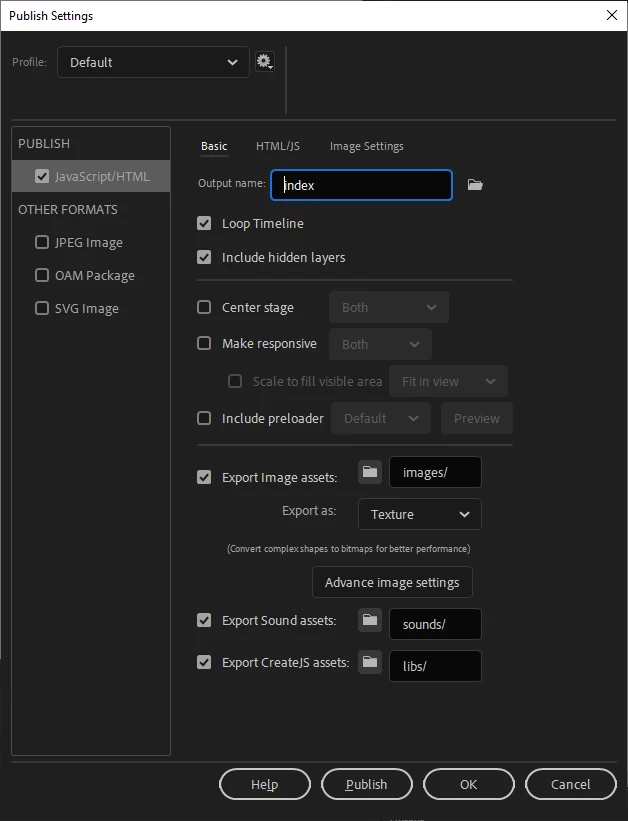
    The second message is shown because I set the FLA to output to a folder called dist. You can either create a folder called dist where your FLA is located or you can just go to the Publish Settings (Ctrl/Cmd + Shift + F12) and change the output to index or another name/path of your choice.


    Please let me know if you are still unable to publish the document.


    Regards,

    JC


    Good afternoon JC - just wanted to let you know your're a diamond! I simply upgraded my Adobe Animate to 2021 and your file opened (and is working) like a charm!!! Thanks you so much for your help have a great day!

    3 replies

    JoãoCésar17023019
    Community Expert
    March 14, 2021

    Hi.


    Here is a sample of an analog clock for Adobe Animate using the HTML5 Canvas document.


    Preview:


    Try it:

    http://bit.ly/3bNp4qi


    Javscript / JS code:

    var root = this;
    
    root.main = function()
    {
    	document.body.style.backgroundColor = lib.properties.color;
    	root.stop();
    	root.analogClock = new root.AnalogClock(root.clock.seconds, root.clock.minutes, root.clock.hours);
    };
    
    root.AnalogClock = function(secondsHand, minutesHand, hoursHand, stop)
    {
    	this.secondsHand = secondsHand;
    	this.minutesHand = minutesHand;
    	this.hoursHand = hoursHand;
    	
    	if (!stop)
    		this.start();
    };
    
    root.AnalogClock.prototype.start = function()
    {
    	this.update();
    	this.stop();
    	this.interval = setInterval(this.update.bind(this), 1000);
    };
    
    root.AnalogClock.prototype.stop = function()
    {
    	clearInterval(this.interval);
    };
    
    root.AnalogClock.prototype.update = function()
    {
    	var now = new Date();
    	
        // seconds
    	this.second = now.getSeconds();
        this.second = (this.second * Math.PI / 30);
    	this.secondsHand.rotation = this.second * 180 / Math.PI;
    	
    	// minutes
    	this.minute = now.getMinutes();
        this.minute = (this.minute * Math.PI / 30) + (this.second * Math.PI / (30 * 60));
    	this.minutesHand.rotation = this.minute * 180 / Math.PI;
    	
    	// hours
    	this.hour = now.getHours();
        this.hour = this.hour % 12;
        this.hour = (this.hour * Math.PI / 6) + (this.minute * Math.PI / (6 * 60)) + (this.second * Math.PI / (360 * 60));
    	this.hoursHand.rotation = this.hour * 180 / Math.PI;
    };
    
    root.main();


    Source / files / download:

    https://github.com/joao-cesar/adobe/tree/master/animate%20cc/html5_canvas/analog_clock


    Please let us know if you need something else.


    Regards,

    JC

    kpabbleAuthor
    Inspiring
    March 15, 2021

    Good morning JC - thank you so much for your "SPOT ON" resolve. It's exactly what I need!!! However when I try to open with Adobe Animate 2020 I get IMAGE 1. When I try to test movie from Adobe Animate 2020 I get image 2...what am I doing wrong 😩

    JoãoCésar17023019
    Community Expert
    March 15, 2021

    Hi!


    You're welcome!


    The first message is telling you that my FLA has been created in a newer version of Animate. You can just click OK.


    The second message is shown because I set the FLA to output to a folder called dist. You can either create a folder called dist where your FLA is located or you can just go to the Publish Settings (Ctrl/Cmd + Shift + F12) and change the output to index or another name/path of your choice.


    Please let me know if you are still unable to publish the document.


    Regards,

    JC

    kpabbleAuthor
    Inspiring
    March 13, 2021

    Hi Vladin M Mitove- many thanks for your reply. I am new to this so I am not sure what I must do with the information you have sent me and how it relates to Adobe Animate 2020?

    Vladin M. Mitov
    Inspiring
    March 12, 2021
    - Vlad: UX and graphic design, Flash user since 1998Member of Flanimate Power Tools team - extensions for character animation