


Participating Frequently
July 24, 2013
Answered

Single MovieClip Drag and Drop to Multiple Targets

  • July 24, 2013
  • 1 reply
  • 1059 views

So I've been sitting down for the past few hours trying to search the web for solutions about being able to drag and drop one MovieClip between multiple Targets. I have no idea and I am struggling to find anything that will help me with this. This is for a drag and drop class assignment and I would please like some help, if I may. Here's the general outline.

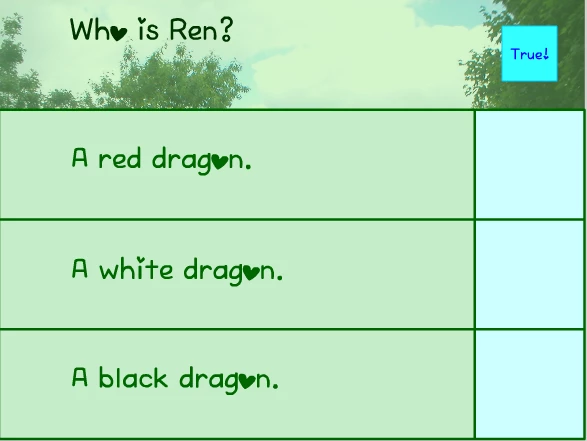
The scene is a multiple-choice quiz. There are 3 statements lined up next to 3 boxes, these are my Targets. One movieclip appears in the corner, this is the item I wish to enable dragging and dropping into any of the 3 Targets. These targets are named seperately as target1_mc, target2_mc, and target3_mc. The movieclip that is the "selector" for the multiple-choice is named selector_mc.

I only know the basic drag and drop script that was taught in class but that is only for a single target, not 3. An image has been provided below. To reiterate, selector_mc is the blue square in the uppermost part of the screen. Targets (target1_mc, target2_mc, target3_mc) are on the rightmost part of the screen. I want to let that blue square be able to be dragged and dropped onto the target areas and snap to any of them, invoking a response to it.
This topic has been closed for replies.
Correct answer kglad

selector_mc.origX = selector_mc._x;

selector_mc.origY = selector_mc._y;

selector_mc.onPress=function(){

this.startDrag();

}

selector_mc.onRelease=function(){

this.stopDrag();

if(eval(this._droptarget)==target1_mc){

// do something. red dragon was selected

this._x = target1_mc._x;

this._y = target1_mc._y;

} else

if(eval(this._droptarget)==target2_mc){

// do something. white dragon was selected

this._x = target2_mc._x;

this._y = target2_mc._y;

} else

if(eval(this._droptarget)==target3_mc){

// do something.blackdragon was selected

this._x = target3_mc._x;

this._y = target3_mc._y;

} else {

// missed em all

this._x = this.origX;

this._y = this.origY;

}

}

1 reply

kglad
Community Expert
kgladCommunity ExpertCorrect answer
Community Expert
July 24, 2013

selector_mc.origX = selector_mc._x;

selector_mc.origY = selector_mc._y;

selector_mc.onPress=function(){

this.startDrag();

}

selector_mc.onRelease=function(){

this.stopDrag();

if(eval(this._droptarget)==target1_mc){

// do something. red dragon was selected

this._x = target1_mc._x;

this._y = target1_mc._y;

} else

if(eval(this._droptarget)==target2_mc){

// do something. white dragon was selected

this._x = target2_mc._x;

this._y = target2_mc._y;

} else

if(eval(this._droptarget)==target3_mc){

// do something.blackdragon was selected

this._x = target3_mc._x;

this._y = target3_mc._y;

} else {

// missed em all

this._x = this.origX;

this._y = this.origY;

}

}

Participating Frequently
July 24, 2013

Adding this to the movie clip instance seems to bring up issues about the if statements not being in an 'on/onClipEvent' handler. Adding it onto the frame just makes the movie clip draggable but it doesn't snap to any of the targets and it doesn't snap back to it's original position.

kglad
Community Expert
Community Expert
July 24, 2013

no code should be attached to objects.  attach that code to the first frame that contains those objects.