

Participating Frequently
December 25, 2017
Answered

Sound quality bad in export to Quicktime

  • December 25, 2017
  • 1 reply
  • 1888 views

Exporting a Quicktime movie. Did the properties settings...set it to best quality.

But it comes out sounding bad. Sounds great as a fla file.

Any ideas why? Thanks.

    This topic has been closed for replies.
    Correct answer Colin Holgate

    Sibilance would be noticeable if you were using the default settings of MP3, 16kbps. In the dialog I showed, you would need to set both Event and Stream audio like that, to make sure you're exporting both kinds in good quality:
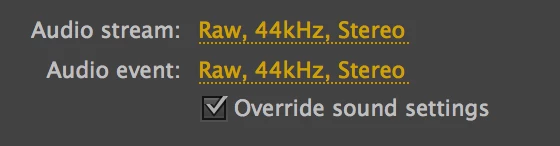
    Also, checking the Override box is worth doing, in case you've already set some sounds in the library to be lower quality.

    When you have done the export, are you listening to the MOV file, or are you sending that to Adobe Media Encoder to make an MP4? If you are, what are your compression settings like? If your plan is to do more work on the export in Premiere or After Effects, and if you're ok for drive space, you should use the MOV version in the other program.

    1 reply

    Colin Holgate
    Inspiring
    December 27, 2017

    Can you give more details about what you mean by 'best quality'? Here's what you should have:

    Also, make sure you're using WAV sounds in your AS3 FLA timeline. If you've already imported them as MP3, it's too late to recover the sound quality.

    evjamieAuthor
    Participating Frequently
    December 28, 2017

    I went back to Cubase and got a wav file of the song. Put it in Flash. But when I export to a Quicktime mov

    file the sound quality is still bad. It sounds very sibilant. Sounds great as a fla file. I set the properties as they should

    be for export.

    Colin Holgate
    Colin HolgateCorrect answer
    Inspiring
    December 28, 2017

    Sibilance would be noticeable if you were using the default settings of MP3, 16kbps. In the dialog I showed, you would need to set both Event and Stream audio like that, to make sure you're exporting both kinds in good quality:

    Also, checking the Override box is worth doing, in case you've already set some sounds in the library to be lower quality.

    When you have done the export, are you listening to the MOV file, or are you sending that to Adobe Media Encoder to make an MP4? If you are, what are your compression settings like? If your plan is to do more work on the export in Premiere or After Effects, and if you're ok for drive space, you should use the MOV version in the other program.