


avid_body16B8
Legend
October 9, 2018
Answered

stage centered text also align center moves left on publish ANCC Canvas

  • October 9, 2018
  • 1 reply
  • 1129 views

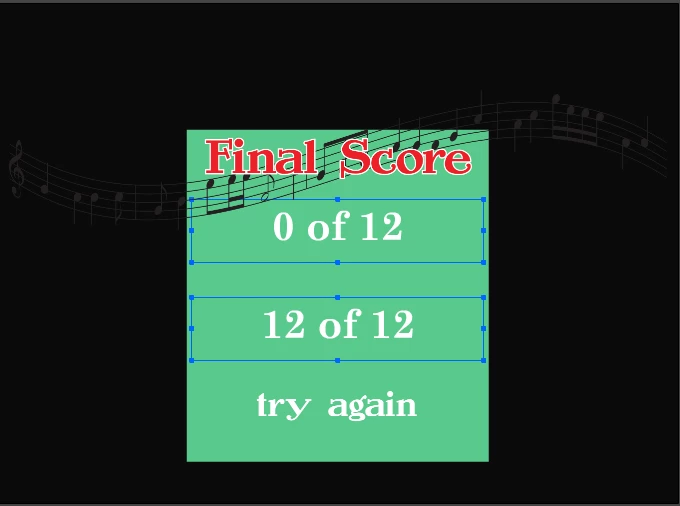
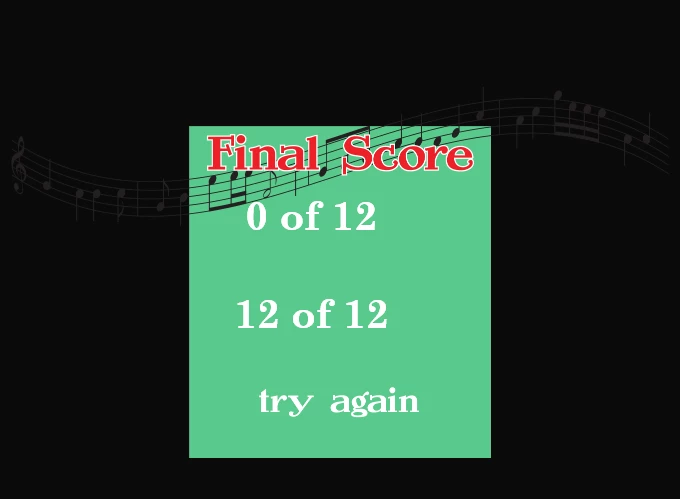
What is the way to correct this problem? See the problem below. image1 is stage screenshot, image 2 is the published version. This is of course a dynamic text.
This topic has been closed for replies.
Correct answer ClayUUID

Greg's code is for correcting vertical text layout differences. I'm not sure why he posted it.

What font are you using? Do you get this horizontal difference when using more common fonts, like Arial or Times New Roman? There aren't any extra spaces on the left or right of either text, are there?

1 reply

Inspiring
October 9, 2018

Is this Firefox? If so try this code in first frame:

var firefox = navigator.userAgent.toLowerCase().indexOf('firefox') > -1;

if (firefox && createjs)

{

createjs.Text.prototype._drawTextLine = function(ctx, text, y)

  {

  // Adjust text position only if textBaseline is "top"

  if (this.textBaseline === "top")

  {

  var lineHeight = this.lineHeight || this.getMeasuredLineHeight();

  y += lineHeight * 0.1; // decrease number to move font up and increase to move down

  }

  // Chrome 17 will fail to draw the text if the last param is included but null, so we feed it a large value instead:

  if (this.outline) { ctx.strokeText(text, 0, y, this.maxWidth||0xFFFF); }

  else { ctx.fillText(text, 0, y, this.maxWidth||0xFFFF); }

  };

}

avid_body16B8
Legend
October 9, 2018

FF, Chrome, Edge, Safari, Brave,...

Your code does not make any difference.

Legend
October 9, 2018

I tried several fonts including Arial and the problem remained for any font.

However, I saw your question about extra space on either side of the text field and as you can see on the screenshot there is a space on each side. So this was the problem (which did not exist in Edge Animate BTW). Taking the space out on the larger text 12 of 12 took care of the problem (mostly) since there is still a little difference between a score of 0 to 9 and 10 to 12 which is done dynamically for a scoring variable.

Thanks for the input. Looks like Animate and Edge Animate handle lots of things differently.


I just tried reproducing your display with a couple dozen random fonts in a center-formatted dynamic text field, and none of them showed the dramatic left shift that you're getting.

What is your code for setting the values of the final score text fields?
