


New Participant
January 15, 2020
Answered

SWF Alternatives for Animation Course

  • January 15, 2020
  • 1 reply
  • 2006 views

I have taught a simple animation course using Animate for years. Students work on both pc and mac and in the past have used flash player to view, critique and exchange each others movies. I don't want students to have to use adobe media encoder as they only subscribe to Animate for the semester? What are my best options...they do simple movies (30-60 seconds) that contain multiple scenes, movie clips, sound etc. Should they just use Canvas files that they view/test in a browser? I understand the demise of Flash Player is inevitable but as a stand alone viewing option where movies were looked at locally it worked fine...any thoughts....Thanks!
 

This topic has been closed for replies.
Correct answer n. tilcheff

Hi mate,


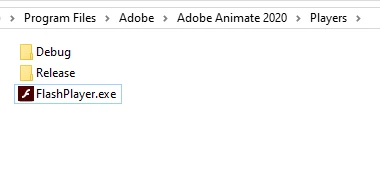
If you have Animate installed, you go to its folder in Program Files and find Players:

There is the standalone player. 

It's a simple player program.

Make a copy of it - just the EXE  (FlashPlayer.exe) - and put it somewhere where the kids can have access to.


All that needs to be done is to have it locally and associate SWF file type with this, so that when a SWF is double-clicked it opens it in player.


As far as I know, this player will always be a part of Animate installation and distribution, but keep a copy of it.

For example, I have kept a few of them over the years as they change a bit. Older ones work on 32-bit systems also.


Hope this helps!


1 reply

Brainiac
January 15, 2020

The only thing that's getting killed off is the Flash browser plugin. The standalone Flash Player is, as far as I'm aware, still supported.

https://www.adobe.com/support/flashplayer/debug_downloads.html


lukedaveAuthor
New Participant
January 15, 2020

Thanks for your input. But the below is what I am confused about. A thread here:


https://community.adobe.com/t5/flash-player/is-there-a-replacement-player-for-the-flash-player/td-p/10040120

states (quoting a few Adobe employees)...

"We will not be publishing updates to Flash Player or the projector after 2020, and you would be best served by migrating to something else."

and

"Flash Player (plugin, or projector) will not be available after 2020.  It's highly recommended to begin migrating to other technologies to ensure your apps work after 2020."

and 

"As mentioned previously, it's recommended that you explore, and migrate to, different technologies.  Flash Player in all it's formats (plugin & projector) will be end-of-lifed at the end of 2020."


This thread however states the projector can still be used:

https://community.adobe.com/t5/animate/flash-player-quot-end-of-life-quot-2020/td-p/9385382


Hence my confusion. I, and my students, use Animate CC to animate...make short films. We do not use browsers/plug ins but simply play a swf. 

n. tilcheff
n. tilcheffCorrect answer
Brainiac
January 16, 2020

Hi mate,


If you have Animate installed, you go to its folder in Program Files and find Players:

There is the standalone player. 

It's a simple player program.

Make a copy of it - just the EXE  (FlashPlayer.exe) - and put it somewhere where the kids can have access to.


All that needs to be done is to have it locally and associate SWF file type with this, so that when a SWF is double-clicked it opens it in player.


As far as I know, this player will always be a part of Animate installation and distribution, but keep a copy of it.

For example, I have kept a few of them over the years as they change a bit. Older ones work on 32-bit systems also.


Hope this helps!


Nick - Character Designer and Animator, Flash user since 1998 | Member of the Flanimate Power Tools team - extensions for character animation