Participating Frequently
February 26, 2018
Answered

SWF SE VE COMO UN BLOC DE NOTAS

  • February 26, 2018
  • 2 replies
  • 2018 views

BUEN DIA PARA TODOS.

TENGO UN GRAN PROBLEMA. NO HE PODIDO EXPORTAR DESDE ANIMATE CC UN SWF, AL MOMENTO DE CREAR O EXPORTAR EL ARCHIVO SOLO ME LO MUESTRA COMO UN BLOC DE NOTAS.

ALGUIEN TIENE IDEA DEL POR QUE?

GRACIAS.

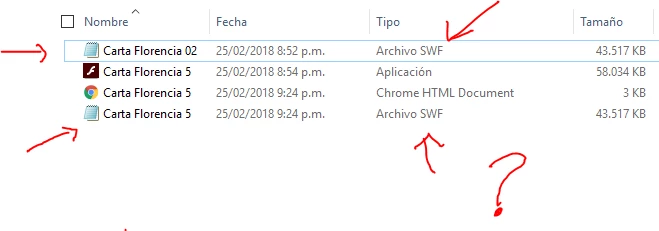
PD: DEJO UNA IMAGEN DE COMO SE VEN LOS ARCHIVOS.

This topic has been closed for replies.
Correct answer JoãoCésar17023019

good afternoon. JoãoCésar.

I leave the link to show you the animation.

I need an XML that allows me to change the texts when the client needs it.

Thanks once again.

https://youtu.be/LIyyku2hW98


Hi again!

Really cool design!

Here is a sample.

- Tried to loosely reproduce your design. Please don't mind. Haha;

- I think JSON is simpler and more organized, so I opted to use it;

- The JSON file is organized in a way that you can add as many profiles/versions for your design as you want. You just have to change the 'settings.currentProfile' key. In this example, there are two profiles: 'marzo' and 'abril'. The default one is 'marzo'.

Preview:

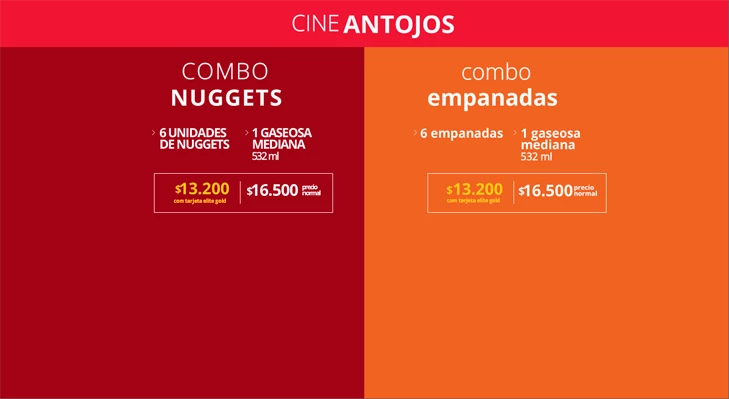
Fictional 'marzo' profile.
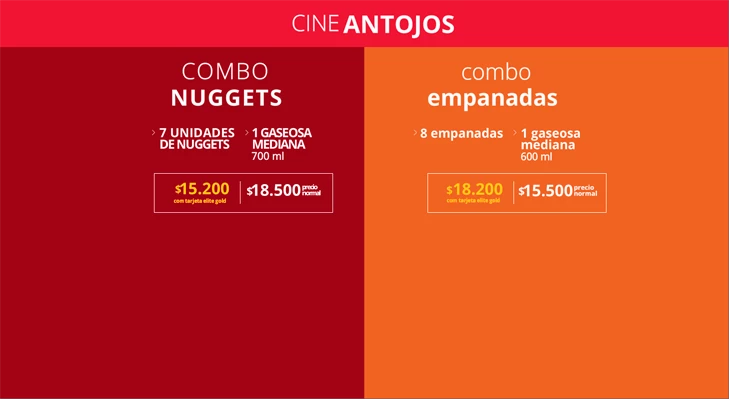
Fictional 'abril' profile.
AS3 code:

import flash.events.Event;
import flash.events.IOErrorEvent;
import flash.net.URLLoader;
import flash.net.URLRequest;

var jsonPath:String = "texts.json";
var json:Object;

function start():void
{
    var loader:URLLoader = new URLLoader();
    var request:URLRequest = new URLRequest();
    request.url = jsonPath;
    loader.addEventListener(Event.COMPLETE, completeHandler);
    loader.addEventListener(IOErrorEvent.IO_ERROR, errorHandler);
    loader.load(request);
}

function completeHandler(e:Event):void
{
    var loader:URLLoader = URLLoader(e.target);
    json = JSON.parse(loader.data);

    setTexts(json);
}

function errorHandler(e:Event):void
{
    trace(e);
}

function setTexts(obj:Object):void
{
    var profileName:String = obj['settings']['currentProfile'];
    var profile:Object =     obj['profiles'][profileName];
    var key:String;

    for (key in profile['title'])
        title[key].text =  profile['title'][key];

    for (key in profile['promo0'])
        promo0[key].text = profile['promo0'][key];

    for (key in profile['promo1'])
        promo1[key].text = profile['promo1'][key];
}

start();

JSON text:

{
    "settings":
    {
        "currentProfile":"marzo"
    },
    "profiles":
    {
        "marzo":
        {
            "title":
            {
                "txt0":"CINE",
                "txt1":"ANTOJOS"
            },
            "promo0":
            {
                "txt0":"COMBO",
                "txt1":"NUGGETS",
                "txt2":"6 UNIDADES",
                "txt3":"DE NUGGETS",
                "txt4":"1 GASEOSA",
                "txt5":"MEDIANA",
                "txt6":"532 ml",
                "txt7":"$",
                "txt8":"13.200",
                "txt9":"com tarjeta elite gold",
                "txt10":"$",
                "txt11":"16.500",
                "txt12":"precio",
                "txt13":"normal"
            },
            "promo1":
            {
                "txt0":"combo",
                "txt1":"empanadas",
                "txt2":"6 empanadas",
                "txt3":"1 gaseosa",
                "txt4":"mediana",
                "txt5":"532 ml",
                "txt6":"$",
                "txt7":"13.200",
                "txt8":"com tarjeta elite gold",
                "txt9":"$",
                "txt10":"16.500",
                "txt11":"precio",
                "txt12":"normal"
            }
        },
        "abril":
        {
            "title":
            {
                "txt0":"CINE",
                "txt1":"ANTOJOS"
            },
            "promo0":
            {
                "txt0":"COMBO",
                "txt1":"NUGGETS",
                "txt2":"7 UNIDADES",
                "txt3":"DE NUGGETS",
                "txt4":"1 GASEOSA",
                "txt5":"MEDIANA",
                "txt6":"700 ml",
                "txt7":"$",
                "txt8":"15.200",
                "txt9":"com tarjeta elite gold",
                "txt10":"$",
                "txt11":"18.500",
                "txt12":"precio",
                "txt13":"normal"
            },
            "promo1":
            {
                "txt0":"combo",
                "txt1":"empanadas",
                "txt2":"8 empanadas",
                "txt3":"1 gaseosa",
                "txt4":"mediana",
                "txt5":"600 ml",
                "txt6":"$",
                "txt7":"18.200",
                "txt8":"com tarjeta elite gold",
                "txt9":"$",
                "txt10":"15.500",
                "txt11":"precio",
                "txt12":"normal"
            }
        }
    }   
}

FLA download: animate_cc_as3_texts_from_json.zip - Google Drive

I hope it helps.

Regards,

JC

2 replies

JoãoCésar17023019
Community Expert
Community Expert
February 26, 2018

Hi.

This is a OS related problem.

In your case, you must tell Windows to always open your SWF files with the Flash Player.

As you have Animate CC installed, the default location of the FlashPlayer.exe is in:

C:\Program Files\Adobe\Adobe Animate CC 2018\Players\FlashPlayer.exe

And the ability to loop a animation is related to the timeline settings of your project. If you choose to export as a SWF or as a Windows Projector won't change this.

Regards,

JC

Participating Frequently
February 26, 2018

Thank you very much for your answer, and let me preview it as SWF at last. For some reason it does not change them and they are still seen as a pad, but if you play them from the Flash Player. Thank you very much.

Now for some reason the Win Projector if it closes when the animation ends, some idea of why?

Pds: I do not have any code in the timeline.

JoãoCésar17023019
Community Expert
JoãoCésar17023019Community ExpertCorrect answer
Community Expert
February 28, 2018

good afternoon. JoãoCésar.

I leave the link to show you the animation.

I need an XML that allows me to change the texts when the client needs it.

Thanks once again.

https://youtu.be/LIyyku2hW98


Hi again!

Really cool design!

Here is a sample.

- Tried to loosely reproduce your design. Please don't mind. Haha;

- I think JSON is simpler and more organized, so I opted to use it;

- The JSON file is organized in a way that you can add as many profiles/versions for your design as you want. You just have to change the 'settings.currentProfile' key. In this example, there are two profiles: 'marzo' and 'abril'. The default one is 'marzo'.

Preview:

Fictional 'marzo' profile.

Fictional 'abril' profile.

AS3 code:

import flash.events.Event;
import flash.events.IOErrorEvent;
import flash.net.URLLoader;
import flash.net.URLRequest;

var jsonPath:String = "texts.json";
var json:Object;

function start():void
{
    var loader:URLLoader = new URLLoader();
    var request:URLRequest = new URLRequest();
    request.url = jsonPath;
    loader.addEventListener(Event.COMPLETE, completeHandler);
    loader.addEventListener(IOErrorEvent.IO_ERROR, errorHandler);
    loader.load(request);
}

function completeHandler(e:Event):void
{
    var loader:URLLoader = URLLoader(e.target);
    json = JSON.parse(loader.data);

    setTexts(json);
}

function errorHandler(e:Event):void
{
    trace(e);
}

function setTexts(obj:Object):void
{
    var profileName:String = obj['settings']['currentProfile'];
    var profile:Object =     obj['profiles'][profileName];
    var key:String;

    for (key in profile['title'])
        title[key].text =  profile['title'][key];

    for (key in profile['promo0'])
        promo0[key].text = profile['promo0'][key];

    for (key in profile['promo1'])
        promo1[key].text = profile['promo1'][key];
}

start();

JSON text:

{
    "settings":
    {
        "currentProfile":"marzo"
    },
    "profiles":
    {
        "marzo":
        {
            "title":
            {
                "txt0":"CINE",
                "txt1":"ANTOJOS"
            },
            "promo0":
            {
                "txt0":"COMBO",
                "txt1":"NUGGETS",
                "txt2":"6 UNIDADES",
                "txt3":"DE NUGGETS",
                "txt4":"1 GASEOSA",
                "txt5":"MEDIANA",
                "txt6":"532 ml",
                "txt7":"$",
                "txt8":"13.200",
                "txt9":"com tarjeta elite gold",
                "txt10":"$",
                "txt11":"16.500",
                "txt12":"precio",
                "txt13":"normal"
            },
            "promo1":
            {
                "txt0":"combo",
                "txt1":"empanadas",
                "txt2":"6 empanadas",
                "txt3":"1 gaseosa",
                "txt4":"mediana",
                "txt5":"532 ml",
                "txt6":"$",
                "txt7":"13.200",
                "txt8":"com tarjeta elite gold",
                "txt9":"$",
                "txt10":"16.500",
                "txt11":"precio",
                "txt12":"normal"
            }
        },
        "abril":
        {
            "title":
            {
                "txt0":"CINE",
                "txt1":"ANTOJOS"
            },
            "promo0":
            {
                "txt0":"COMBO",
                "txt1":"NUGGETS",
                "txt2":"7 UNIDADES",
                "txt3":"DE NUGGETS",
                "txt4":"1 GASEOSA",
                "txt5":"MEDIANA",
                "txt6":"700 ml",
                "txt7":"$",
                "txt8":"15.200",
                "txt9":"com tarjeta elite gold",
                "txt10":"$",
                "txt11":"18.500",
                "txt12":"precio",
                "txt13":"normal"
            },
            "promo1":
            {
                "txt0":"combo",
                "txt1":"empanadas",
                "txt2":"8 empanadas",
                "txt3":"1 gaseosa",
                "txt4":"mediana",
                "txt5":"600 ml",
                "txt6":"$",
                "txt7":"18.200",
                "txt8":"com tarjeta elite gold",
                "txt9":"$",
                "txt10":"15.500",
                "txt11":"precio",
                "txt12":"normal"
            }
        }
    }   
}

FLA download: animate_cc_as3_texts_from_json.zip - Google Drive

I hope it helps.

Regards,

JC

UDESCO
Adobe Employee
Adobe Employee
February 26, 2018

The first and fourth file in your screenshot looks like "SWF Archive" files that are not meant to be played directly. They are used for importing in After Effects.

Try opening the Second file - that should play the animation.

Participating Frequently
February 26, 2018

Good thanks for answering

but the second file is a win projector, and I need the animation to always be reproduced as a loop and publishing it as a win projector does not allow that. every time you see the animation closes alone, so I'm more interested in exporting it as SWF.