


Participant
March 29, 2020
Question

using adobe animate with a huion tablet and the brush is miss aligned

  • March 29, 2020
  • 1 reply
  • 3409 views

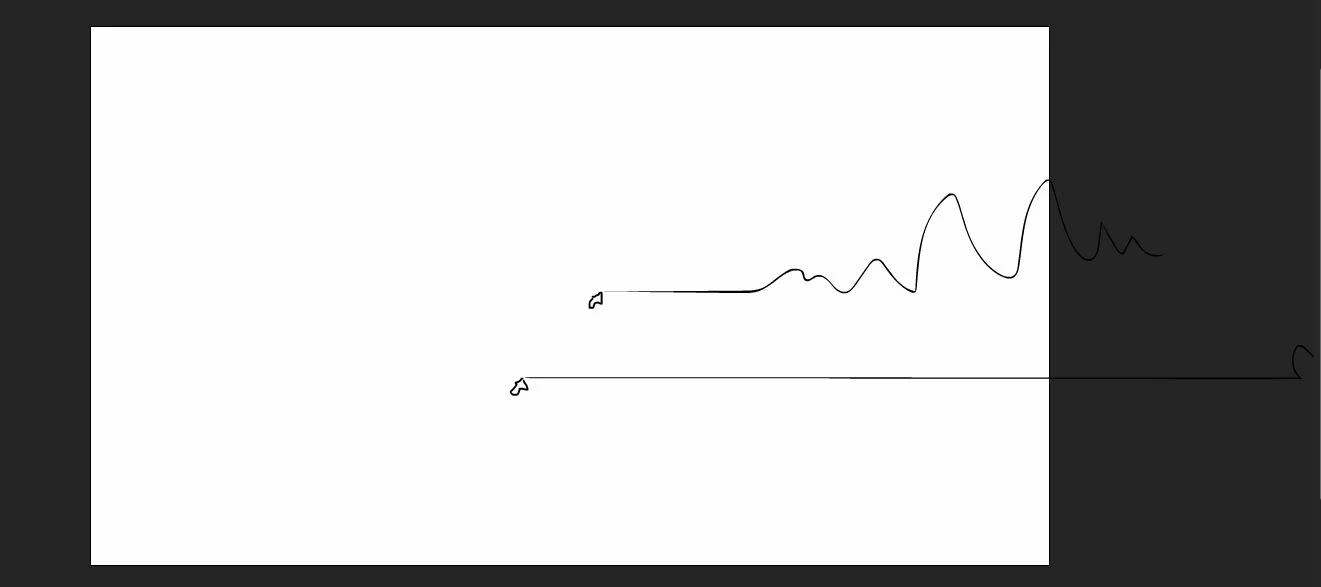
Hi, I am using adobe animate with a huion tablet and the brush never works it is miss-aligned and starts with a long straight horizontal line.
the arrow is where the pen starts drawing. for reference.


I have tried reinstalling, clearing all data of the software in the process.

still no luck, if you could give me any way of fixing it

    This topic has been closed for replies.

    1 reply

    n. tilcheff
    Legend
    March 29, 2020

    Have you tried searching there forums for similar topics?

    Have you tried installing an older version of Animate?


    Nick - Character Designer and Animator, Flash user since 1998 | Member of the Flanimate Power Tools team - extensions for character animation
    sv4942972Author
    Participant
    March 29, 2020

    Most solutions seems to be "it just dosen't work if its not wacom" as far as i have found 😕😕

    I will try the older version and let you know, good shout


    n. tilcheff
    Legend
    March 29, 2020

    Hi again mate,


    That's great to hear!

    I suppose you installed 2019. Maybe just for the sake of others who have the same problem, you could add some more details here.


    AA 2020 is plagued with tablet issues.

    The devs are working on this as with the current version it has become a really huge problem, but I don't know when and how it will be fixed.


    Nick - Character Designer and Animator, Flash user since 1998 | Member of the Flanimate Power Tools team - extensions for character animation