


jeffery wright
Inspiring
June 20, 2017
Question

Exporting JavaScript/HTML Not Responding?

  • June 20, 2017
  • 3 replies
  • 1148 views

Enough already, why is this considered normal and acceptable?

I have a weapons-grade Z840 workstation:
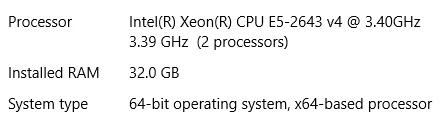
But an Adobe product gives me this, just for rendering a simple canvas file?

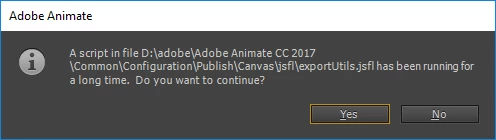
exportUtils.jsfl - After waiting 10 minutes, who the hell would say "No, don't continue!"?

Every freakin' time... what gives?

Isn't anyone at Adobe interested in providing paying customers with software that simply does its job? Make this crap stop already.

    This topic has been closed for replies.

    3 replies

    UDESCO
    Adobe Employee
    Adobe Employee
    June 21, 2017

    Certain things may not appear to be complex on stage but may still take a lot of time for publishing.

    This dialog is essentially present to recover from Application freezing - leading to crash and loss of data, in case something has gone wrong internally or is taking very long to process.

    You can do the following to avoid getting these timeout errors.

    1.       Create a new JSFL file

    2.       Copy the below command and save your JSFL file.

                   fl.showIdleMessage(false);

    3.       Now, directly run the JSFL file using the Play button in the top right corner of the window; or, Goto Commands Menu and click on the Filename you just saved above.

    Please note, this command is valid for the current session only, so everytime you launch Animate and want to suppress the warning messages, run this command once!

    Brainiac
    June 21, 2017

    The fact that core functionality like publishing has been relegated to JSFL scripts in Animate, instead of being implemented in native code, has always been deeply concerning to me.

    Colin Holgate
    Inspiring
    June 20, 2017

    I have seen that as an oddity, where right at the end, and the publish has finished, that dialog comes up. Clicking Yes immediately opens the page in the browser. It hasn't caused any problem.

    kglad
    Adobe Expert
    June 20, 2017

    these are user-to-user forums.  ranting here is venting on adobe customers, not adobe employees (which is also senseless if you want help).

    anyway, what os?

    is your project extremely large (by any measure)

    and what happens when you click yes to allow it to continue?

    jeffery wright
    Inspiring
    June 21, 2017

    I am hoping that perhaps another Adobe customer has figured out a way to trick the software into working properly.

    Windows 10 is the OS, like I mentioned earlier it is a very simple interactive graphic.

    How does one bring the glaring shortcomings of Adobe products to Adobe employees who will do something about it?

    When I click continue, it continues to compile and then pops up the same window again, when I click continue the second time, the compile completes. This means casually checking on an edit I just made is not simple task, just tweaking a line of code means a serious investment in time just to see if what I just did, works. That is not helpful to an efficient workflow.

    Why would Adobe users simply accept this? Are you saying Adobe is less likely to fix their products if anyone complains loudly about the stark deficiencies of the products their customers pay for? How is that culture also acceptable?