


Answered
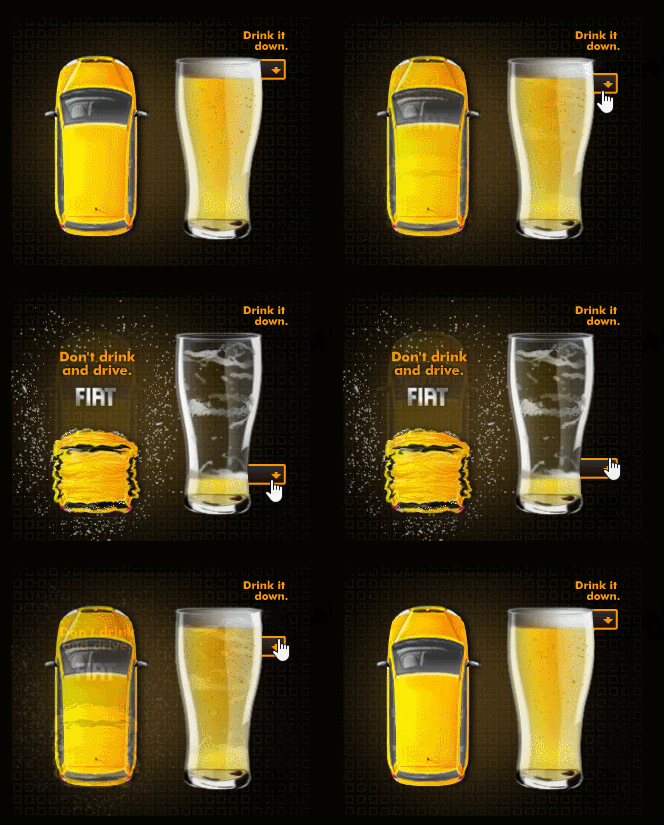
How can i achieve such an animation
I would love to create something similar for Guinness. [Explicit content. Please provide another sample.]
whether its java script or HTML code anyhelp would be welcome.

I would love to create something similar for Guinness. [Explicit content. Please provide another sample.]
whether its java script or HTML code anyhelp would be welcome.
Hi.
I have a sample here.
You can of course improve the transition between the two images. It's just a matter of modifying the anim Movie Clip instance. The code will remain the same.
Preview:
Live demo:
JS:
var root = this;
var slider = root.slider;
var button = slider.button;
var bar = slider.bar;
button.mouseDownHandler = function(e)
{
// we need to get the difference from the mouse y coordinate to the origin of the button instance and also taking into account the stage scale
this.offsetY = (e.stageY / stage.scaleY) - this.y;
};
button.pressMoveHandler = function(e)
{
var scrollHeight = bar.nominalBounds.height - button.nominalBounds.height;
this.y = (e.stageY / stage.scaleY) - this.offsetY;
this.y = root.clamp(this.y, this.nominalBounds.y, scrollHeight);
// the y coordinate of the button divided by the scroll height gives a value from 0 to 1. Then we multiply it by the total frames we have in the animation Movie Clip instance. The result must be rounded.
root.anim.gotoAndStop(Math.round(root.anim.totalFrames * (this.y / scrollHeight)));
};
// limits a value within a range
root.clamp = function(value, min, max)
{
if (value < min)
return min;
if (value > max)
return max;
return value;
};
root.start = function()
{
document.body.style.backgroundColor = lib.properties.color; // sets the background color for the page
createjs.Touch.enable(stage); // enables touch interaction for the default stage
stage.mouseMoveOutside = true; // mouse move events will continue to be called when the mouse leaves the target canvas
stage.preventSelection = true; // prevents selection of other elements in the html page if the user clicks and drags
root.anim.loop = false; // it prevents a Movie Clip instance from returning to the first frame when the last frame is reached
button.on("mousedown", button.mouseDownHandler);
button.on("pressmove", button.pressMoveHandler);
};
root.start();
FLA download:
animate_cc_html5_canvas_drag_to_reveal.zip - Google Drive
I hope this helps.
Regards,
JC
Already have an account? Login
Enter your E-mail address. We'll send you an e-mail with instructions to reset your password.
 AdChoices