


imtryingtolearnflash
New Participant
February 12, 2019
Answered

Modify > Arrange is greyed out

  • February 12, 2019
  • 2 replies
  • 7853 views

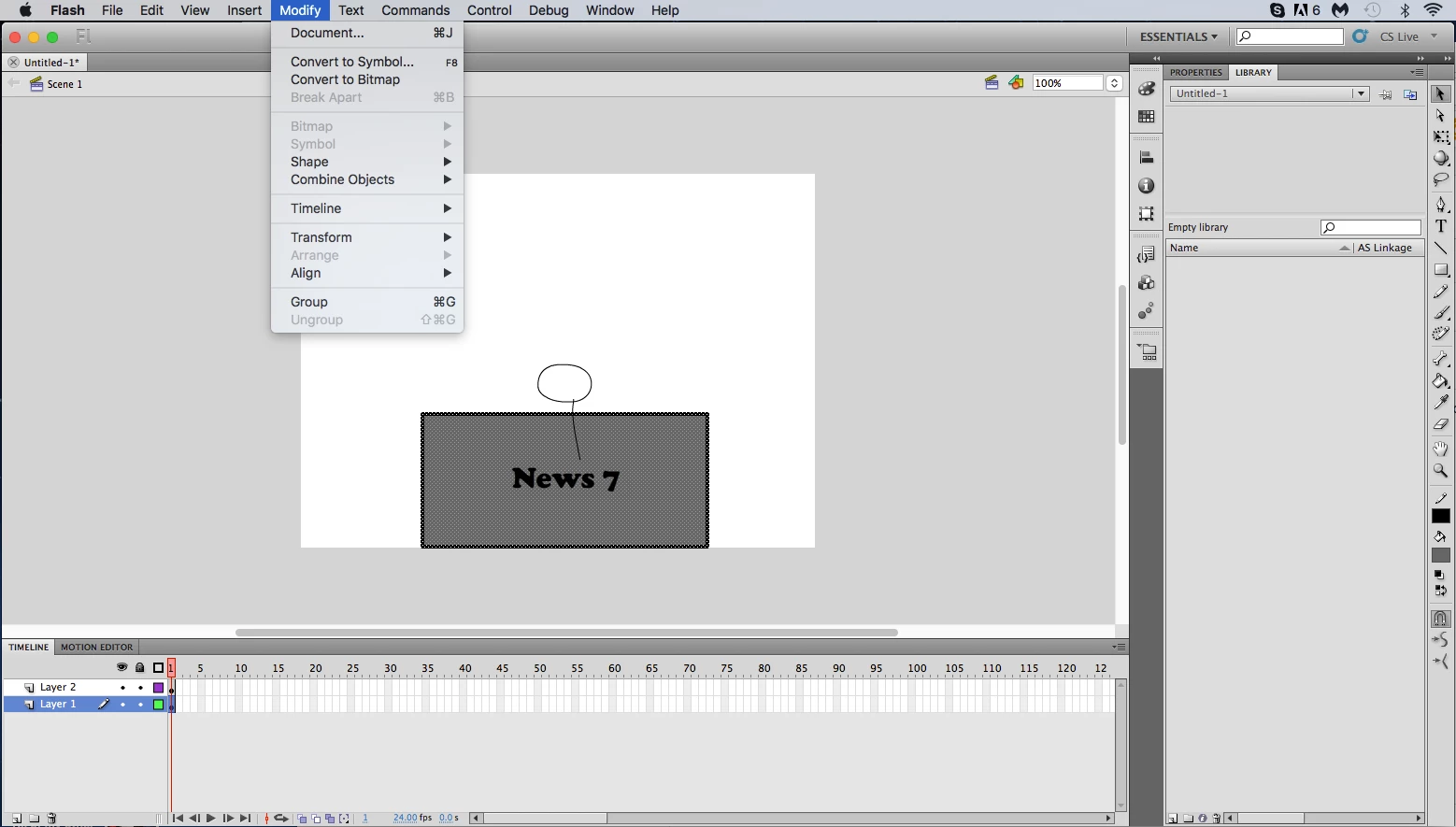
Hello! I'm just starting to learn flash, and i would like to bring a layer (the desk) to the foreground (front). however, when attempting to do this, the program will not let me, with the option greyed out. what am i doing wrong? (I am using flash CS5.5)
This topic has been closed for replies.
Correct answer kdmemory

That what I said about that raw shapes can't be Arranged was only meant for everything in one layer. When you have two or more layers, a layer is in vertical order always on top of another one being further down. No matter the layers contain raw shapes, groups, drawing objects or symbols.

So going back to your screenshot. When you want the rectangle (the desk) in front of all the other stuff, you have to move the Layer 1 vertically above Layer 2. By literally dragging Layer 1 ↑ up above Layer 2.

Klaus

2 replies

kdmemory
Inspiring
February 12, 2019

Hi

What you have selected here is a shape. You can't arrange a raw shape with i.e. Send Backward. First when you either group the shape (ctrl/cmd + g) or when you convert it into a symbol (Modify -> Convert to Symbol...) you will be able to use Arrange.

Klaus

imtryingtolearnflash
New Participant
February 12, 2019

thanks for replying, now i know to convert to symbols before i try to arrange. How would i make it so I can display one layer in front of or behind the other?

kdmemory
kdmemoryCorrect answer
Inspiring
February 12, 2019

That what I said about that raw shapes can't be Arranged was only meant for everything in one layer. When you have two or more layers, a layer is in vertical order always on top of another one being further down. No matter the layers contain raw shapes, groups, drawing objects or symbols.

So going back to your screenshot. When you want the rectangle (the desk) in front of all the other stuff, you have to move the Layer 1 vertically above Layer 2. By literally dragging Layer 1 ↑ up above Layer 2.

Klaus

Joseph Labrecque
Adobe Expert
February 12, 2019

You have 2 layers - arrange is for working the stack of objects within a single layer... so do you only have a single object within that layer?

imtryingtolearnflash
New Participant
February 12, 2019

i only have one object on each layer. How would i make it so I can display one layer in front of or behind the other one?