
Participant
February 16, 2020
Répondu

Path's are joining other parts of the same path if they overlap each other in animate

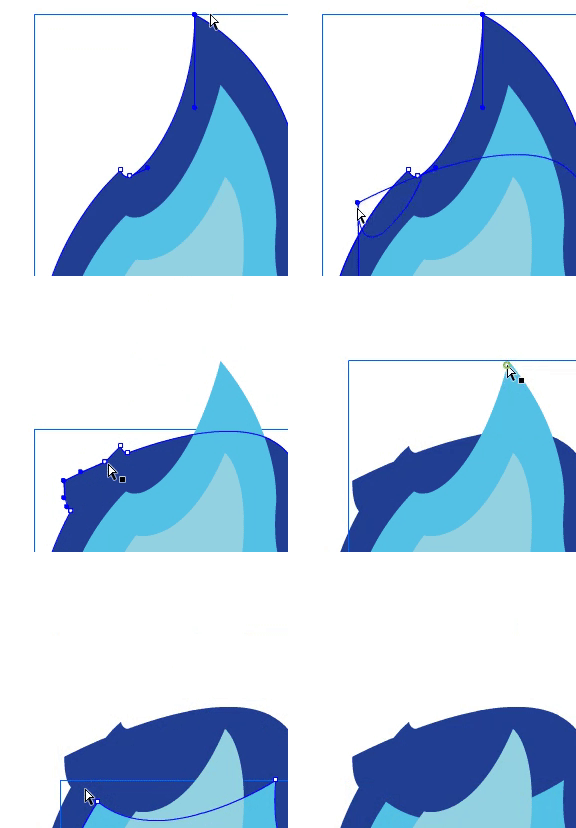
I'm new to Adobe animate and I'm trying to animate a .ai file by moving the anker points in a shape tween. If I cover another part of the same path, they will merge and I don't know why. Can I turn this option off somewhere? I don't want to merge them.
Ce sujet a été fermé aux réponses.
Meilleure réponse par thepixelsmith

The behavior demonstrated is called Merge Drawing mode and is the default way shapes are created in Animate.

There is also a mode called Object Drawing mode that allows shapes ot behave more like they do in Illustrator.

You can select an existing shape iwth the selection tool and choose Modify > Combine Objects > Union to convert an existing shape from Merge to Object mode. This should let it work the way you want.

Most of the drawing tools have a button a tthe top of the properties panel that lets you initially create teh shapes on Object Drawing mode.

2 commentaires

thepixelsmith
Community Expert
Community Expert
May 2, 2024

The behavior demonstrated is called Merge Drawing mode and is the default way shapes are created in Animate.

There is also a mode called Object Drawing mode that allows shapes ot behave more like they do in Illustrator.

You can select an existing shape iwth the selection tool and choose Modify > Combine Objects > Union to convert an existing shape from Merge to Object mode. This should let it work the way you want.

Most of the drawing tools have a button a tthe top of the properties panel that lets you initially create teh shapes on Object Drawing mode.

andrervieira
Participant
April 29, 2024

Can't find a solution for this!

n. tilcheff
Legend
April 30, 2024

Since what is demonstrated above is not a problem, there is no solution to be found.


Nick - Character Designer and Animator, Flash user since 1998 | Member of the Flanimate Power Tools team - extensions for character animation
andrervieira
Participant
April 30, 2024

Hi Nick,
That’s neither true nor helpful.

The fact that very other Adobe app behaves in a different way, should be enough to give the users the option to have the same workflow on Animate.

And it’s easily a problem:
You can imagine the example above as a character hair. If you wanted to animate it with the wind, and do that type of movement, grabbing the hair ‘tip’. You want to keep the shape path ‘live’ because you need to keep moving it. That auto merged intersection destroys the original shape and makes it unusable.


Similar situation happened to me while animating a letter drawing in, frame by frame, reusing the shape each new frame. Because the letter goes around and intersects itself, when the intersection happens it destroys the ‘tip’ of the shape and makes the workflow much harder.

I'm sure there's an option somewhere to disable that 'auto merge' behaviour, and I'm just not seeing it.

Anyone? 😄

Thanks