rogersub
Participating Frequently
January 4, 2018
Answered

Zooming and panning map in Animate CC movie html5 to Canvas

  • January 4, 2018
  • 11 replies
  • 14082 views

I need to create zoom and pan controls in an Adobe Animate CC movie html5 to Canvas (using .js) that operate similar to the controls that you see in Google Maps.

I have one layer with a movie symbol containing a vector map. In another layer I have the up, down, left, right, +, - buttons. I want to be able that on clicking the buttons the map pans around and zooms in and out.

Does anyone know which code I can use to do this using Adobe Animate CC?

Any examples or tutorials?

Many thanks in advance!

    This topic has been closed for replies.
    Correct answer JoãoCésar17023019

    UPDATE 4 (06/06/2022): here is a new link: https://bit.ly/3mfYFWz.


    UPDATE 3: If anyone is interested, here is an updated version of this map (http://bit.ly/2NBV82b ) with bounds checking and other improvements. Please change the 'this.map' property at the top of the code to change the behavior of the app.


    UPDATE 2 (2/12/19):

    - The Map instance is set to be cached as a bitmap in the Properties Panel. Please make sure to test your app with and without caching as bitmap for performance improvements or if you need to place buttons and animated Movie Clips inside of the map;

    - And if you're using a 2019 version, exporting the document as a texture (Publish Settings > Image Settings > Export document as texture) may give you even more performance.


    UPDATE 3 (2/18/19):

    - The drag area was being incorrectly calculated. The correct is to get the canvas size and divide by the stage scale;

    - The methods getBounds and getTransformedBounds will sometimes return null. So I replaced the last one by the nominalBounds property that Animate CC creates and then I multiplied the width and the height by the scaleX and scaleY of the map;

    - Did some other tweaks.


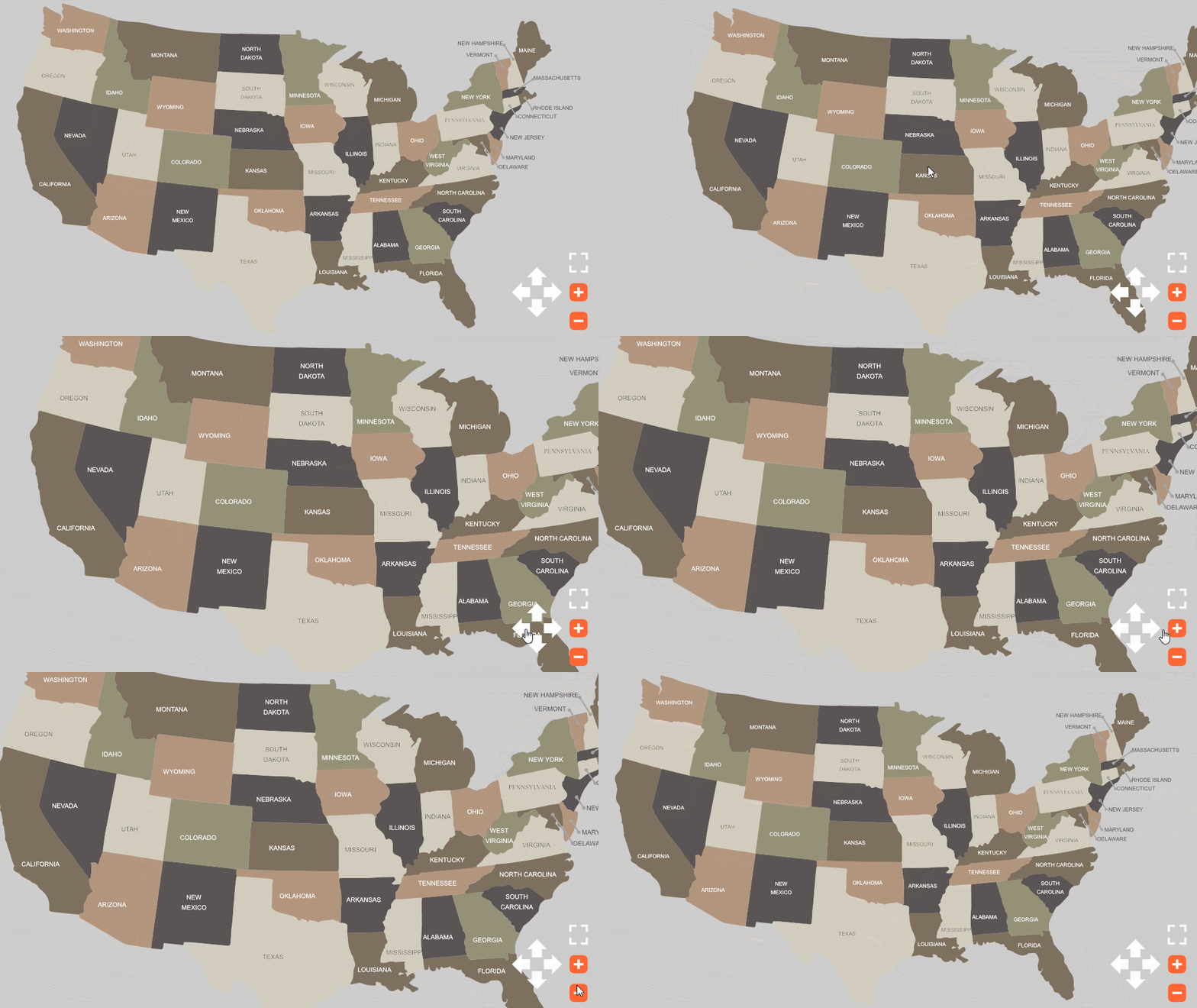
    Made this very simple demonstration. I hope it can help you. Notice you can drag the map and change the zoom with the mouse wheel.


    Download: animate_cc_html5_map_pan_and_zoom


    Code:

    var that = this;

    var clickedX;

    var clickedY;

    var isDragging = false;

    var friction = 0.85;

    var speedX = 0;

    var speedY = 0;

    var mapOriginalX = this.map.x;

    var mapOriginalY = this.map.y;

    var mapNudge = 5;

    var minScale = 0.25;

    var maxScale = 3;


    function onMouseWheel(e)

    {   

        var zoomFactor = e.detail / 30;   

        scaleMap(zoomFactor);   

    }


    function mouseDown(e)

    {

        clickedX = stage.mouseX;

        clickedY = stage.mouseY;

        isDragging = true;   

    }


    function stageMouseUp(e)

    {

        isDragging = false;

    }


    function update(e)

    {   

        if (isDragging)

        {

            speedX = stage.mouseX - clickedX;

            speedY = stage.mouseY - clickedY;

        }   


        speedX *= friction;

        speedY *= friction;


        that.map.x += speedX;

        that.map.y += speedY;


        clickedX = stage.mouseX;

        clickedY = stage.mouseY;

    }


    function resetMap()

    {

        that.map.x = mapOriginalX;

        that.map.y = mapOriginalY;

        that.map.scaleX = that.map.scaleY = 1;

    }


    function zoomMap(e)

    {

        if (e.currentTarget == that.plusButton)

            scaleMap(-0.1);

        if (e.currentTarget == that.minusButton)

            scaleMap(0.1);

    }


    function moveMap(e)

    {

        if (e.currentTarget == that.upButton)

            speedY -= mapNudge;

        else if (e.currentTarget == that.rightButton)

            speedX += mapNudge;

        else if (e.currentTarget == that.downButton)

            speedY += mapNudge;

        else if (e.currentTarget == that.leftButton)

            speedX -= mapNudge;

    }


    function scaleMap(amount)

    {

        var map = that.map;


        map.scaleX -= amount;

        map.scaleY = map.scaleX;


        if (map.scaleX < minScale)

            map.scaleX = map.scaleY = minScale;

        else if (map.scaleX > maxScale)

            map.scaleX = map.scaleY = maxScale;

    }


    // listeners

    this.map.on("mousedown", mouseDown.bind(this));

    this.resetButton.on("click", resetMap.bind(this));

    this.plusButton.on("click", zoomMap.bind(this));

    this.minusButton.on("click", zoomMap.bind(this));

    this.upButton.on("click", moveMap.bind(this));

    this.rightButton.on("click", moveMap.bind(this));

    this.downButton.on("click", moveMap.bind(this));

    this.leftButton.on("click", moveMap.bind(this));

    stage.on("stagemouseup", stageMouseUp.bind(this));

    document.getElementById('canvas').addEventListener('mousewheel', onMouseWheel.bind(this));

    document.getElementById('canvas').addEventListener('DOMMouseScroll', onMouseWheel.bind(this));

    createjs.Ticker.addEventListener("tick", update.bind(this));


    resetMap();


    Preview:
     

    Regards,

    JC

    11 replies

    ramóngarcía
    Participant
    February 22, 2023

    Hi JoãoCésar

    I have used your code for a diagram (it is like your map but with cables). It works perfect with the zooming and panning. 

    The problem it comes when I jump to another frame with a second diagram. The first one remains on top, and I don't know how to remove it.


    Thank you in advanced

    Ramón

    ramóngarcía
    Participant
    February 22, 2023

    I have solded now, Thank you anyway

    JoãoCésar17023019
    Community Expert
    Community Expert
    February 22, 2023

    Hi.


    I'm glad that you were able to solve the issue!

    Participant
    December 9, 2020

    Hello everyone and thanks to @JoãoCésar17023019 for the great example.

    I just recently found this map while working on a similar project.  So I downloaded and opened the file with adobe 2021 and published the html5. 

    I found out unfortunately that only mouse on wheel is working.  No signs of functioning from buttons and pan effects.

    I`m losing a bit my mind on reserching possible anwers or lines of code 🙂

    Is this related to the version of Animate or maybe the web browser? (tried on latest chrome, firefox, edge)


    Thanks in advance 

    shahriarq99529171
    Participant
    October 22, 2018

    Whenever I was trying to putting my map, it zoom and pan stop functioning. Is there any way that I can upload my own map and get url to specific area even though it is a movie clip?

    franciscog47374926
    Known Participant
    June 8, 2018

    Hi,

    I am also getting Uncaught TypeError: Cannot read property 'x' of undefined error when applying this code to my animation.

    that x refers to ..  var mapOriginalX = this.map.x; 

    any ideas..

    franciscog47374926
    Known Participant
    June 6, 2018

    Hi,

    I am also trying to figure out something about this great tool.

    So I have my stage and my stage has a header with a logo and a footer as well for the controls. The thing is that I would like the map always fill the whole stage area, meaning that the user is not supposed to be able to pull the map completely to a side and see the background image of the stage. No matter how much the user pans through the map, the sides of the map should always stick to the sides of the stage and don´t go any further.

    The first image is no good , and the second is good.

    Thanks,

    JoãoCésar17023019
    Community Expert
    Community Expert
    January 25, 2018

    Hi! Sorry for the long delay!

    Animate CC should take care of the published output automatically.

    See this (specifically in the Publishing animations to HTML5 section):

    Create HTML5 Canvas documents in Animate CC

    rogersub
    rogersubAuthor
    Participating Frequently
    January 25, 2018

    Hi all,

    I think the problem with blurry graphics is because when you pinch the map on an iphone you're zooming in the whole screen, not actually zooming in the map inside the Animate CC.

    In fact, on the html page, you should disable the capability to zoom the iphone screen by adding this on the <head>

    <meta name="viewport" content="width=device-width, initial-scale=1.0, maximum-scale=1.0, minimum-scale=1.0, user-scalable=no">

    Then, as it has been mentioned before, we need to find out the coding to use gestures in Animate CC and being able to zoom the map inside the Animate CC html5 canvas. I believe that will keep the graphics fine!!

    It has been said that by using hammer.js library it can be possible to develop the zoom and pan functions for the HTML5 canvas.

    Does anyone know how to develop this zooming and panning using hammer.js in Animate CC? Any examples?
    I think Joao was trying something.

    Participating Frequently
    January 25, 2018

    Thanks Roger,

    I think your right. I will try adding that line in the html

    JoãoCésar17023019
    Community Expert
    Community Expert
    January 22, 2018

    Sorry for the inconvenient!

    Please update the onMouseWheel function like this:

    function onMouseWheel(e)

    {

        var delta;


        if (e == window.event)

            delta = -10 / window.event.wheelDeltaY;

        else

            delta = e.detail / 30;


        var zoomFactor = delta;  

        scaleMap(zoomFactor);  

    }

    Now it should work.

    Please let me know.

    Regards,

    JC

    susiee7090075
    Inspiring
    January 23, 2018

    Hey Joao,

    I have another question. Removing the zoom option.

    When viewing the map in a mobile device the pop up card is very low res. I tried importing it as a svg and it still didn't make much of a difference. Would putting it into an iframe make a difference?

    JoãoCésar17023019
    Community Expert
    Community Expert
    January 25, 2018

    Are all your artworks in pure vector shapes and texts? I don't really remember.

    Inspiring
    January 22, 2018

    Crossbrowser issue with mouse wheel in sample. It is working in Firefox but do not in Chrome.

    gillesd83777795
    Participant
    January 22, 2018

    Hey guys,

    JoãoCésar​, just downloaded the files of susiee, tested it and my mouse wheele doesn't work. Too bad because that's the exact thing I need to make it work in my project... - i mean, create the possibility to zoom until a certain size in my canvas... can you please give me some advice, thanks !

    JoãoCésar17023019
    Community Expert
    JoãoCésar17023019Community ExpertCorrect answer
    Community Expert
    January 4, 2018

    UPDATE 4 (06/06/2022): here is a new link: https://bit.ly/3mfYFWz.


    UPDATE 3: If anyone is interested, here is an updated version of this map (http://bit.ly/2NBV82b ) with bounds checking and other improvements. Please change the 'this.map' property at the top of the code to change the behavior of the app.


    UPDATE 2 (2/12/19):

    - The Map instance is set to be cached as a bitmap in the Properties Panel. Please make sure to test your app with and without caching as bitmap for performance improvements or if you need to place buttons and animated Movie Clips inside of the map;

    - And if you're using a 2019 version, exporting the document as a texture (Publish Settings > Image Settings > Export document as texture) may give you even more performance.


    UPDATE 3 (2/18/19):

    - The drag area was being incorrectly calculated. The correct is to get the canvas size and divide by the stage scale;

    - The methods getBounds and getTransformedBounds will sometimes return null. So I replaced the last one by the nominalBounds property that Animate CC creates and then I multiplied the width and the height by the scaleX and scaleY of the map;

    - Did some other tweaks.


    Made this very simple demonstration. I hope it can help you. Notice you can drag the map and change the zoom with the mouse wheel.


    Download: animate_cc_html5_map_pan_and_zoom


    Code:

    var that = this;

    var clickedX;

    var clickedY;

    var isDragging = false;

    var friction = 0.85;

    var speedX = 0;

    var speedY = 0;

    var mapOriginalX = this.map.x;

    var mapOriginalY = this.map.y;

    var mapNudge = 5;

    var minScale = 0.25;

    var maxScale = 3;


    function onMouseWheel(e)

    {   

        var zoomFactor = e.detail / 30;   

        scaleMap(zoomFactor);   

    }


    function mouseDown(e)

    {

        clickedX = stage.mouseX;

        clickedY = stage.mouseY;

        isDragging = true;   

    }


    function stageMouseUp(e)

    {

        isDragging = false;

    }


    function update(e)

    {   

        if (isDragging)

        {

            speedX = stage.mouseX - clickedX;

            speedY = stage.mouseY - clickedY;

        }   


        speedX *= friction;

        speedY *= friction;


        that.map.x += speedX;

        that.map.y += speedY;


        clickedX = stage.mouseX;

        clickedY = stage.mouseY;

    }


    function resetMap()

    {

        that.map.x = mapOriginalX;

        that.map.y = mapOriginalY;

        that.map.scaleX = that.map.scaleY = 1;

    }


    function zoomMap(e)

    {

        if (e.currentTarget == that.plusButton)

            scaleMap(-0.1);

        if (e.currentTarget == that.minusButton)

            scaleMap(0.1);

    }


    function moveMap(e)

    {

        if (e.currentTarget == that.upButton)

            speedY -= mapNudge;

        else if (e.currentTarget == that.rightButton)

            speedX += mapNudge;

        else if (e.currentTarget == that.downButton)

            speedY += mapNudge;

        else if (e.currentTarget == that.leftButton)

            speedX -= mapNudge;

    }


    function scaleMap(amount)

    {

        var map = that.map;


        map.scaleX -= amount;

        map.scaleY = map.scaleX;


        if (map.scaleX < minScale)

            map.scaleX = map.scaleY = minScale;

        else if (map.scaleX > maxScale)

            map.scaleX = map.scaleY = maxScale;

    }


    // listeners

    this.map.on("mousedown", mouseDown.bind(this));

    this.resetButton.on("click", resetMap.bind(this));

    this.plusButton.on("click", zoomMap.bind(this));

    this.minusButton.on("click", zoomMap.bind(this));

    this.upButton.on("click", moveMap.bind(this));

    this.rightButton.on("click", moveMap.bind(this));

    this.downButton.on("click", moveMap.bind(this));

    this.leftButton.on("click", moveMap.bind(this));

    stage.on("stagemouseup", stageMouseUp.bind(this));

    document.getElementById('canvas').addEventListener('mousewheel', onMouseWheel.bind(this));

    document.getElementById('canvas').addEventListener('DOMMouseScroll', onMouseWheel.bind(this));

    createjs.Ticker.addEventListener("tick", update.bind(this));


    resetMap();


    Preview:


    Regards,

    JC

    rogersub
    rogersubAuthor
    Participating Frequently
    January 5, 2018

    Thank you very much JoãoCésar. This is exactly what I needed!

    JoãoCésar17023019
    Community Expert
    Community Expert
    January 5, 2018

    Excellent! You're welcome!
