


Audio error in Audition

Copy link to clipboard
Copied
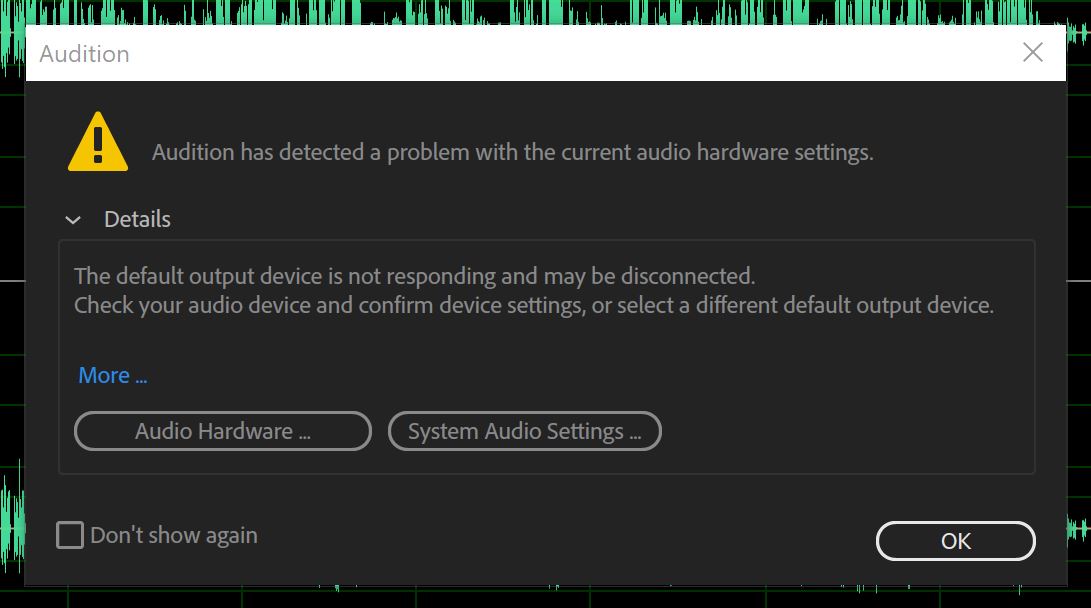
Please help, I cannot figure out why this error is popping up. Music plays from my laptop speakers just not through audition.


 3
Replies
3
3
Replies
3


Copy link to clipboard
Copied
Have you tried clicking on the Audio Hardware option and finding out what's disconnected? If you've been using another app for playing audio and you haven't closed it, this is exactly what will happen - you need all other audio-playing apps closed before Audition can access your sound device. Similarly, you'd find that if you were playing something in Audition, the chances are that the other app wouldn't work, for exactly the same reason.
Copy link to clipboard
Copied
Hi SteveG - when I click the Audio Hardware option it tells me that the built-in speakers in my laptop are not connected. I was on the phone with microsoft for about 2 hours last night and they confirmed that it was an adobe audition issue. I can play music on my laptop and other mp3 files. The temporary solution was I "deactivated" the speakers and put in a headset. I will definitely be contacting adobe again to do a screenshare so they can see the issue I'm facing.
Copy link to clipboard
Copied
ste10399671 wrote
I was on the phone with microsoft for about 2 hours last night and they confirmed that it was an adobe audition issue.
That's how they get you off the phone... actually it's 100% their fault - all to do with active socket sensing, by the sound of it. Make sure that Audition's the only thing running, reduce the Windows volume control to zero and bring it back up again - that often works. It's got to be their fault; they're the ones providing the audio interface software!

Get ready! An upgraded Adobe Community experience is coming in January.
Learn more
 AdChoices