


New Participant
November 3, 2019
Answered

Exporting different tracks in mixdown as separate files

  • November 3, 2019
  • 3 replies
  • 12504 views

Hey Adobe Support Community,


I have one audio file with 20 different tracks, which I opened an empty stereo session for. I separated the different sections into tracks 1-20, but there is no option that I can find that allows me to export those tracks as separate mp3 or aac files. Maybe I am just missing something in plain sight, but if you could help me with this issue, that would be great!


NOTE: I want to export the files as mp3, highest quality possible.
This topic has been closed for replies.
Correct answer SteveG_AudioMasters_

Tracks in Audition can be separated and mixed down, but I suspect that's not what you mean by tracks...


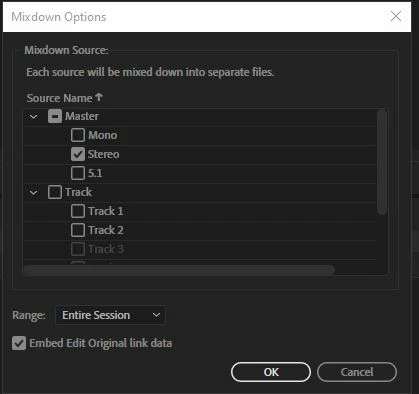
If you import a single file into a track on Audition and split it up, then what you have is clips on a track - not tracks; tracks stack vertically, not horizontally. But if you have actually split this file into clips, then all you need to do is grab each one and put it onto a track of its own. Then, when you go to Export.Mixdown>Entire selection, you get some options. In Format Setup, you can select the file type, and in Mixdown Options,  you get a display like this:

 ...where you can select the tracks you want to export. If you select the appropriate ones, they'll all be mixed down to separate files.

3 replies

New Participant
March 18, 2024

The mixdown option to export all tracks separately is what I am looking for - the issue is that the effects on the Master channel are not exported per track.

I have many tracks with the exact same effects applied. Instead of applying the effects to each track individually I have them only applied to the master output mix. 


When exporting each track individually (soloing the track, then exporting) - the master mix effects are applied to the export.

When exporting all the tracks using the mixdown option the master mix effects are not applied.


So how do I export many tracks in one go with the master mix effects being applied?

Thank you!

SteveG_AudioMasters_
Community Expert
March 18, 2024

We're not absolutely sure, but something similar has been reported recently relating to effects not being applied at mixdown, so it may be a bug.

November 14, 2019

thankx for sharing with us

SteveG_AudioMasters_
SteveG_AudioMasters_Correct answer
Community Expert
November 3, 2019

Tracks in Audition can be separated and mixed down, but I suspect that's not what you mean by tracks...


If you import a single file into a track on Audition and split it up, then what you have is clips on a track - not tracks; tracks stack vertically, not horizontally. But if you have actually split this file into clips, then all you need to do is grab each one and put it onto a track of its own. Then, when you go to Export.Mixdown>Entire selection, you get some options. In Format Setup, you can select the file type, and in Mixdown Options,  you get a display like this:

 ...where you can select the tracks you want to export. If you select the appropriate ones, they'll all be mixed down to separate files.

New Participant
November 5, 2019

Thanks so much! That is exactly what I was looking for and helped a ton. Have a great week!