
elfim77783075
Participating Frequently
July 22, 2019
Answered

Extracting channels from a multi-channel recording

  • July 22, 2019
  • 2 replies
  • 4670 views

Can anyone help me? I have recorded eight soundtracks in the original but only need two for further processing. How do I delete the remaining six tracks along with the recordings and save it as a Wav file in Adobe waveform? Best regards, Lilly

[Mod note; title changed to make searching easier]
    This topic has been closed for replies.
    Correct answer SteveG_AudioMasters_

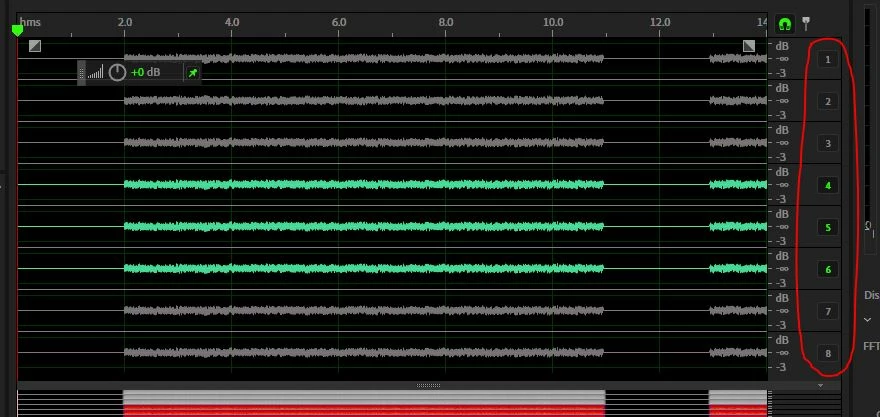
    This is simple. Assuming that you don't want to lose the original (you don't!), then use the active channel selectors at the RHS of each track to turn off all of the channels you don't want. Now Select All, Copy to New, and save the result. You will have just the three channels in the resulting file. Looks like this:

    2 replies

    Mike Russell
    Inspiring
    July 30, 2019

    The quickest way to do this is to pop down the little triangle (next to the file) in the Files window. Then right click on the track you wish to extract and click Extract Channels to Mono Files. You can hold down Ctrl/Cmd and select multiple channels if you like too.

    See this screen shot for a visual explanation:

    SteveG_AudioMasters_
    Community Expert
    Community Expert
    July 30, 2019

    https://forums.adobe.com/people/Mike+Russell  wrote

    The quickest way to do this is to pop down the little triangle (next to the file) in the Files window. Then right click on the track you wish to extract and click Extract Channels to Mono Files. You can hold down Ctrl/Cmd and select multiple channels if you like too.

    Fine, except that isn't what the OP wanted to do. She said "How do I delete the remaining six tracks along with the recordings and save it as a Wav file in Adobe waveform?"

    Mike Russell
    Inspiring
    July 31, 2019

    Thanks Steve! I was adding some thoughts based on the topic title however it looks like this topic is already covered well

    ryclark
    Participating Frequently
    July 22, 2019

    First a couple of questions. Are the wanted audio tracks recorded as stereo and is there any audio recorded on the tracks that you don't want to keep?

    There are also several ways to do what you want depending on your answers to the above.

    elfim77783075
    Participating Frequently
    July 22, 2019

    Dear ryclark,

    The 9 Channels are POLY WAV Mono. I need only 3 Chanels for the speech. The rest I’ll delete. I will do it in Audition Wellenform and save it as WAV, not as sexs.

    Xox,

    Lilly

    Am 22.07.2019 um 23:55 schrieb ryclark <forums_noreply@adobe.com>:

    Replies to this message go to everyone subscribed to this thread, not directly to the person who posted the message. To post a reply, either reply to this email or visit the message page: [https://forums.adobe.com/message/11178799#11178799 <https://forums.adobe.com/message/11178799#11178799>]

    Please note that the Adobe Forums do not accept email attachments. If you want to embed an image in your message please visit the thread in the forum and click the camera icon: https://forums.adobe.com/message/11178799#11178799 <https://forums.adobe.com/message/11178799#11178799>

    To unsubscribe from this thread, please visit the message page at [https://forums.adobe.com/message/11178799#11178799 <https://forums.adobe.com/message/11178799#11178799>], click "Following" at the top right, & "Stop Following"

    Start a new discussion in Audition by email <mailto:discussions-community-audition@adobe-v8.hosted.jivesoftware.com> or at Adobe Community <https://forums.adobe.com/choose-container.jspa?contentType=1&containerType=14&container=3371>

    For more information about maintaining your forum email notifications please go to https://forums.adobe.com/thread/1516624 <https://forums.adobe.com/thread/1516624>.

    elfim77783075
    Participating Frequently
    July 24, 2019

    I'm not entirely clear about what you're asking. But if you have bad recordings made with a wireless mic, then it's not going to be possible to tell you whether they can be corrected at all without actually hearing the recording. Generally radio mic faults are very difficult to correct, though. Especially breaking up in the transmission path...


    Dear Jive,

    The recording with the Lectrosonic and the dpa microphone has too many low frequencies and too few high frequencies. The man's voice sounds too dull. I think you can edit it in Audition, but you don't know how.

    xox,

    Lilly

    Am 24.07.2019 um 16:37 schrieb SteveG(AudioMasters) <forums_noreply@adobe.com>:

    I'm not entirely clear about what you're asking. But if you have bad recordings made with a wireless mic, then it's not going to be possible to tell you whether they can be corrected at all without actually hearing the recording. Generally radio mic faults are very difficult to correct, though. Especially breaking up in the transmission path...