


- Home
- Audition
- Discussions
- Re: Help restrict pitch shift to certain range?
- Re: Help restrict pitch shift to certain range?
Help restrict pitch shift to certain range?

Copy link to clipboard
Copied
Hello, everyone,
Audition CC user here. I am trying to figure out this pitch shift functionality and I can’t achieve what I need. I have multiple notes playing at the same time in the sound file, and I need to change pitch of only one of them. So my graph looks like this:
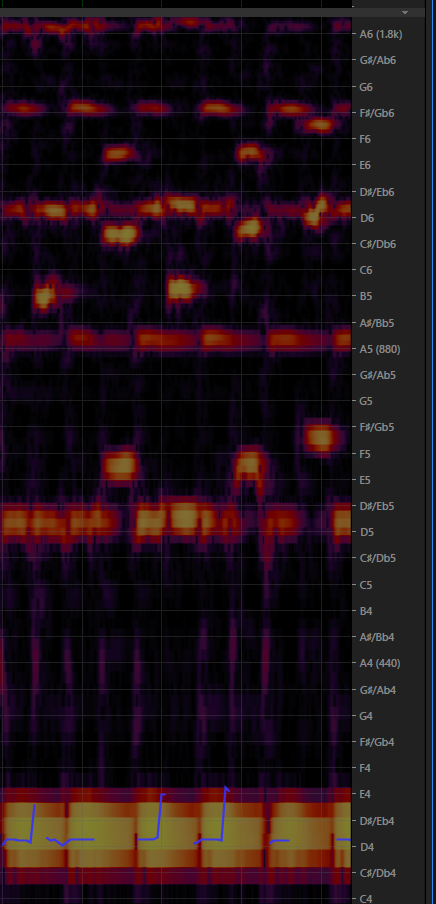
If I make a selection of some range and apply pitch shift, it will shift both the lower, the medium, and the higher pitches, but I need to just shift this way:
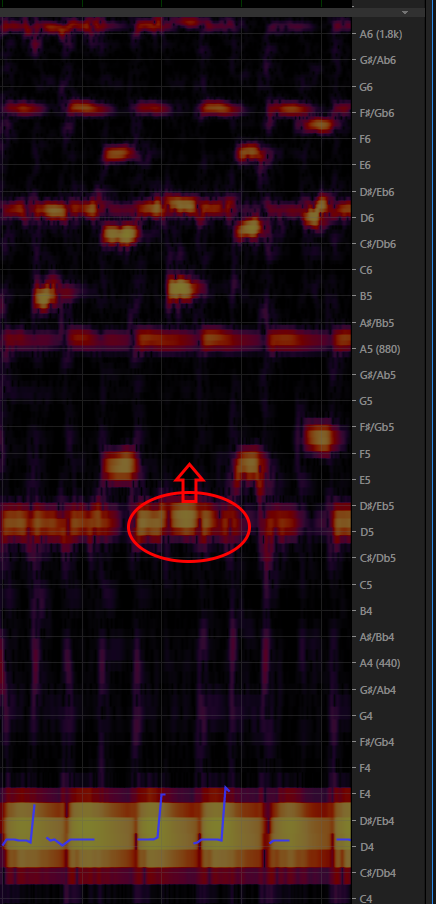
How can I achieve this? Would the SDK allow me to build a plugin that can help get this?


 4
Replies
4
4
Replies
4


Copy link to clipboard
Copied
This is quite a complex thing you're trying to do - you've only selected the fundamental of the note you want to move - what are you going to do about the harmonics?
Fortunately there is a solution, but it's not contained within Audition (unfortunately). It's called Melodyne, but I don't think it's available as a plugin. It's designed to do what you want, and if there's any doubt, a trial version is available. Whether the cheapest version is adequate, I don't know - but the mid-range version certainly will be. You can find out more here: Melodyne

Copy link to clipboard
Copied
I know of no way to do this in Audition.
The only software I know that can do this successfully is Melodyne from Celemony. http://www.celemony.com/en/start?id=home
It is not cheap but does include, in all versions from Editor upwards, a facility called DNA which allows you to do exactly what you are wanting to do, select one note and change its pitch. (That is not just restating what the makers claim, I have actually used it to correct an error by the bass player in a direct-to-stereo file, without affecting any other notes which were sounding at the same time.)
UPDATE: I see SteveG beat me to it but to answer one question he poses: Melodyne CAN run as a plug-in within AA (I have CS6) but it does not always want to do so! I've never been able to track down why or why not.

Copy link to clipboard
Copied
As the others have said it may not work just re-pitching those few notes if there are harmonics involved. However I have done it reasonably successfully in a multipart choral work where one part had the odd note out of tune. There was so much else going on that the incorrect harmonics weren't really discernible once I had shifted the pitch of the fundamental.
However you can't do it in the Spectral Pitch display. You have to go to the Spectral Frequency display to be able to use the one of the various Brush tools to select the notes that you want to pitch shift. You can change the right hand frequency scale to Notes instead of Frequency. It will also help if you have placed Markers on either side of the bum notes when still in Spectral Pitch mode. You will have to do a certain amount of zooming in on both the time and frequency axis to identify the correct notes to select. Then you should be able to just select the notes you want and shift the pitch to where you need it to be.
Give it a try. It may work sufficiently for your purpose if you experiment a bit. But there are no guarantees.
Copy link to clipboard
Copied
Thanks, I will try doing that right away.

Get ready! An upgraded Adobe Community experience is coming in January.
Learn more
 AdChoices