Known Participant
September 9, 2018
해결됨

How do I improve the sound of my spoken voice in Audition CC? (Still confused...)

  • September 9, 2018
  • 3 답변들
  • 27693 조회

Hello everybody,

I have spend basically the whole day watching tutorials on Youtube and trying to understand how to use Audition CC to improve my voice in a few Youtube videos I am recording (speech, not music). I am more confused than ever. There is so much to adjust, and in most tutorials, they just say that the setting are different for every voice and tell me to play around with the settings until it sounds good.

For example, in "parametric equalizer" how am I supposed to know which dot I need to move where?

Or in graphic euqualizer, I have 10,20 or 30 bands (since this is what they are apparently called?)  which I can move around, and there is no tutorial that tells me what each single one means and how to adjust them to fit my voice!

Also, what the is this "FFT" that I am supposed to adjust when using noise reduction?

And so on, and so on! There is just a solid lack of high-quality information on the internet explaining everything, and I don't want to just copy some settings from a Youtube video without a clue what they mean.

Does somebody have advice on how to use Audition CC to improve the sound of my recorded voice? (I am using the Rode Videomic pro+)

Or can somebody recommend a good tutorial /book /online-class /anything that will teach me all these things?

I appreciate any help!

이 주제는 답변이 닫혔습니다.
최고의 답변: SteveG_AudioMasters_

Thanks everyone for the answers!

SteveG(AudioMasters)  wrote

ryclark   wrote

However I do find his delivery a bit annoying and couldn't watch all the tutorial.

For some strange reason he seems to think that he sounds good...

I totally agree. To me, the guy in that video sounds like kermit the frog, to be honest. 

Here is a link to a short audio sample of what I am doing:

audio sample for forum.mp4 - Google Drive

I have already done quite a bit work on my voice to minimize my German accent and to make it sound better, though I realize I still sound far from good.

My questions is what I can do to make it sound better in post production. I realize I can probably do little about the accent there, but maybe there are still ways to make it sound better, clearer, more "professional"? I just didn't find any of the Youtube tutorials very satisfying because they do not explain their settings in detail.


Let's start with just your recording - there's a lot of room tone in it, and that really doesn't help. Also there's not too much clarity, especially in the HF, although there's no real 'gravitas' either, as the bass end is also quite restricted. Just listening to it on this laptop using a pair of headphones (Beyers, which are pretty good for speech), I tried EQing the file a bit to see how much of this I could compensate for, and to a first approximation, I did this:
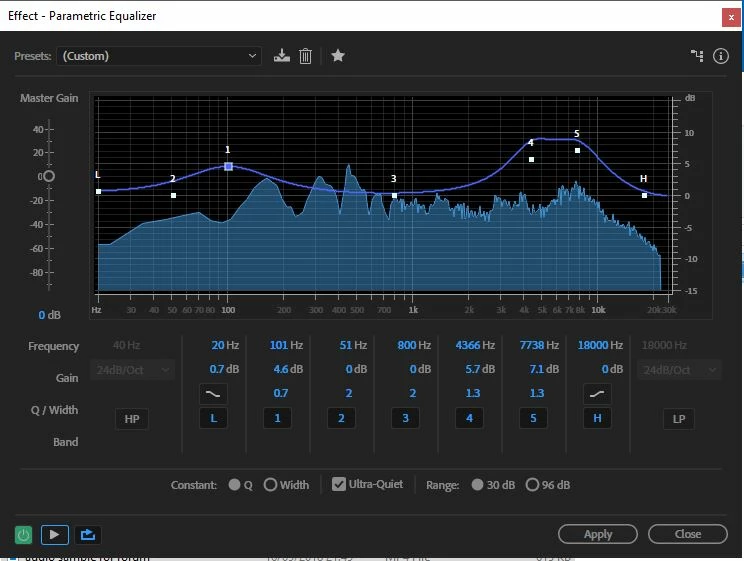
The HF boost is pretty vicious, but it does actually improve the clarity quite a bit. Most of the clarity of speech comes from the response in the 4-8kHz region, and there's definitely a suck-out in your original:
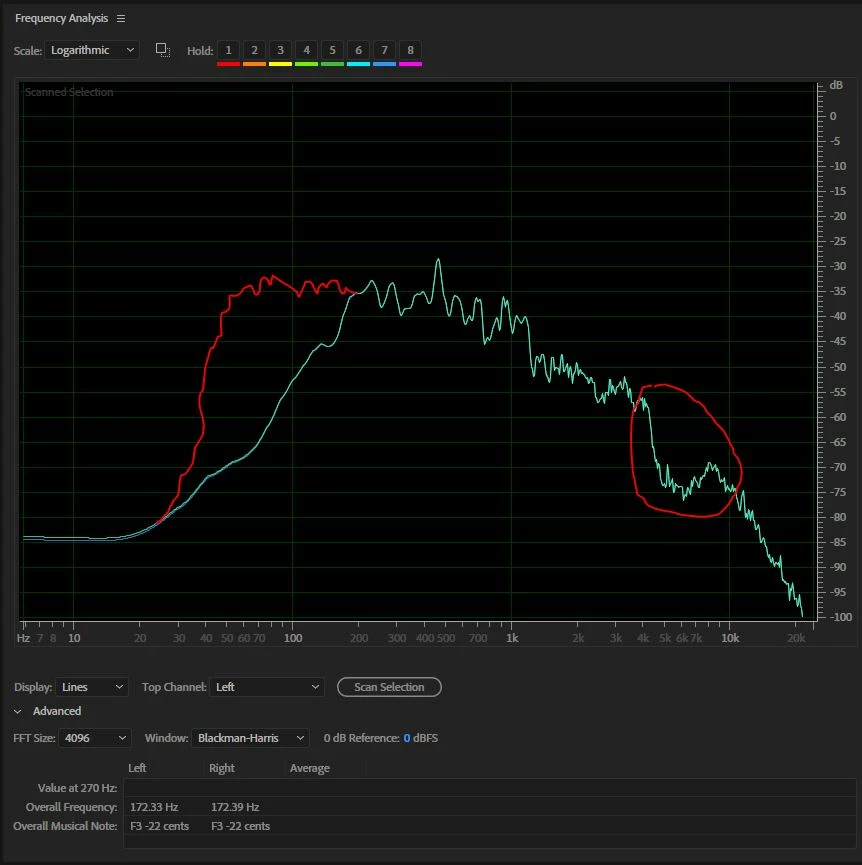
This is the overall response of your audio. The region I've ringed is the suck-out (the response should follow down smoothly), and the red line represents a better response for the bass, but since that's really missing in your recording, you can't really fix that very much.

Which brings me to the rest of it. Firstly you need a better mic, and to get a sensible distance from it in a room that doesn't echo anything like as much as yours does! That will make a significant difference to the clarity. We could talk a bit more about that if you can describe exactly your recording situation.

The second thing I have to mention about clarity is important; you need to speak more slowly! What you need to do is to concentrate on saying the ends of words - this is where you're really rushing. Concentrating on articulating those correctly will slow you down slightly. but that will be a good thing for another reason...

What you have to bear in mind about speech is that people can only assimilate and understand what you're saying in the pauses between sentences; whatever you do, don't crush them all together, or people will just switch off. Don't worry about your accent - that's not actually an issue, believe it or not!

There's nothing you can't fix here, but you'll need to attend to all of it to achieve your goal, I'm afraid. As I said, start by telling us about how you've actually recorded this...


3 답변

MikeEsholt
Participant
September 19, 2018

The problem you have is not your gear, it’s the room.

Whatever mic mic you have you need the sound of your voice to be significantly louder than the reflections coming in from your surroundings. That why you can reduce the background sounds.

The videomic should be fine, but you need it up close  - at least as close as you can with the video. However you need to do whatever you can to deaden the room or go find somewhere else to record.

Another mic may help, but could create new problems as the root problem isn’t addressed.

where do you intend to show this video?

SteveG_AudioMasters_
Community Expert
Community Expert
September 19, 2018

miket61732453  wrote


The videomic should be fine, but you need it up close  - at least as close as you can with the video.

The problem you have is not your gear, it’s the room.

Actually it's both. The videomic is very well suited to picking up distant sounds in a room - the reflections from the walls - and those are the ones that are colouring the speech. But the videomic is specifically designed not to be used close-up - that's what the OP did originally, and what produces the unacceptable sound.

Yes the room needs treating (or not using) but to get a decent result, the videomic is not the one to use.

Sky24작성자
Known Participant
September 20, 2018

I found where to buy it and ordered the Tram TR-50 along with an audio interface (Presonus AudioBox iTwo) and will upload a new audio sample when ready. 

MikeEsholt
Participant
September 17, 2018

To dampen down the reflections you need something heavier. Cotton and paper won't cut it.  Blankets, duvet, coats - The recording sounds like you're in a shower. If you are in a bedroom, record with your wardrobe door open and you facing it. Hang a blanket behind you. Get under a duvet. Some people use cat beds to 'get in'. There are lots of options.

Get in closer to the mic - about a fist away, but keep the mic about 45 degrees to your mouth to minimise pops.

Speaker slower and make each word more defined, Try to reduce your accent.

Get the recording as good as you can and then compress and EQ - there are lots of video instructions on YouTube.

The VideoMic Pro= is a good mic - if you need something to sit on top of a videocamera and get general ambiance - Not the first choice for speech - you would do better with a dynamic mic like a Shure SM58a or similar if budget is a constraint.

SteveG_AudioMasters_
Community Expert
Community Expert
September 17, 2018

miket61732453  wrote

To dampen down the reflections you need something heavier. Cotton and paper won't cut it.  Blankets, duvet, coats - The recording sounds like you're in a shower. If you are in a bedroom, record with your wardrobe door open and you facing it. Hang a blanket behind you. Get under a duvet. Some people use cat beds to 'get in'. There are lots of options.

If you are going to hang anything on the wall, then leave a gap between it and the wall of about 15cm - this will make it a lot more efficient as an absorber. even cotton sheets work better like this (although not a lot, admittedly) but with any other heavier drape it will. The reason for this is simple; sound gets absorbed to an extent by the front of it, but a lot of it gets transmitted through, which then hits the wall and is reflected back into the room. The first thing it hits though is the back of your drape, so the transmission is once again reduced. If you have the drape any closer to the wall, then there won't be sufficient room for half a wavelength of the sounds you can affect like this to develop - and without that happening, you don't get the benefit of the return path attenuation, as you'll be within the pressure wave distance. With a 15cm gap, this can be effective down to about 1kHz. It will do nothing for bass frequencies though - that costs a lot to fix.

Get in closer to the mic - about a fist away, but keep the mic about 45 degrees to your mouth to minimise pops.

Er, no. Not with any line gradient mic! For a start, it's directional. If you speak at 45 degrees to it, you will only be exciting the line tube, whose sole purpose is to provide cancellation effects. So whatever you record like that is inevitably going to sound dreadful. In fact, the news that it's a line gradient mic explains very nicely why there's a suck-out in the response. And with almost any mic, a fist away is too close; popping is almost inevitable unless it's a good omni at LF, when you might get away with it... 15-20cm is much more like it if you want a relatively flat response from any sort of pressure gradient mic, which most are unless you pay a lot for them.

Sky24작성자
Known Participant
September 17, 2018

SteveG(AudioMasters)  wrote

miket61732453   wrote

Get in closer to the mic - about a fist away, but keep the mic about 45 degrees to your mouth to minimise pops.

Er, no. Not with any line gradient mic! For a start, it's directional. If you speak at 45 degrees to it, you will only be exciting the line tube, whose sole purpose is to provide cancellation effects. So whatever you record like that is inevitably going to sound dreadful. In fact, the news that it's a line gradient mic explains very nicely why there's a suck-out in the response. And with almost any mic, a fist away is too close; popping is almost inevitable unless it's a good omni at LF, when you might get away with it... 15-20cm is much more like it if you want a relatively flat response from any sort of pressure gradient mic, which most are unless you pay a lot for them.

Yes,  45 degree was exactly what I was doing, so that makes sense. Do you think I should keep the Rode shotgun, or is there something else around this budget that you would recommend?

MikeEsholt
Participant
September 9, 2018
ryclark
Participating Frequently
September 9, 2018

This one may be a bit better for your usage. HOW TO MAKE YOUR VOICE SOUND PERFECT FOR VIDEO | AUDITION CC TUTORIAL - YouTube . However I do find his delivery a bit annoying and couldn't watch all the tutorial.

SteveG_AudioMasters_
Community Expert
Community Expert
September 9, 2018

ryclark  wrote

However I do find his delivery a bit annoying and couldn't watch all the tutorial.

For some strange reason he seems to think that he sounds good...

And as we've said before, the real starting place for sounding good has nothing to do with recording. You need to learn to use your voice effectively - so that's breathing, learning to articulate effectively and all of that sort of stuff. Also, in that video he didn't mention anywhere what it is you have to do to learn to modify this effectively (here's a clue - it involves using headphones...). And I think he's gone a bit mad with the compression, too - there's no blanket approach to this, whatever he thinks. And as for using two different sorts of EQ - quite frankly there's no point; parametric EQ just sounds better at both ends of the spectrum. I've never used that 20 or 30 band graphic thingy for anything, mainly because of the alarming phase distortion it's capable of introducing,

To the OP: the chances are that unless you get a bit of impartial feedback about what you're doing, you'll never really learn what's 'good' or 'bad' about your voice. Apart from anything else, you're far too familiar with it, and what it sounds like to you. And this isn't how others hear it - your version is picked up as much inside your head as outside it. Also, unless you have a pair of decent speakers to listen to the result on, all the adjustments you make are likely to be a bit moot. Most of what you need to do has to come from within you, not a load of processing.

Why not post us an example, tell us what you think might be wrong with it, and we might be able to give you a little more advice?
