


Measuring impulse response

Copy link to clipboard
Copied
I need to measure impulse response for some electronics. Problem 1 is coming up with the impulse stimulus file--that's all I need right now. A proper digital impulse, should have a single bit--right?--with silence before and after. Sounds simple, but I can't figure it out. I can easily delete all but one sample, but then there's no silence. If I use the "silence" feature, Audition appears to do some sort of convolution--anyway, things get rounded off and I end up with many more non-zero samples than I want.
An alternative would be access to .wave files with the properties I want--a single bit, silence before and after, at several sampling frequencies.
Once I've got the file, making the measurement should be easy. Can anyone help with either of these approaches?
Thanks.
Jim


 6
Replies
6
6
Replies
6



Copy link to clipboard
Copied
Jim wrote
A proper digital impulse, should have a single bit--right?--with silence before and after.
Don't you mean a single sample of, say, 16 bits? A single bit wouldn't have any useful energy. But even so there will tend to some rounding of the edges due to any D/A conversion. But when you use Silence to remove samples if you don't have the default Crossfade Edits or Deletion turned off in Preferences then, yes, you will get lots of non zero samples before and after due to the crossfading time.
However it is probably best to wait until Steve G comes along since he is the expert at this sort of thing. 
Copy link to clipboard
Copied
Thanks, yes I should have written sample, not bit. I haven't disabled any defaults, so I'll try your suggestions. I'm fully expecting the DA converter to cause some rounding/ringing; that's just what I'm trying to measure.
BTW, I did finally manage (I think) to set all but one samples to zero--but even then the trace "rung", reflecting, I guess, the limited bandwidth. (Unfortunately, when I used that single-sample file to attempt a measurement, I couldn't find anything in the output at all, except the baseline noise.)
jca


Copy link to clipboard
Copied
Can of worms, this! I think you'll have to define exactly what it is you want to do, as there are a lot of different impulses available, and some are easier to generate than others. But...
...to get anywhere with this at all, generally you need a playback device with a high sample rate, as the rise-time of your impulse is limited to the Nyquist frequency of the sample rate you use. And for most testing of electronic devices, I'd say that this simply isn't good enough, by a country mile. And the same goes for measuring it; unless it's a really crude bit of electronics, it will defeat most sound devices in this regard from the word go.
Let's put it like this: If you sample at 96k, then the bandwidth of the device you're doing the measurement with will be 48kHz tops. If you provide an electronic impulse like a square wave, and just measure the flatness of the top of it with a basic oscilloscope, you'll have a bandwidth of several MHz, and a much clearer idea of what your electronics is doing at its transition point than you'll ever get from the sound device approach. In an ideal world, you need a source of impulses and a measuring device that performs an order of magnitude better than the thing you're trying to measure, or you're not really measuring anything at all!
https://forums.adobe.com/people/james+ca60449927 wrote
BTW, I did finally manage (I think) to set all but one samples to zero--but even then the trace "rung", reflecting, I guess, the limited bandwidth. (Unfortunately, when I used that single-sample file to attempt a measurement, I couldn't find anything in the output at all, except the baseline noise.)
You can't generate impulses like that at all - they will all ring! You have to set up the transition so that it doesn't attempt to exceed the Nyquist frequency, otherwise the anti-aliasing filter will reject it, with exactly the results you've got. This means that you simply can't do a jump from 0 to 1; your pulse has to have a finite rise time and settling time at the top. or it will overshoot everywhere.
Copy link to clipboard
Copied
SteveG(AudioMasters) wrote
https://forums.adobe.com/people/james+ca60449927 wrote
BTW, I did finally manage (I think) to set all but one samples to zero--but even then the trace "rung", reflecting, I guess, the limited bandwidth. (Unfortunately, when I used that single-sample file to attempt a measurement, I couldn't find anything in the output at all, except the baseline noise.)
You can't generate impulses like that at all - they will all ring! You have to set up the transition so that it doesn't attempt to exceed the Nyquist frequency, otherwise the anti-aliasing filter will reject it, with exactly the results you've got. This means that you simply can't do a jump from 0 to 1; your pulse has to have a finite rise time and settling time at the top. or it will overshoot everywhere.
Actually you can, and I just did. That's what an impulse is--it's the narrowest possible pulse, which is one sample. My goal is precisely to figure out how DACs respond to it. It's a pretty standard test, because DACs are designed in different ways, with different types of filters--slow, brick-wall, minimum-phase, etc.--leading to different impulse response.
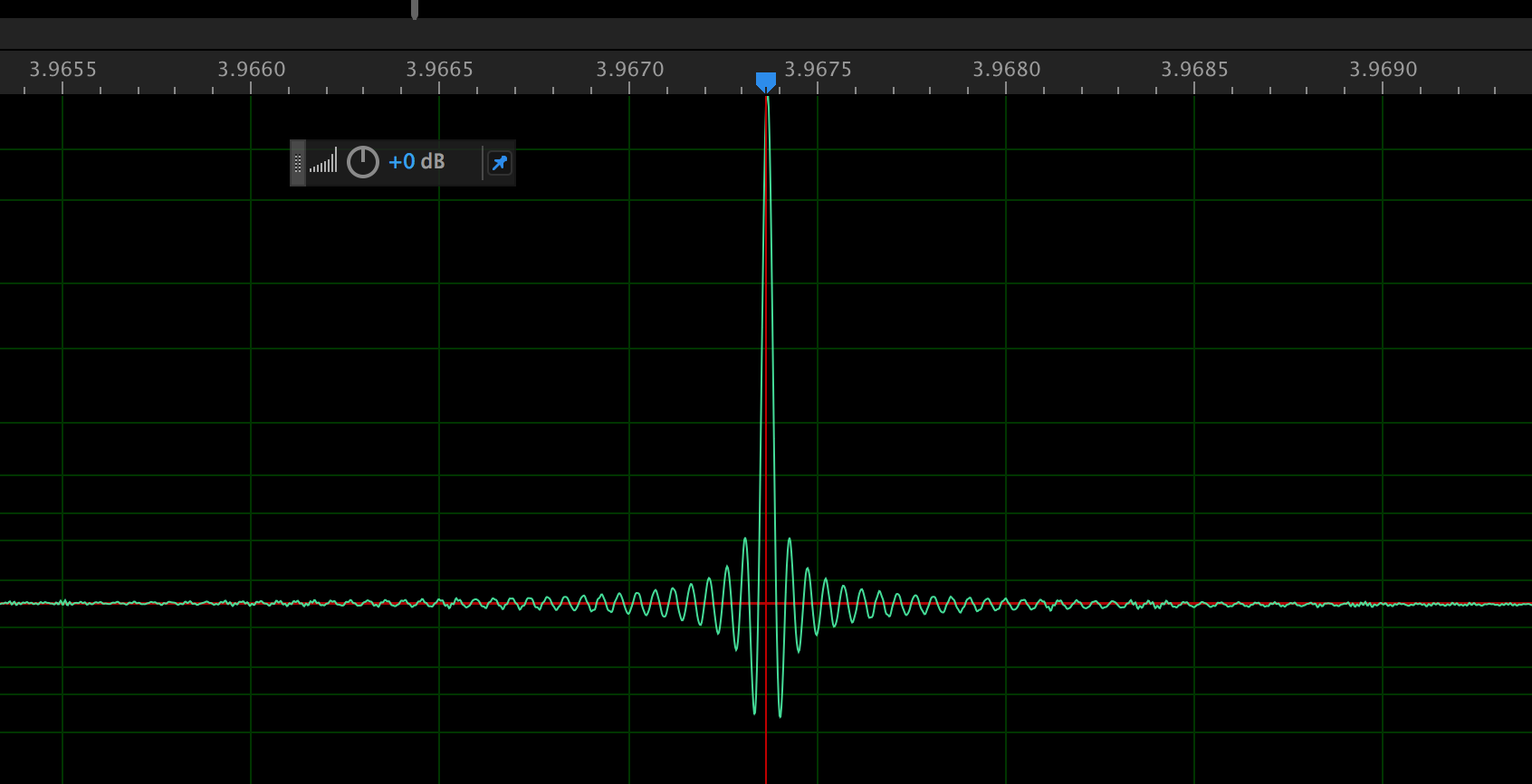
I was able to get it to work by following ryclark's advice and turning off those Crossfade Edit defaults. FWIW, here's an example of the impulse response of a particular DAC with a 44.1/16 single-sample input, which exactly corroborates the published impulse response:
Here's the same thing at a sampling rate of 192kHz:
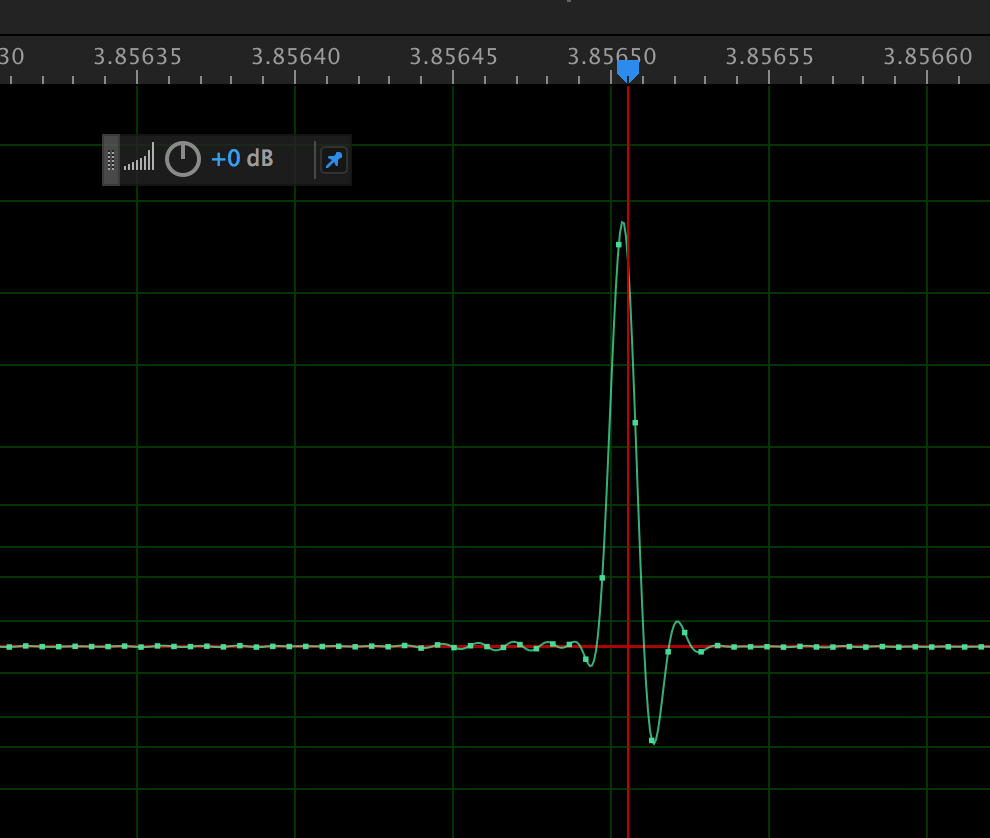
Here you can see the individual samples. They're very different because at 44.1 sampling rate, aliased images are very close in frequency to the audio band. To avoid rolling off the frequency response, this particular DAC uses a steep brick-wall filter--steep in the frequency domain--which causes lots of time-domain ringing. At 192kHz, you're far above the audio band so there's no need to roll off the frequency response so abruptly. Consequently, you can optimize for time-domain response. That's what the designer of this DAC has done, yielding the very sharp impulse response shown above.
Thanks,
Jim
Copy link to clipboard
Copied
Well not really... You've shown us Audition's drawn response to the moving of one sample from the baseline (which does exactly what I said it would do), and then you've sent that pulse to a DAC and then re-digitised it to get it back into Audition. Your problem here is that you don't seem to have isolated the DAC at all; a picture of the output displayed on a scope would be a lot more meaningful.
Copy link to clipboard
Copied
SteveG(AudioMasters) wrote
Well not really... You've shown us Audition's drawn response to the moving of one sample from the baseline (which does exactly what I said it would do), and then you've sent that pulse to a DAC and then re-digitised it to get it back into Audition. Your problem here is that you don't seem to have isolated the DAC at all; a picture of the output displayed on a scope would be a lot more meaningful.
The measuring device seems pretty good, and does 192kHz. Which means the 44.1kHz measurement is probably pretty accurate--and indeed, as I said earlier, mirrors published data for the same device quite precisely. Indeed I'm surprised how good it looks. As or the 192kHz spectrum, you're certainly right that I'm measuring the effects of both the DAC and the ADC. Surprising then--to me at least--that the response is as good as it is. To do serious, high-quality measurements, I'd definitely want a higher-quality device (and as a former research physicist, with a PhD, I agree that there's something to be said for analogue 'scopes). But that doesn't mean I can't learn anything with basic equipment. Sometimes it can surprise you.
Thanks for your input.
Jim

Get ready! An upgraded Adobe Community experience is coming in January.
Learn more
 AdChoices