


- Home
- Audition
- Discussions
- Re: Retrieve deleted track effect preset
- Re: Retrieve deleted track effect preset
Retrieve deleted track effect preset

Copy link to clipboard
Copied
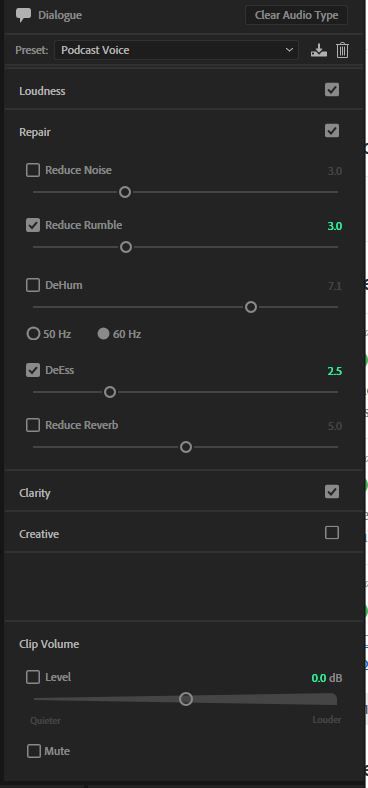
I accidentally deleted the Podcast Voice preset. How can I retrieve it? I'm on a mac running CC 11.02.02


 4
Replies
4
4
Replies
4



Copy link to clipboard
Copied
I did the exact same thing!!!
so far i've deleted the effects file in setup, started the app with shift key held down and uninstalled/reinstalled the app entirely.
NO LUCK!
Did you figure it out?


Copy link to clipboard
Copied
It's relatively easy to recreate - Just set the Dialog box to the settings in this screen-grab and save as a new preset (or call it what the old one was):

Copy link to clipboard
Copied
I need help for this same problem. I'm sorry I don't where the Dialogue box is so I'm unable to create a new present as described above.
Copy link to clipboard
Copied
Window>Essential Sound. As long as you have a file open, you should see the basic settings choices, or you can pull it down from the Preset box if you want. Then follow the instructions above.


To save your preset, use the Save button:


Get ready! An upgraded Adobe Community experience is coming in January.
Learn more
 AdChoices