
Participant
June 3, 2019
Question

Error Code: FMT issue with source file - tracks built from source

  • June 3, 2019
  • 1 reply
  • 1535 views

Hi y'all - My question is very similar to this one: Error when saving a session in Audition CC but it is a different error code. 

I uploaded a wav file to a session and built edits from that track. Now I have a few different tracks with various arrangements from the original file and when I go to save I get an error.

  • First it gives me the usual "The session contains 1 file with unsaved changes. Would you like to save changes to [file]?" and when I hit yes...
  • I am then met with the ensuing "compressed (lossy) format" alert. And when I select yes to that...
  • I then get "Apple AudioToolbox cannot create the specified file" Error code: 'fmt?'

And because the whole thing is built off this track (Monday brain mistake) I now have alerts on every single cut.
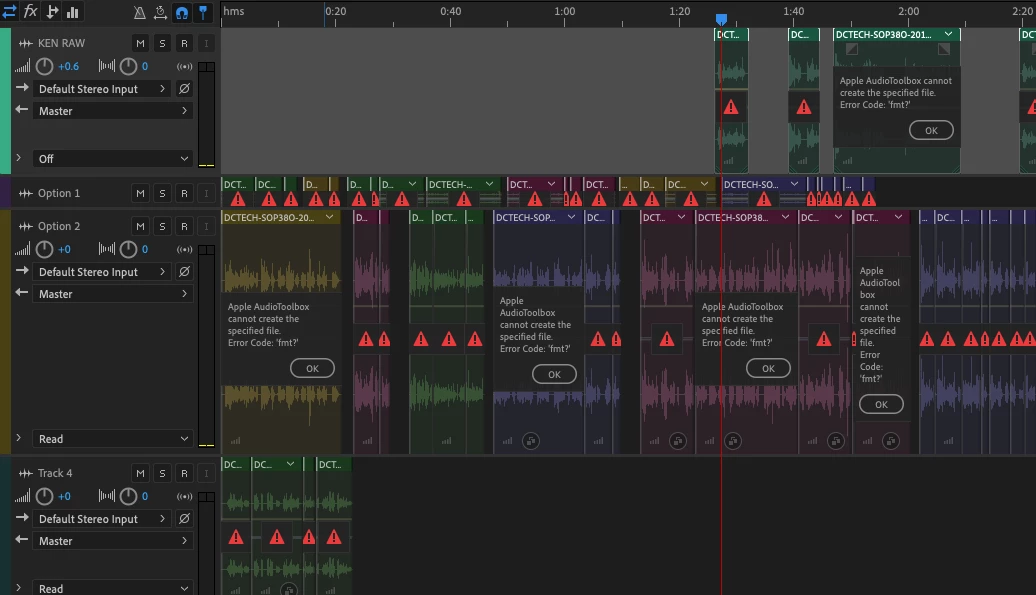
I'd really like to not have to redo this entire session. I have a few ideas for work arounds (exporting each track and going from there) but hoping there may be a quick fix on this... Any tips or tricks?

This topic has been closed for replies.

1 reply

SuiteSpot
Inspiring
June 4, 2019

"First it gives me the usual "The session contains 1 file with unsaved changes. Would you like to save changes to [file]?" and when I hit yes"

That's all good

"I am then met with the ensuing "compressed (lossy) format" alert. And when I select yes to that"

This is a warning that should be heeded.  Generally, you should be saving to a lossless format and then if needed convert to a lossy format for distribution

What format are you trying to save to?

"I then get "Apple AudioToolbox cannot create the specified file" Error code: 'fmt?'"

It looks like this is an Apple licensed format that you do not have a codec installed for - which format is it?
I would consider saving to a different format

sbo-2019Author
Participant
June 4, 2019

I guess I'm confused because I'm trying to save the session, and didn't select a format for the file. When it asks me to save changes it is to a wav file.

The session is saved as a .sesx file, 48000 Hz Stereo, 16-bit

The original file is also 48000 -- when I look at the properties of the file it has "Format: WAVE, MPEG Layer 2, 2 channels, 48000 Hz"

Working through things:

  • Q: When I hit "edit source file" and "convert sample type" the auto bit depth there is 24, which makes me wonder if that is the issue? Is this file in 24-bit and that's why Audition is mad at me for trying to save it otherwise?
    • A: So I tried the above, changing the clip to 16-bit to see if that would work and still was met with the first alert (file with unsaved changes) and the second alert (compressed, lossy format)

  • Q: If I export the original source file as a new file and replace the weird track with that new wav will that fix things?
    • A: It doesn't seem like you can easily swap things out and this fix (Multi-Track Clip replace ) wouldn't work since I can't even save the session...
SuiteSpot
Inspiring
June 4, 2019

I'm also a bit confused

I'm happy to be corrected but as I understand it a standard RIFF wav file is a lossless format whereas MPEG layer 2 is a lossy audio compression format

Are you saving the file as WAV PCM or something else?

Where did the audio file originate?