


- Home
- Bridge
- Discussions
- 15 minutes and already missing Output Module in Br...
- 15 minutes and already missing Output Module in Br...

Copy link to clipboard
Copied
As simple as the subject.. please.. bring it back! 
Adobe Output Module was an essential tool in Bridge, possibly the key feature to show people why to use Bridge.
Any good news in the near future?
L.


 1 Correct answer


To add the Adobe Output Module to Bridge CC, please follow the directions here: http://helpx.adobe.com/bridge/kb/install-output-module-bridge-cc.html
We have repaired and updated the files to correct an issue where the panel would appear blank if you did not have Bridge CS6 installed.

 102
Replies
102
102
Replies
102


Copy link to clipboard
Copied
Try installing Bridge CS 6 in addition to Bridge CC.

Copy link to clipboard
Copied
Thank you, CameraAnn! I installed Bridge CS 6 by installing Photoshop CS 6 and even in Bridge CC the Output Module works now!

Copy link to clipboard
Copied
Hi
It isn't necessary to install Bridge CS6.
These Output-Modules seem to be the old CS6 Modules and want to reside in their usual Folder.
Therefore : Do as adviced and copy them into the ' Bridge CC Extensions ' Folder,
but also into a new additional ' Bridge CS6 Extensions ' Folder under ' Program Files\Common Files\Adobe ',
Copy link to clipboard
Copied
Hello Gertberg,
While trying to do the same on a Mac I've copied all the extensions also in a new Bridge CS6 Extensions folder, located in
/Library/Application Support/Adobe
After that I finally see the interface of the OAM module, but every save or preview action I perform I get a generic "I/O error".
Any clues?
Thanks
Copy link to clipboard
Copied
Sorry, I'm on PC..
Copy link to clipboard
Copied
To add the Adobe Output Module to Bridge CC, please follow the directions here: http://helpx.adobe.com/bridge/kb/install-output-module-bridge-cc.html
We have repaired and updated the files to correct an issue where the panel would appear blank if you did not have Bridge CS6 installed.
Copy link to clipboard
Copied
Hello there, it works now showing the panels without any previous version, but every action I perform (preview or save) I'm always getting a "I/O error" as seen here:
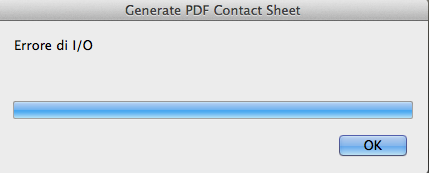
Any clues?
Reinstalling all Bridge CC?

Copy link to clipboard
Copied
Can you try and switch to the English language in Bridge preferences advanced tab.
Not sure but as I recall the other screenshots also used a non English language, just a wild guess but worth a try, also check the keyboard settings. I have a Qwerty version and although my system language is Dutch I have set both language and keyboard to English.
Copy link to clipboard
Copied
I always keep Bridge set as English, both keyboard and language.

Copy link to clipboard
Copied
Will the Output module return to Bridge in a future update?

Copy link to clipboard
Copied
Brett, I've tried the instructions multiple times from the link you gave, and I cannot get the output module to show up in my Bridge CC. I'm on a Mac with Mountain Lion. I'm up to date on Bridge updates. FYI, I don't have Bridge CS6 bit I have Bridge CS5. When I follow the instructions and then restart Bridge I do not get any notice asking me to OK a new module. Just nothing.
Copy link to clipboard
Copied
I don't have Bridge CS6 bit I have Bridge CS5.
The easiest way should be to install Bridge CS6 because this seems to help in most cases. Log in to your CC account on the Adobe site and look for the Download site. Select Photoshop and you have the option to change the version form CC to CS6. Download and install PSCS6 to get also Bridge CS6 on your system.
Forget about Bridge CS5 (only be sure to have the custom settings for templates and keywords etc exported and imported in your CC version). Once start Bridge CS6 and let it cache a small folder. Then close CS6 again when ready and try if this brings the AOM back in CC.
If not first do a check and repair permissions on your Mac and then repeat the latest detailed install procedure for AOM

Copy link to clipboard
Copied
Hi Omke,
The updated script from 8/22 removed the CS6 dependency.
Something else is getting in Ed's way.
regards,
steve
Copy link to clipboard
Copied
Yep, something is not working for me as well. No CS6 installed but tried everything and I keep getting that "I/O ERROR" when saving PDF/Web galleries. Repaired permissions, not solved.
Copy link to clipboard
Copied
Hi Lorenzo,
Ed can't even get the Output panel to load still.
For your problem, have you tried creating a new user account, yet? And sorry if you've noted this before, but what version of OSX are you running?
regards,
steve
Copy link to clipboard
Copied
Latest OSX 10.8.5
OAM interface appeared after the 8/22 update (following published instruction) and seems to work, only final script run is somewhat corrupted. Will try the test user soon.. then will try uninstalling PS CC and reinstalling.. and we shall see.. keep you posted. Thanks.
Copy link to clipboard
Copied
After re-trying yesterday, using the "AOM_Mac_New" installer downloaded from the knowledge base page which had the suffix "NEW" I did not notice before everything was 100% working!
Output module is back and running in Bridge CC...
Problem solved here... thanks...
L.

Copy link to clipboard
Copied
Great news! Thanks heap Lorenzo!!!! I'm up and running again. Brilliant!
Copy link to clipboard
Copied
Just so every one can rest easy, after a number of restarts and things like that my output module finally appeared! Now if nay I could figure out why most of my filter options don't show up.
Ed
Copy link to clipboard
Copied
Hi Ed,
Are you talking about seeing these filter options? Do you see any of the categories?
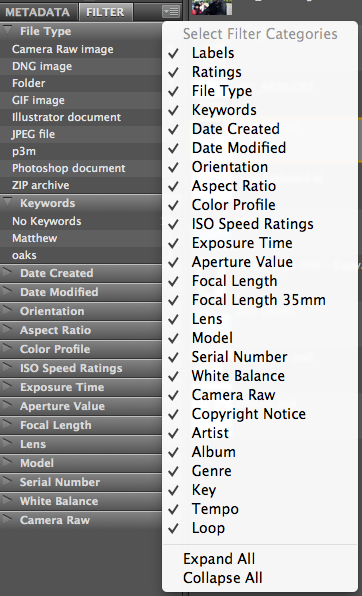
regards,
steve
Copy link to clipboard
Copied
Steve,
Well, once I did! But I reset the workspace as part of the recommendations for getting my output module to show up. I didn't work for that but it messed up the filter panel. I get about a third of them from the drop down menu, but the rest don't show up even when selected. Naturally, this includes the one I use the most, the labels. A problem for another day, I think.
Ed
Copy link to clipboard
Copied
I get about a third of them from the drop down menu, but the rest don't show up even when selected. Naturally, this includes the one I use the most, the labels. A problem for another day, I think.
You have to be aware that the filter panel only works for the files you have pointed Bridge to in the Content panel and they don't show in the filter panel if there is nothing to filter at all.
So if you have no labeled files in the content window the filter for label doesn't even show as a tab. The moment you apply a label to one of the files in the content window the label tab will show and give you the option to filter for the label that is present or for non labeled files.
Same for file type, rating, keywords etc. When the files don't have different filter criteria there is nothing to filter for so also no option to select those filters 
Copy link to clipboard
Copied
Aha! All of the files in the window had the same label. Playing around, I see that you have to have some "variety" for anything to show up. Thanks for reducing my headaches by one.
There's a number of adjustments to make with CC. Not having the export panel was a bit of a shock, since I had it set up to automatically upload to flickr etc. But life goes on.
Ed
Copy link to clipboard
Copied
Thanks for reducing my headaches by one.
Feel free to tell us about the other ones, if needed we maybe even can provide a prescription…
There's a number of adjustments to make with CC
That can't be a great number since you cured the AOM already. Only export panel and synchronized windows are left out definitively in Bridge CC, to my knowledge that is about it regarding changes compared to CS6 in workflow.
The export panel can be a pain if you want to do the process in Bridge alone but Image Processor or actions in PS Batch can replace this with more options at hand then the previous export panel (both under menu tools/ PS)
Sync windows is a must have in a two monitor set up, some users feel this pain heavy and pills won't help to cure
Copy link to clipboard
Copied
The updated script from 8/22 removed the CS6 dependency.
Thanks Steve, did miss that one.
Any news on the I/O error I have missed also?


Get ready! An upgraded Adobe Community experience is coming in January.
Learn more
 AdChoices