


- Home
- Bridge
- Discussions
- Re: Adobe Bridge using +200% of my CPU on a regula...
- Re: Adobe Bridge using +200% of my CPU on a regula...
Adobe Bridge using +200% of my CPU on a regular basis, becoming unusable - used 900% at one point.

Copy link to clipboard
Copied
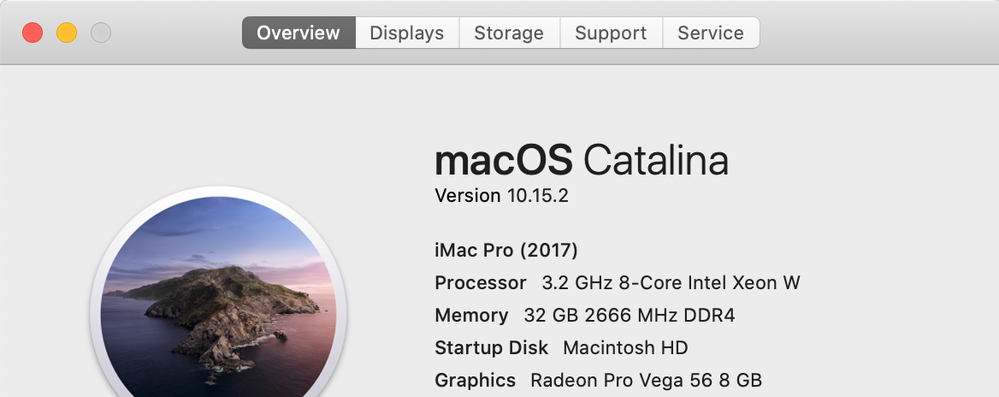
I have a iMac 2017 edition, 8 core processor, 32 gb of ram and 1 terra-byte of hard disk space and yet it struggles to run adobe bridge - I have 200+ gb of available space! It's unbelievably slow for a 5k computer, but only slow when using Adobe products, does anyone have any recommendations?
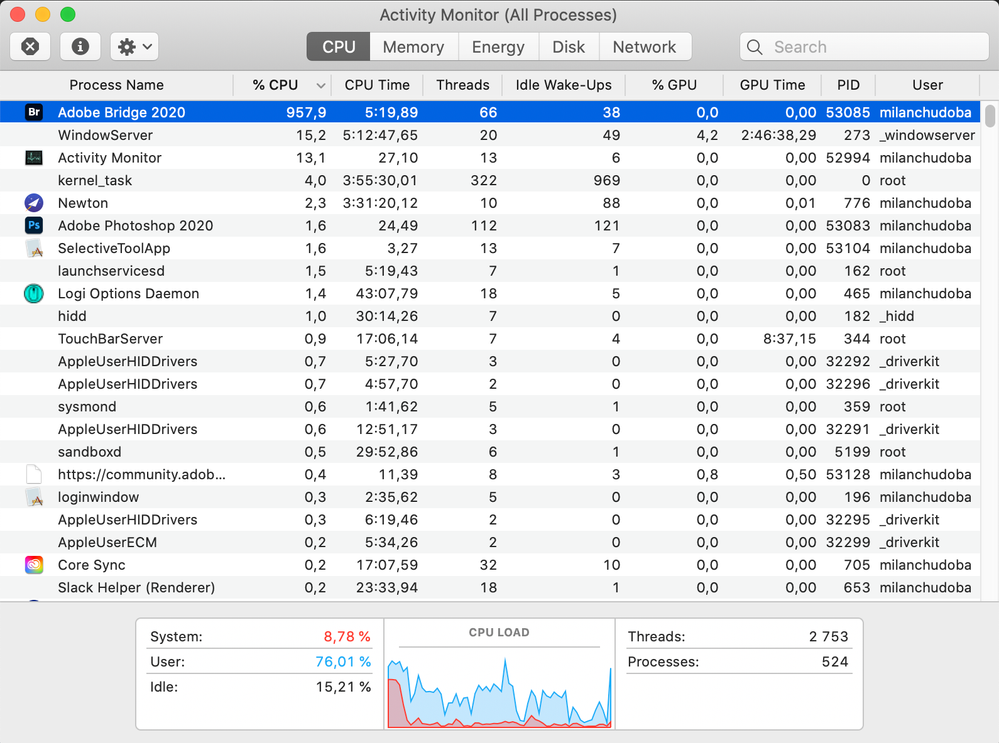
At one point it used 900% of my cpu according to activity monitor and regular uses 100% to 200% of cpu.
Is anyone experiencing this? It crashes randomly and sucks up a large amount of processing power?
I am currently using Catalina, and Adobe Photoshop 2020 and Adobe Bridge 2020.



UPDATE:
Just uninstalled everything adobe related (removed all adobe files from my hidden library folder, application support, preferences etc ) and no change just fired up bridge and it hit 600% cpu usage when trying to load a folder of tif files.

Installed nviewmp and work great! But i want to use bridge for batching and not interested in using gimp or anthing else, what do i need to do to optimise this?


 21
Replies
21
21
Replies
21



Copy link to clipboard
Copied
same problem here (on strong W10 machine) - Bridge2020 is totally not usable! Hopefully installing previous version will solve the issue...

Copy link to clipboard
Copied
I also have the same issues you have with Adobe Bridge having high CPU Usage. And we're at 16 months later here.
I got the skinny on Clubhouse App. One of the Adobe insiders that was invited to speak at the last Adobe MAX was telling us how the Lightroom Lead Product Managers doesn't understand why people are still using Adobe Bridge. They expect everyone to use Lightroom for all photos.
The funny thing is that Adobe MAX doesn't even recognize "Photo Retouching/Manipulation" as a usecase for Photoshop anymore. The presenter was given a non-representative title.
The former speaker even vented their frustrations online and was ripped a new one by the Adobe PMs because the Adobe developers were getting their feelings hurt.
So don't expect Bridge to ever work like it was meant to be. We're all expected to move toward Lightroom even though it's completely against our current usecase.


Copy link to clipboard
Copied
Wish I could help, but Catalina nd Bridge its a crap shot.
On windows what do you mean a strong machine?
A little more info would be helpful.
On some things Bridge is slow.
But there are ways to improve its performance.

Copy link to clipboard
Copied
I'm getting sporadic 100% CPU loads from bridge for no apparent reason. It happens every time I transfer files from sd-card to PC folder using Bridge, but also randomly when Bridge is idling in the background.
Bridge version: 10.0.2.131
Win 10
i7-9700K @ 5.0GHz
32GB ram
M.2 NVMe drives with plenty space left

Copy link to clipboard
Copied
Same issues all over the place in Bridge on my 2018 MacBook Pro w/ Mojave (2.6 GHz Intel Core i7, 32 GB 2400 MHz DDR4, Radeon Pro 560X 4 GB Intel UHD Graphics 630 1536 MB). While rendering thumbnails, or example. Worst seems to be when "Save Images" from multiple selection in ACR. Opened 25 Nikon D850 .NEF files (opened really fast), open save all as PSD and locks of the entire MacBook Pro will saving the files. By "lock up" I mean, switch to another app and start typing and maybe every fifth to tenth keystroke is recognized. NO APPLICATION SUPPOSED TO BE ABLE TO DO THIS ON A MAC ON MAC OSX.

Copy link to clipboard
Copied
POSSIBLE FIX
I'm probably a little late to the game on this one but I was having the same issues. I'm running Bridge V. 10.0.4.157 on a 16inch Macbook Pro.

I seemed to have solved my issue by going into Bridge > Camera Raw Preferences > Performance and then under Graphics Processor: i set it to Custom. It has "Use GPU for Display" and L " Use GPU for image processing checked on. It brought my CPU Usage from over 200% or highter sometimes to well below 50%. When I've been going through images or what not it's been at around 20% CPU ussage and then when it's just idling i'm at 0.1% -- it's worked for me so far, hope this helps.

Copy link to clipboard
Copied
SECONDED - my iMac 27 Late 2013 3.5GHz i7 with 32GB RAM was fanning around all the time in Bridge 2020 and Activity Monitor showing extremes (CPU and also high disk activity). Changed the prefs as above and the problem seems to have gone. The issue was that this was not happening just during Bridge use, it would appear almost at random when other applications were being used. Now Bridge is down to 0.6% when idle instead of something approacing 300%.

Copy link to clipboard
Copied
thank you! this solved my problem on my laptop. On my desktop with egpu I had to select preview with gpu and than uncheck the L for GPU for image processing on version 5 to get it to work quietly. Now I am happy with both. Don't understand why the automatic setting is SO BAD!

Copy link to clipboard
Copied
The same for me... I am looking for some alternatives becasue bridge and photoshop are totally useless with this problems (this problem is hore for loooong time and still not resolved)
its totaly crazy because sometimes bridge takes 200% of CPU, sometime 100 or 400 or 500 and I cant use another application, because my computer is in fire
ADOBE - WHERE ARE YOU?
Copy link to clipboard
Copied
I have the latest update again and it's returned to being very heavy on CPU load. However I found another small problem, I enabled the Bridge file importer (I find its dated folders would really help and just wish it knew how to find new files only). For each card or camera connected, Bridge was creating a complete new window. I've never seen or done that before - half a dozen Bridge main windows all open in a stack. This also can hardly lower the processing load. I have an old version of Bridge (CS6) running on a 2010 MacPro which has Affinity Photo, mostly use it for printing as my CC installs are occupied on my main iMac and MacBook, so I need another photo program (two devices is not enough). I've configured it to use Affinity by changing filetype associations, and somehow it runs fast and clean and Affinity is rendering previews of raw files which that old version of Bridge can't in theory see. I've always been aware that Bridge is a versatle DAM and can handle almost any file format of any document from graphics to WP and movies, Adobe or non-Adobe programs included. Just wish it worked better in the pure Adobe environment!

Copy link to clipboard
Copied
Im seeing exactly the same problem ona brand new Macbook Pro , with the latest version of Adobe Bridge. If I view a folder with a large number of images in it the Processor time shoots up and the fans on the Mac start running high within a few seconds. If I view a folder with just one image .... no issue and the problem goes away
Ive tried playing with the GPU settings as suggested by a few on this thread , none of which seem to make a difference.
Copy link to clipboard
Copied
2020 27" imac i7, 128 GB DDR4, 5700 XT 16 GB, 4 TB SSD (plenty of space)
Same issue. Freezes computer. Unusable. Anybody recommend an alternative software solution?

Copy link to clipboard
Copied
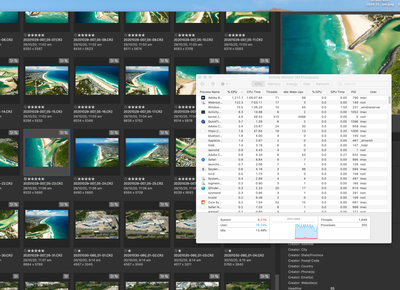
Same issue for me... running bridge v11.00 & Camera Raw 13.0.2 on a 2020 i7 iMac with 16gb graphics card & 128gb ram.
CPU running continuously at near max for 5 mins after simply opening a folder of photos bridge. I did nothing else, no high res full screen previews, no editing... just opening a folder of photos!!!
Please fix this!

Copy link to clipboard
Copied
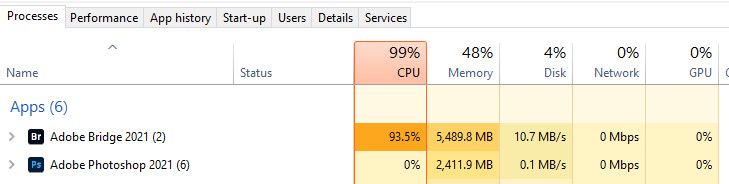
Yep. Same problem with me.
Closing it down and restarting can help.
W10 Pro
Intel i5-9400F 2.90GHz
32gb RAM

Copy link to clipboard
Copied
I just got my new max out mbp and have this problem. 3am and man it's just sad having this issue with the new machine. Please fix. Thanks.

Copy link to clipboard
Copied
https://www.youtube.com/watch?v=tIC6Fnjky9Q
Easiest fix in the world.


Copy link to clipboard
Copied
Good find! That seems to have fixed it for me. When from 100% CPU while idle down to ~0.6%.
Hopefully this continues to work.

Copy link to clipboard
Copied
Adobe, I suggest as a general design principle never doing things resource intensive things without user awareness or consent.

Copy link to clipboard
Copied
Same issue. All those mentioned "fixes" have not helped - at least on this end.
Bridge still uses an obscene amount of CPU, while idling or viewing a folder with one single jpg in it, it does not matter.
It makes working even on a Mac Pro with 16 cores almost impossible.
This bug needs to be fixed pronto, Adobe!


Copy link to clipboard
Copied
Hi @GrandfatherTrout ,
Thanks for your feedback. Sorry to hear about the issue.
Could you please share the Bridge version you're using? Updating to 11.0.2 should resolve this.
Let us know if you still face the same after updating Bridge.
Thanks,
Bridge Team
Copy link to clipboard
Copied
Unfortunately, it does not resolve it, I am already on 11.0.2.
This is what I get while the program is idling:
No application should ever consume this much CPU while doing nothing.
It is actually dangerous as it can cause overheating and system shutdowns.



Find more inspiration, events, and resources on the new Adobe Community
Explore Now
 AdChoices