I have tried it in these places. I do not have an option for just Bridge CS5 just the extensions folder. But in all my searching it is the only place I see json file format on my computer.
~/Library/Application Support/Adobe/Bridge CS5/Adobe Output Module/UserTemplate/ContactSheet
~/Library/Application Support/Adobe/Bridge CS5 extentions OutputModule/UserTemplate/ContactSheet/resourses/datas
~/Library/Application Support/Adobe/BridgeCS5 extentions OutputModule/UserTemplate/ContactSheet/resourses/datas/customtemplate
What version of Mac OS X are you using?
In later versions of mac os the user library is hidden.
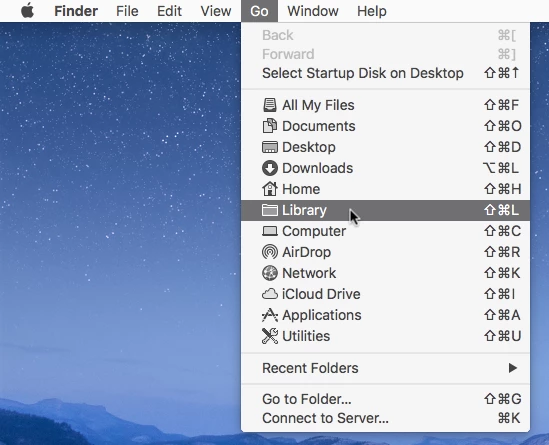
Click on your desktop and the in the Go menu hold down the Option or Shift key and click on Library
That'll take you to your user library.
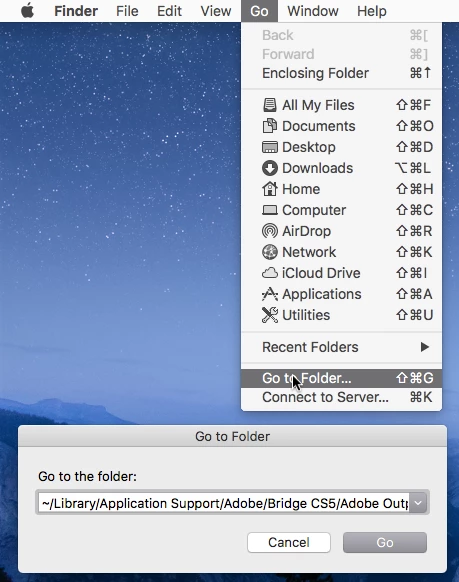
Or click on your desktop and in the Go menu click on Go to Folder and paste the path below into the field.
~/Library/Application Support/Adobe/Bridge CS5/Adobe Output Module/UserTemplate/ContactSheet

 AdChoices