
Ramigrafx
Inspiring
October 29, 2017
Answered

Auto-stacking does not work with latest version of Bridge

  • October 29, 2017
  • 2 replies
  • 2163 views

I bracket all of my images, and have been able to use auto-stacking feature in Bridge prior to the latest upgrade. I use Windows 10 (latest version) and have a Sony camera. When I try to auto-stack from within bridge I get this meassage 'Image is missing preview data'.

The only thing that has changed is Bridge so something must be wrong here. Anyone else with the same problem?
    This topic has been closed for replies.
    Correct answer siddharthsingh

    Hi Ramigrafx​,

    Do you see a black border around your images which you are trying to auto-stack? If yes , then that means that the previews are not generated.

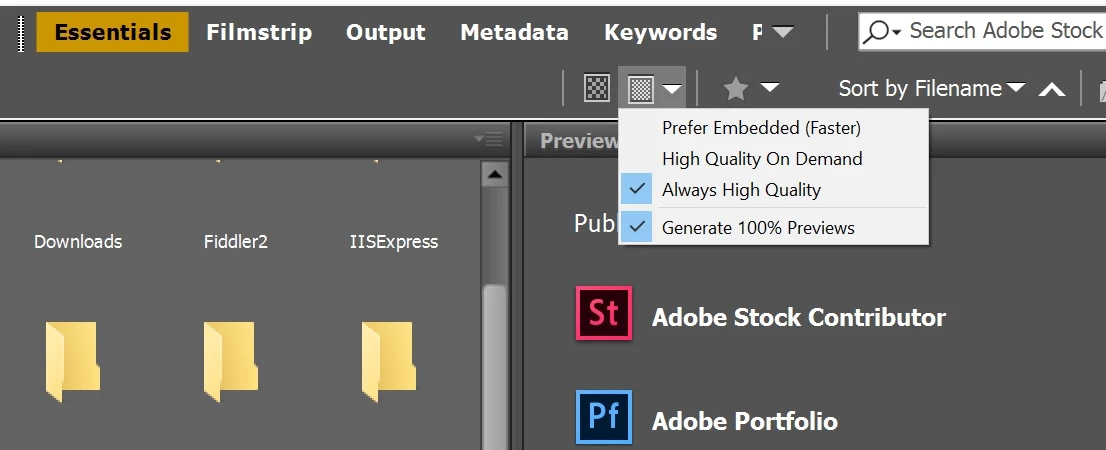
    To generate the High quality preview for an image, you have to select the 'Always high Quality' and 'Generate 100% previews' option for displaying the thumbnails. Please refer to below snapshot for locating these options.

    Once you have selected these options, Please purge the cache for the entire folder and let Bridge generate the preview automatically once you browse the folder again. You can also test this by creating a new folder and putting a small number of files and then try to auto-stack it.

    Please let us know if you are able to auto-stack your images after generating the previews.

    Thanks,

    Siddharth

    2 replies

    Inspiring
    August 28, 2023

    I have been having similar problems for the past several years and variious different versions of Bridge and PS.

    I stack versions of "same" image  (NEF, Tif, jpg etc etc_ ) Have multiple folders (landscape, seascape, farms etc by category)   I sort my images in the folders  by file name which based on my sequence numbers at the beginning of filename (yymmddseqText) is also dae order

    I had tried to keep my images stacked for easier readiability. Then suddenly I will find in a given folder most but not all of the images unstacked from the bottom (most recent) back up the file. Occasionally I will find one of the previously stacked groups only half unstacked. Of the four images the rightmost 2 will be unstacked and the stacking group for that image will now only have 2 images in the stack. 

    Bridge never unstacks the entire folder. Adobe has been no help. Says it is my Apple OS is the fault but it has occurred across multiple "versions" and patch levels within the versions. It was dormant for a while a couple of years ago then it came back. 

    So it is something Adobe has done but like most of the other problems we encounter they are unaware. Firs level of supprt just, as I said, oh yeah, it is an apple problem

    I do NOT see any black borders so it is not the prview 

    Community Manager
    October 30, 2017

    Hi  Ramigrafx

    Thank you for reporting your problem.

    As per the error message, It seems that the images which need to auto-stacked don't have high quality preview generated in Bridge.

    To resolve the same, Can you please try below steps?

    1) Purge the Cache for the folder which has the images.  For that, right Click on the folder and select Purge Cache for selection from the context menu.

    2) Select 'Generate 100% previews' option for thumbnails. Browse the folder to generate the High Quality previews.

    3) Try auto-stacking the images once the High quality preview is generated.

    Please let us know if you still see the issue after following above steps.

    Thanks,

    Siddharth

    Ramigrafx
    RamigrafxAuthor
    Inspiring
    October 30, 2017

    Hi,

    Did all of that on a folder of previously stacked images which I unstacked. Same problem.

    I normally have the cache on another drive so moved the cache folder location to the default location that Bridge 2018 makes

    C:\users\richa\appdata\roaming\adobe\bridge cc 2018\cache\

    I did not transfer any files. In fact there is little in the folders.It still did not work, presumably because there are no previews.

    I presume I have to get Bridge to create the new previews.  How do I do that?

    The now defunct cache folder in the same place but under Bridge 2017  has 40Mb of data in it.

    I have added about 2000 images since the upgrade from 2017 to 2018.

    Please advise what to do next.

    siddharthsinghCommunity ManagerCorrect answer
    Community Manager
    October 31, 2017

    Hi Ramigrafx​,

    Do you see a black border around your images which you are trying to auto-stack? If yes , then that means that the previews are not generated.

    To generate the High quality preview for an image, you have to select the 'Always high Quality' and 'Generate 100% previews' option for displaying the thumbnails. Please refer to below snapshot for locating these options.

    Once you have selected these options, Please purge the cache for the entire folder and let Bridge generate the preview automatically once you browse the folder again. You can also test this by creating a new folder and putting a small number of files and then try to auto-stack it.

    Please let us know if you are able to auto-stack your images after generating the previews.

    Thanks,

    Siddharth