
Participating Frequently
November 18, 2020
Question

Batch Rename Error In Bridge

  • November 18, 2020
  • 4 replies
  • 1813 views

I'm having a problem in Bridge where every time I try to batch rename I get a ^SEQN^ error in the images I tried to batch rename.


I've attached two screenshots of the issue.
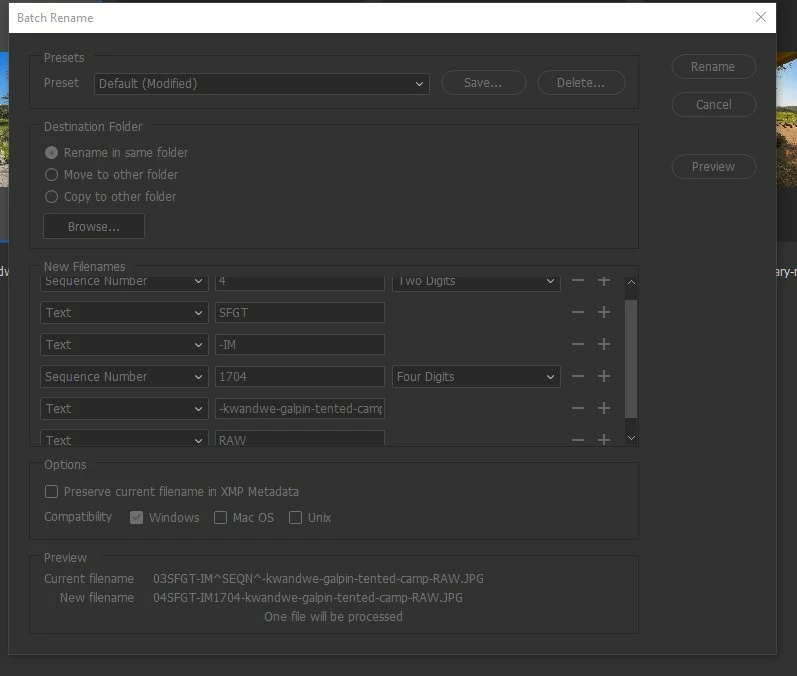
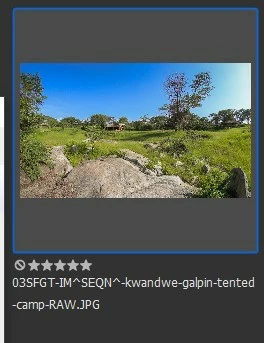
 

If anyone has any idea how to fix this that would be great.

4 replies

Participant
March 14, 2025

This is still not fixed, please do something

Known Participant
November 3, 2022

Me: Hey Adobe, I've found a bug with bridge

Adobe: Noted. That'll be $50 a month please.

Me: Hey Adobe, is it fixed?

Adobe:

Me: ???

Adobe: *2 years later* That will be $50 a month please.

Adobe Employee
July 22, 2022

Hi nicholasp94971515,


Thank you for reporting the issue to us. This issue is added to our engineering pipeline. Team is investigating the same.

There is a workaround for this issue: Its working fine if copy /move to another folder while batch rename instead of batch rename in same folder.


Regards,
Bridge Team


weba63719669
Participant
June 5, 2023

Hi Tanu Goel/Bridge Team,


Thanks for adding it to the pipeline. This bug has meant I have not been able to update Bridge, Photoshop or Camera Raw because I use the batch rename too often to have it bug out and you cant have an old copy of bridge but have it work with an up-to-date copy of camera raw and Photoshop. Sadly the workaround you mentioned would waste too much time for the way I use it. 


Since it has been a bug for the last 3 years do you have any idea when it might be fixed? I would love to use the new features in all your programs.


Thanks,


Jon

Legend
November 18, 2020

How many photos are you renaming?

Participating Frequently
November 18, 2020
Only about 4 or 5 in separate folders. It's been working fine for years and
now all of a sudden has stopped.
gregreser
Legend
July 15, 2022

After some A/B testing I can see that the issue is only occuring when there are multiple "Sequence Number" components in the rename schema.


Sadly, I can confirm @nicholasp94971515 original results.


I can also, sadly, confirm @Mary25254818gqwp conclusion that it is caused by repeating "Sequence Number" commands.


Interestingly, if I change one of the "Sequence Number" to "Sequence Letter", I don't get ^SEQN^ so this is a batch rename bug. Now, to find a workaround...