
Participating Frequently
December 20, 2023
Question

Batch Rename - Incorrect Sequence Numbers

  • December 20, 2023
  • 3 replies
  • 2109 views

Hello Adobe & Community,

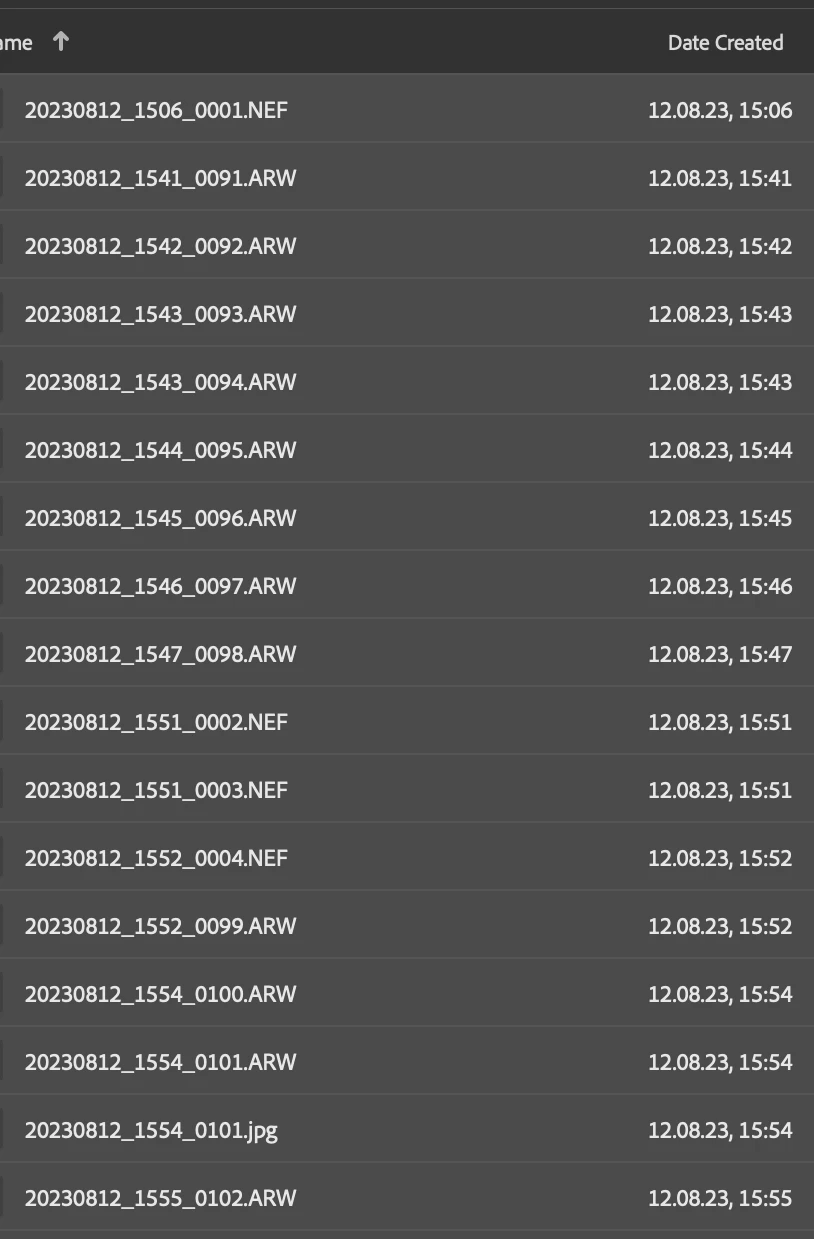
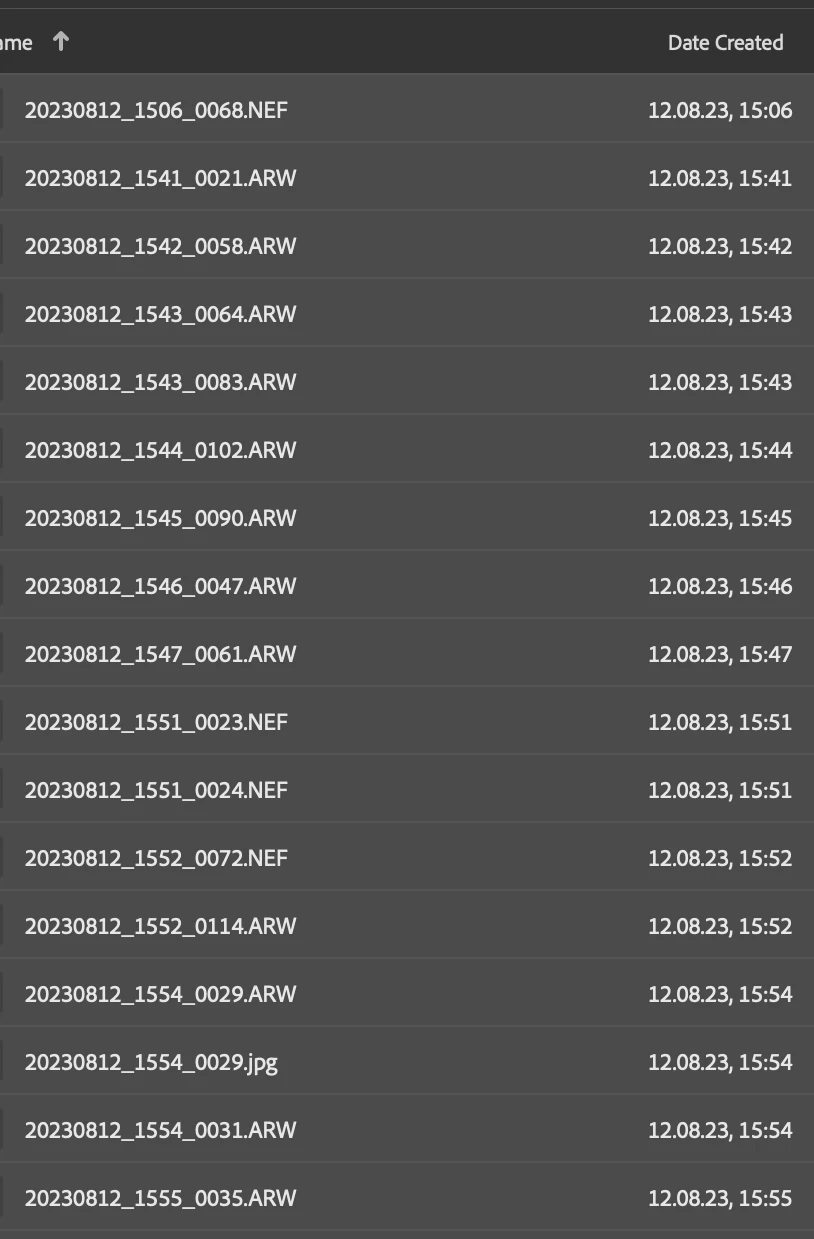
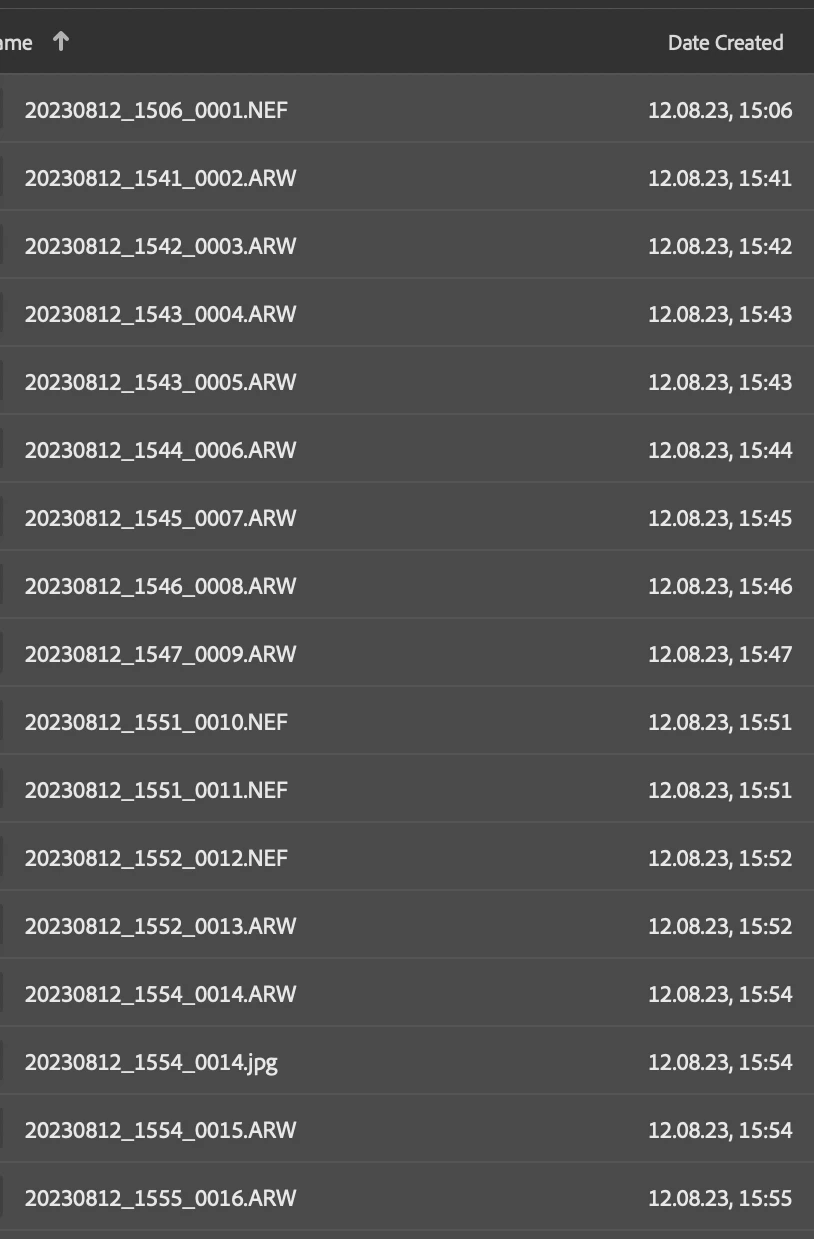
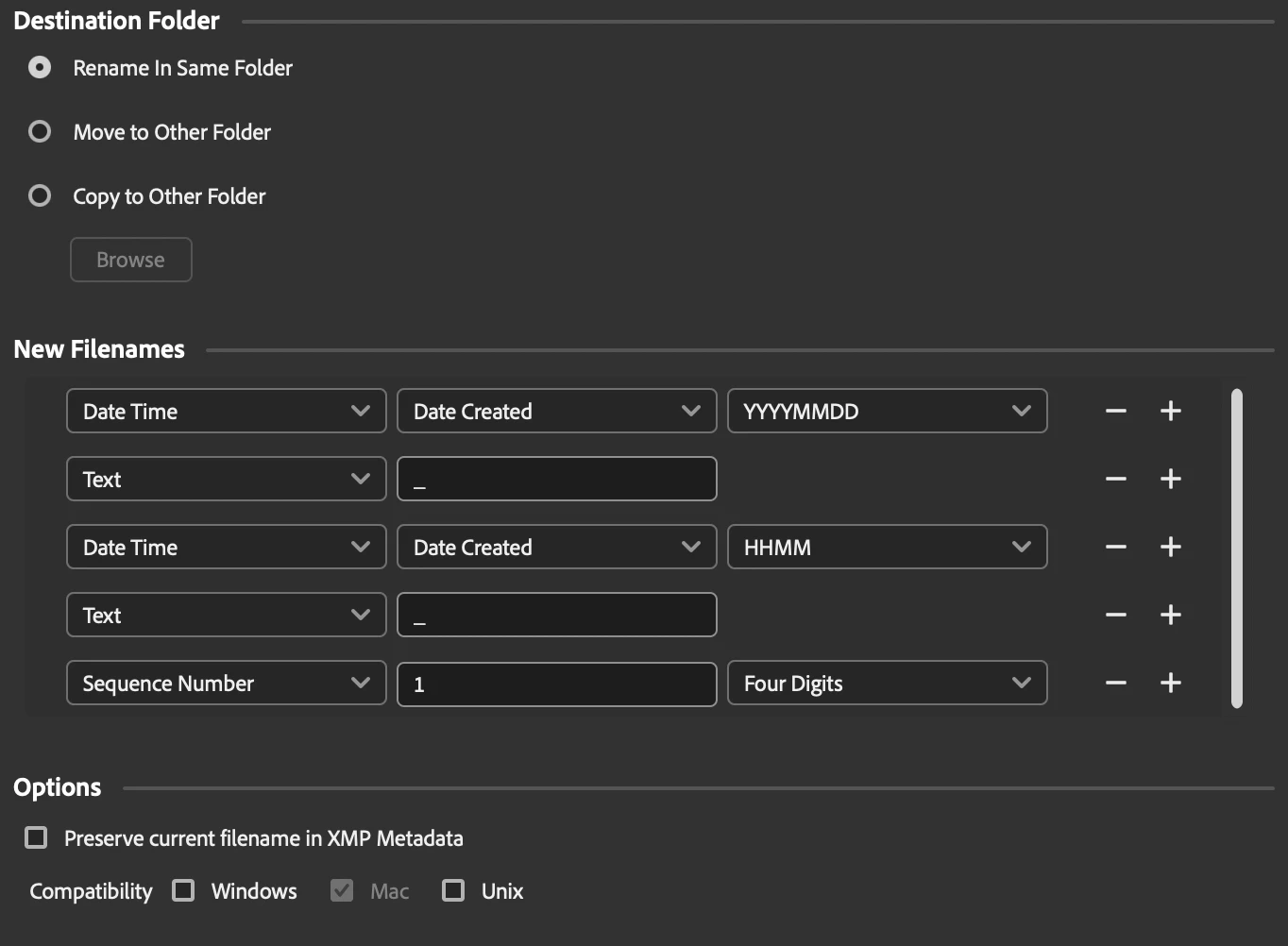
after selecting all (120) files in a folder and running "batch rename", (sometimes) it needs several attempts to apply correct sequence numbers. Please check my (1, 2 & 3) screenshots and the setting below.


After renaming 30K pictures without questioning the results, now I have to go back and investigate each folder...

It would be nice if someone could look into this problem. Thank you in advance.


OS: MacOS Sonoma

Bridge: Latest version


1. First attempt:


2. Second attempt:


3. Third attempt - this time correct:


My Setting:
 

This topic has been closed for replies.

3 replies

Adobe Employee
January 9, 2024

Hi @GXMedia ,


We have carefully reviewed the entire thread. The batch rename function currently processes files in the order they appear in the content panel. However, as you've organized the files by name and opted to rename them based on the date created.


To address your specific use case, we recommend sorting the files by date created before initiating the batch rename process. Once this is done, you can subsequently sort the files by either file name or date created, and it will not impact the outcome. This approach ensures alignment with your preferences and produces the desired result.


If you still facing any issue, Please share the video of the issue you are observing at sharewithbr@adobe.com


Thanks,
Bridge Team

Rob_Cullen
Community Expert
Community Expert
December 21, 2023

I might be wrong, but I see a flaw in your sorting that might explain your problem with sequence-

Any sort function 'reads' a filename from left to right through the filename characters. Because your 'Sequence' number is on the end of the filenames any number appearing BEFORE the sequence number takes precedence in a sort.


In your screen-clips I indicate (in green box) the 'numbers' that are sorted BEFORE the sequence numbers take effect, and I don't see any problems- (They are sorted correctly!)

eg. FIrst clip:  20230927_0909_0231   will sort before   20230927_0910_0090

Second Clip:  20230812_1547_0098 will sort before  20230812_1551_0002

The only way for force a strict numerical sequence is to place the sequence numbers at the beginning of file names, AND pad the sequence with enough zeros to accomodate the number of files being renamed.

eg.  0001_20230812_1551.NEF,  0002_20230812_1547.NEF,  0003_20230812_1544.NEF, etc.


Regards. My System: Windows-11, Lightroom-Classic 15.1.1, Photoshop 27.3.1, ACR 18.1.1, Lightroom 9.0, Lr-iOS 10.4.0, Bridge 16.0.2 .
GXMediaAuthor
Participating Frequently
December 22, 2023

Numbers you outlined in green are hours and minutes, they match the creation date on the right, which is how it’s supposed to be - there is nothing wrong with it. What’s incorrect is the sequence number at the end. In this example it starts with 0030 instead of 0001 (which is further down) and it continues to be wrong all the way down at several occasions.

Rob_Cullen
Community Expert
Community Expert
December 23, 2023

@GXMedia    "Numbers you outlined in green are hours and minutes"

It makes NO difference- they are still just NUMBERS in the filename- no matter what you think they represent.

My explanation is still relevant IMO.

The numbers , that YOU call hours and minutes, are still sorted as number/characters by the OS. And so the OS is sorting by 'Creation Date/Time' before it even gets to reading your added sequence numbers.


Regards. My System: Windows-11, Lightroom-Classic 15.1.1, Photoshop 27.3.1, ACR 18.1.1, Lightroom 9.0, Lr-iOS 10.4.0, Bridge 16.0.2 .
Stephen Marsh
Community Expert
Community Expert
December 20, 2023

(1) Are you making backups first so that you can easily restore the filenames if something goes wrong?


(2) Are you using the "preview" button to inspect all of the files before renaming (don't just use the preview of the first file, use the button to inspect all files).


(3) It may also be wise to use the "Preserve current filename in XMP metadata" so that you can undo the rename if something goes wrong, especially if you are not following point (1).

GXMediaAuthor
Participating Frequently
December 21, 2023

Thank you Stephen,

no, I haven't done any of it, because I assumed, that renaming is going to be a pretty basic task for a software suit like Adobe (I've spotted the issue as it was already too late).


I would like to share a few more details on this bug, after spending hours struggling with thousands of files.

The problem occurs with files from two different cameras in one folder. Here are other examples:


Screenshot 1.

Folder with more than 800 files from one (Nikon and Sony) photo shoot. Even after several renaming attempts Bridge couldn't get it right. It starts correctly, but then the sequence number jumps from 223 to 639 and the mess continues from this moment on. The only solution was to rename a small batch of files and repeat it several times until end (which can't be the real  solution).


Screenshot 2.

But as this example shows, Bridge struggles even with a small folder and number of files. Here it starts the count with "0030"  and jumps from "0032" to "0001" when the file format changes. After repeating the process, everything was correct.


Screenshot 3.

As you can see, it's a total mess from the beginning to the end...


My question: What happens now? Is Adobe going to address this bug?

Thank you.


Screenshot 1:


Screenshot 2:


Screenshot 3:


Stephen Marsh
Community Expert
Community Expert
December 22, 2023

Thank you Stephen,

I haven't seen the bug option, when I started this topic. It would be very kind of you if you could change and report it. I will try to provide all the info needed (as I just found a backup and can reproduce the bug, based on one random folder).


My Bridge version is: 14.0.1.137 (it should be the current one)


This is the file structure in my MacOS folder, which contains 152 items:


This is how Bridge sees it before applying batch rename.


And this is the result. Part 1, it starts with the wrong sequence number:


...and continues until it comes across Nikon RAW files:


This is just one example of many. In this one, when I "purge cache" and apply the batch process one more time, it does a correct job:


The Nikon break, this time without issue:


I wonder if this could be part of the issue:


I'd expect that renaming the XMP would at least rename the NEF, but I'm not sure on the JPG... But how does this work with sequential numbering?


I'm curious to test and see!