Participant
September 29, 2021
Answered

Batch Rename String Substitution

  • September 29, 2021
  • 3 replies
  • 3491 views

I am currently looking to rename/rearrance a file name as a batch but I am not familiar with Reg Ex to know what to use for string substitution. So here is my delima. I have file names with similar structure. Below is original filename and then what I would like for it to be. Any help would be greatly appreciated. 


Orginal Filename structure:

A-1LastnameFirstname1211.pdf


Wanted Result:

Lastname, Firstname [1211].pdf


The number at end will be different for each file name.

Correct answer Stephen Marsh

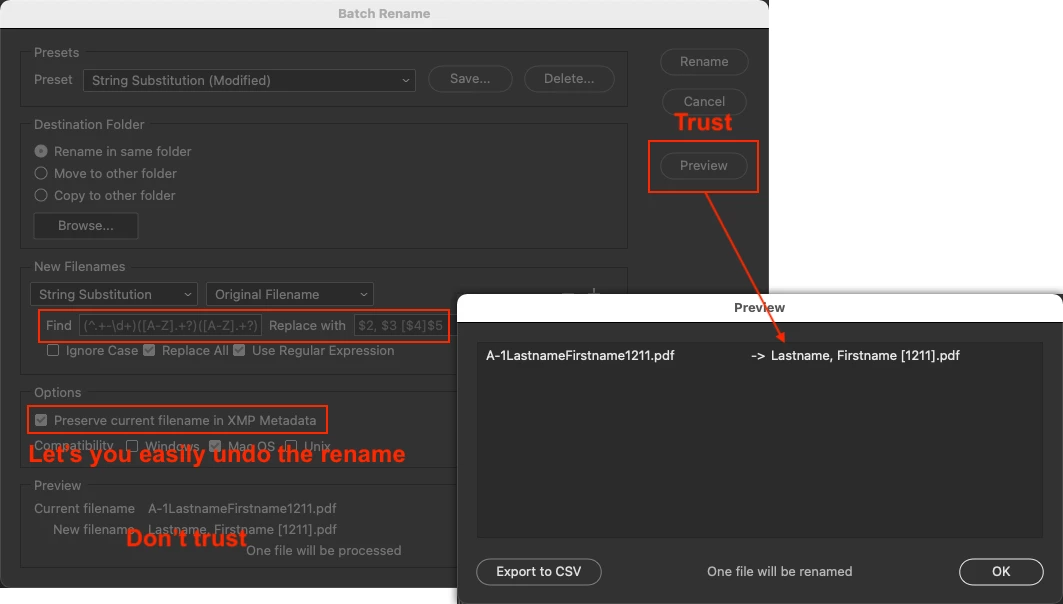
Try the following regular expression find/replace:


Find:

(^.{3})([A-Z].+?)([A-Z].+?)(\d+)(\.[^\.]+$)


or


(^.+-\d+)([A-Z].+?)([A-Z].+?)(\d+)(\.[^\.]+$)


or


(^.+\d+)([A-Z].+?)([A-Z].+?)(\d+)(\.[^\.]+$)


Replace:

$2, $3 [$4]$5


3 replies

Inspiring
March 24, 2022

I'm trying to figure out getting rid of the _0001_ sequence number before the Filename of files such as:

_0002_CatInTheHat.jpg


What would be the string substitution I would need get rid of the _0002_ where the 2 is sequential up to double digits?

Kukurykus
Legend
March 24, 2022


[_\d]+ // Original Filename and only Use Regular Expression


Inspiring
March 24, 2022

Excellent. Thank you!

Kukurykus
Legend
September 30, 2021
'A-1LastnameFirstname1211.pdf'.replace(/(.{3})([A-Z]\w*)([A-Z]\w*)(\d{4})/g, '$2,$3 [$4]')
Stephen Marsh
Community Expert
Community Expert
September 30, 2021

I didn't see the scripting tag, so assumed that this would be a simple Batch Rename task.


@Kukurykus – just to be clear, that is just code snippet, yes?

Kukurykus
Legend
September 30, 2021

Yes, the user should use it for activeDocument.activeLayer.name

Stephen Marsh
Community Expert
Stephen MarshCommunity ExpertCorrect answer
Community Expert
September 29, 2021

Try the following regular expression find/replace:


Find:

(^.{3})([A-Z].+?)([A-Z].+?)(\d+)(\.[^\.]+$)


or


(^.+-\d+)([A-Z].+?)([A-Z].+?)(\d+)(\.[^\.]+$)


or


(^.+\d+)([A-Z].+?)([A-Z].+?)(\d+)(\.[^\.]+$)


Replace:

$2, $3 [$4]$5


Participant
September 30, 2021

Stephen, you're awesome! This appears to work with the file naming formats I'm having to work with and should save me a lot of time that I don't have trying to figure out RegEx syntax. I greatly appreciate it!

Stephen Marsh
Community Expert
Community Expert
September 30, 2021

@sportshooter – You're welcome!


Are you using this regex with the Batch Rename or in a script?


As you can see from my three examples and the one from @Kukurykus there are different equivalent regex searches that may or may not work depending on how your data may vary. You need to know your own data! It is very hard to write a robust or bullet proof regex with only a sinlge example pattern, as there will likely be exceptions/variances. One can write a very "tight" search pattern, or make it more flexible.